
Top 5 POS Systems
32 products
Our five best-rated picks right now, based on real user ratings.
-
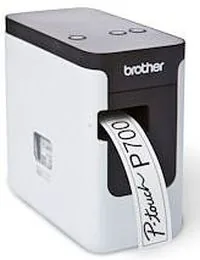
Brother P-touch P700
4.6 · 19 ratings
The Brother P-touch P700 brings professional labeling to home and office environments with impressive ease of use. This compact printer simplifies organization by allowing you to create durable, high-quality labels in minutes.
Read the manual -
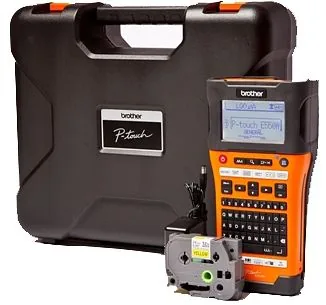
Brother P-touch PT-E550WVP
5.0 · 2 ratings
The Brother P-touch PT-E550WVP is an intuitive and feature-rich machine designed to produce professional-looking labels with high quality. This device is perfect for organizing cables, identifying faceplates, or managing inventory in complex environments.
Read the manual -
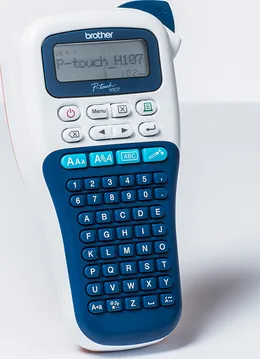
Brother P-touch PT-H107B
4.8 · 4 ratings
Organizing your life requires efficient tools. Users often consult the Brother P-touch PT-H107B Manual for optimal operation of this versatile device. It ensures users understand how to operate the hardware safely.
Read the manual -

Dymo LabelManager 280
5.0 · 1 rating
Utilizing principles found in the Dymo LabelManager 280 Manual specifications, this portable labeling system elevates organizational tasks effortlessly across home and office spaces. The device is engineered for both standalone operation and seamless computer connectivity.
Read the manual -
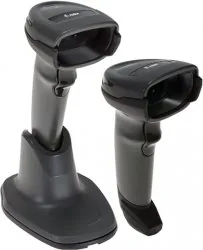
Motorola DS4308-SR
The Motorola DS4308-SR Standard Range digital scanner represents a versatile solution for modern data capture needs. Designed with a lightweight and ergonomic form factor, this device seamlessly transitions between hands-free presentation mode and traditional hand-held operation.
Read the manual
The Best POS Systems Right Now
The products at the top of this page are the best-rated POS systems on the site right now, ranked by real user ratings. Card terminals, POS terminals, receipt printers, cash drawers, barcode scanners and customer displays all compete for a place, and the list updates as new ratings come in.
What Makes a Great POS System
- Payment options: contactless, chip and PIN, mobile wallets and QR payments.
- Reliability and speed: fast transactions and a stable connection, even at busy times.
- Compatibility: hardware that works with your POS software and payment provider.
- Connectivity: Ethernet, Wi-Fi, Bluetooth and mobile data for counter and mobile use.
- Durability: robust devices that handle daily use in shops, bars and restaurants.
- Costs: compare hardware prices, transaction fees and monthly software plans.
Best POS Systems for Every Need
Best Card Terminals
Portable terminals for table service and markets, countertop terminals for shops.
Best All-in-One POS Terminals
Touchscreen systems that combine sales, stock and reports in one device.
Best Receipt Printers
Fast, quiet thermal printers with automatic paper cutters.
Best Barcode Scanners
Handheld and countertop scanners that read both printed barcodes and screens.
Best Cash Drawers and Customer Displays
Secure cash storage and clear price displays for customers.
How the Top 5 Is Ranked
The top POS systems are chosen by real user ratings. A product with many good ratings ranks above one with a single perfect rating, because a few votes are pulled toward the site-wide average. On a tie, the product with more ratings comes first, then the newest.
Frequently Asked Questions
What is the best POS system right now?
The best-rated POS systems right now are the products at the top of this page, ranked by real user ratings.
Do I need a separate card terminal?
Many all-in-one POS terminals include card payment; a separate terminal adds mobility for table service.
How often does the list change?
Whenever new ratings come in or new products are added.
More POS Systems
30 Pages
5 Pages
9 Pages
309 Pages
50 Pages

376 Pages
249 Pages
41 Pages
45 Pages
39 Pages
58 Pages
11 Pages
41 Pages
227 Pages
214 Pages
49 Pages
121 Pages
25 Pages
154 Pages
298 Pages
122 Pages
164 Pages
202 Pages

202 Pages
5 Pages
46 Pages
37 Pages
Search for 67,706 Manuals online


Type-in Brand or Model