
Worx Landroid S400 WR184E Manual
PDF manual · 344 Pages
English



Quick check
Incorrect answer, please try again.
Chat with your Worx Landroid S400 WR184E manual using AI
Get instant AI answers from your Worx Landroid S400 WR184E manual
Ask anything about the Worx Landroid S400 WR184E. Answers come from this manual, with the pages they are based on.
Landroid S400 WR184E Maintenance Schedule
Inspect Landroid each week and replace worn or damaged parts for safety. Check blades and blade disc for damage.
Store in shed or garage during winter. Clean thoroughly, fully charge battery, and turn power off before storage.
Update time/date settings. Clean oxidation on charging contacts with fine emery cloth if present. Fully charge battery.
Each cutting blade lasts up to 2 months when programmed to mow every day. Replace all blades and screws in sets.
Clean regularly with a spray bottle and brush. Remove dirt, debris, and grass buildup from daily mowing.
Remove build-up of grass clippings or debris around contact pins and charging strips to ensure successful charging.
Free maintenance reminders
Timed to your purchase date. Always free, unsubscribe anytime.
Ask a Question
Do you recommend Landroid S400 WR184E?
Yes NoFrequently Asked Questions
The device handles up to 400 square meters effectively for daily maintenance tasks.
Is this answer helpful?
Approximately 1.5 hours from empty to full capacity status reported.
Is this answer helpful?
No. Water pressure may enter seals and damage internal electronics permanently.
Is this answer helpful?
Sensors stop the machine until rain stops and delay period expires completely.
Is this answer helpful?
Turn off power and hold by the front handle while facing blades away.
Is this answer helpful?
Yes, connects to Wi-Fi for software updates and scheduling controls easily.
Is this answer helpful?
Usually indicates boundary wire missing or machine sits outside wire zone.
Is this answer helpful?
Advantages and Disadvantages
Advantages

- Large cutting area covers up to 400m2 efficiently without interruption
- Low noise level protects neighbors from loud machinery during work
- Fast charging allows full battery reuse quickly within one hour half
- Intelligent safety sensors prevent accidental injuries involving pets and kids
- Weather protection halts work during rain automatically to save machine
Disadvantages

- Requires boundary wire installation around entire perimeter for boundaries
- Cannot mow wet grass without slipping risks on slippery terrain
- Heavy wheels may struggle on steep slopes alone without traction aids
- Battery must be removed for long storage periods to maintain health
- Obstacles like toys block mowing path constantly causing error states
Product Specification
Battery
1x Battery (20V, 2.0Ah, Li-Ion)
Cutting Width
7.09 inches
Cutting Height
0.79-1.97 inches, height adjustable, 4 settings
Recommended Lawn Area
up to 4,305.56 sq. ft.
Navigation
Tilt sensor, Lift sensor, Rain sensor, Zones
Boundary System
Boundary wire (328.08 feet)
Special Features
Alarm system, Anti-theft
Smart Home
App control (Wi-Fi)
Max Slope
19° / 35%
Charging System
Automatic
Charging Time
90 min
Noise Level
65 dB(A)
Weight
17.64 lbs
Package Contents
1x Battery, Charging station, Boundary wire (328.08 feet), 130x Boundary hooks, 9x Replacement blades, Height spacers
Product Description
Welcome to Automated Lawn Care
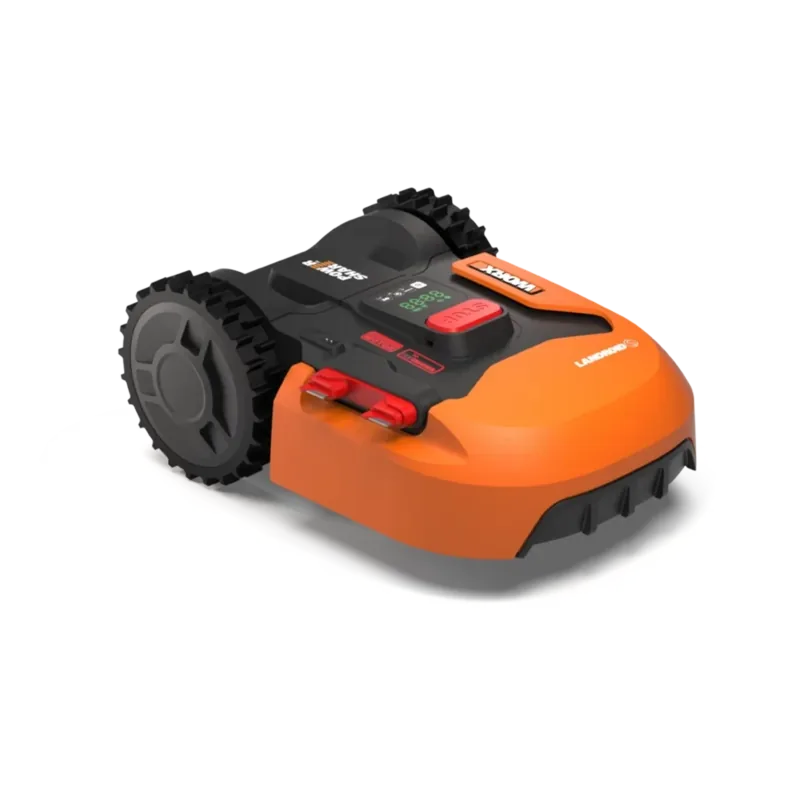
The Worx WR184E Landroid S400 stands as a premier solution for automated lawn care enthusiasts seeking efficiency and precision in their gardening routine. Designed with advanced robotics technology, this orange robotic mower transforms your yard into a pristine green space without requiring constant human intervention. With a maximum cutting area capacity of 400 square meters, it handles medium to large plots with ease, ensuring a well-groomed lawn at all times. The device operates on a robust 20-volt lithium-ion battery system which provides sufficient power for extended sessions while keeping noise levels remarkably low compared to traditional gas-powered equipment. Measured sound power reaches approximately 64.2 decibels, allowing you to work nearby without disturbance or discomfort for neighbors.
Safety and Security Features
Safety remains a top priority throughout the design process. The unit features intelligent sensors that detect lifts and obstacles to prevent accidents involving pets or children playing nearby. Operators can feel confident knowing that sharp blades are enclosed and only active when the machine is grounded properly. Furthermore, the boundary wire system creates invisible boundaries to define where the machine works effectively without crossing property lines. This specific model requires adherence to strict setup guidelines found in the Worx WR184E Landroid S400 orange Manual regarding wire placement and PIN codes to start operations securely. Following these steps ensures optimal performance and longevity of the cutting components for years of service.
Maintenance and Upgrades
Maintenance is straightforward for most users who follow the recommended schedules listed in documentation. Regular cleaning prevents grass build-up which could hinder wheel movement or cause excessive friction on the deck. Blades should be inspected weekly and replaced as needed to maintain disc balance and cut quality effectively. The battery management system includes protections against overheating and short circuits during charging cycles to ensure safe energy storage. Users are advised to store the unit indoors during winter months to protect sensitive electronic components from extreme cold conditions damaging circuitry. Connectivity options allow for Over-the-Air software updates that enhance functionality over time without physical visits to a service center ever needed.
Handling and Longevity
Transporting the machine requires specific caution protocols to avoid personal injury or damage to parts. It should be carried by the front handle under the mower with blades oriented away from the body to avoid accidental contact. Power must always be switched off before moving the unit manually or storing it long-term for seasons. The included accessories cover essential needs like wire repair connectors and spare blade kits for quick fixes onsite. Rain sensors automatically pause operation during bad weather to protect electronics from water damage entering sealed areas. A dedicated charging station docks the mower automatically returning it to base when energy is low enough for recharge. This feature eliminates the need for manual collection after every session ends successfully. Investment in this tool pays dividends through consistent grass quality and saved time every single week. Proper care according to manufacturer specifications ensures maximum operational life for your garden needs.
Search for 67,706 Manuals online


Type-in Brand or Model