

Free Miroir Manuals – Read, Download & Print
3 Manuals
Manuals


Categories

Miroir Manuals
What Miroir Manuals Are
Miroir Manuals are user guides, setup sheets, and reference documents created to help owners understand and operate Miroir products with confidence. Whether you are unboxing a portable projector, configuring wireless features, charging a battery-powered device, or looking for troubleshooting steps, a manual gives you the clearest path from first setup to daily use. For many users, the manual is the fastest way to answer practical questions without guessing or risking damage to the device.
Miroir manuals typically cover product basics, connection options, safety notes, button functions, and maintenance recommendations. They are especially useful for first-time users who want a smooth start, but they are also valuable for experienced owners who need to confirm a setting, resolve an error, or find the correct accessories. In short, Miroir Manuals act as a dependable roadmap for getting the most out of your device.
Why These Manuals Matter
A manual is more than a document. It is a support tool that reduces confusion and helps users avoid common setup mistakes. With portable electronics and projection equipment, even a small misunderstanding can lead to poor image quality, audio issues, or incomplete charging. Miroir Manuals help prevent these problems by explaining the recommended steps in a structured way.
Benefits for New Owners
New users benefit from clear instructions on powering on the device, selecting input sources, adjusting focus, and pairing external devices. A manual can also explain what is included in the box, how long charging may take, and which indicators show that the unit is ready to use.
Benefits for Returning Users
Even if you already know the basics, manuals remain useful when you need a refresher on advanced settings, firmware-related notes, or compatibility details. They can save time when you are switching between devices or preparing for a presentation, movie night, or classroom session.
Benefits for Troubleshooting
If a Miroir device does not behave as expected, the manual often includes a troubleshooting section with simple checks before you contact support. These checks may involve verifying cables, resetting the unit, confirming the source device, or adjusting display settings.
Common Topics Covered in Miroir Manuals
Most Miroir manuals are organized to make information easy to locate. While each model may differ, many manuals include similar sections that cover the most important tasks and questions.
Product Overview
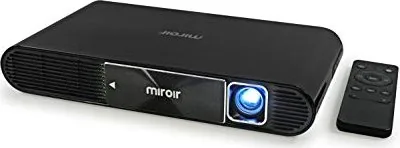
The product overview usually introduces the main components of the device. This may include the lens, power button, input ports, speaker, status lights, remote control, and menu controls. Understanding these parts helps users navigate the device with less trial and error.
Setup and Installation
Setup instructions explain how to prepare the product for use. For projection devices, this often includes placing the unit at the correct distance, connecting a power source, and choosing the best surface or screen. Some manuals also explain how to connect to laptops, smartphones, streaming devices, or gaming systems.
Operation and Controls
This section details how to power the device on and off, change inputs, adjust brightness, modify volume, or access menus. It may also describe remote control buttons and special shortcuts that make operation easier.
Connectivity
Modern devices often support several connection methods. Miroir Manuals may describe HDMI connections, USB playback, wireless screen mirroring, Bluetooth pairing, or audio output options. Clear connectivity guidance helps users match the device to their preferred setup.
Safety and Care
Safety sections are important because they explain proper handling, storage, ventilation, and cleaning. These instructions can extend the life of the device and help avoid overheating, damage from dust, or accidents caused by improper use.
Troubleshooting
Troubleshooting chapters are among the most useful parts of any manual. They may address issues such as no picture, no sound, distorted display, poor focus, weak battery life, or connection failures. The goal is to help users identify likely causes and try practical solutions before requesting service.
How to Use a Miroir Manual Effectively
A manual is most helpful when you use it in the right order. Instead of reading everything at once, it is often best to begin with the sections that match your current goal. This saves time and keeps the process manageable.
Start with the Basics
Begin with the product overview and quick start instructions. These sections give you the first steps needed to power the device and confirm that it works properly. If you are setting up the unit for the first time, this is usually the best place to begin.
Follow the Suggested Sequence
Manuals are designed in a logical order. When instructions mention a specific sequence, it is usually wise to follow it exactly. For example, you may need to connect a source device before adjusting display settings, or fully charge a battery before first use.
Use the Troubleshooting Guide Early
If something does not work, check the troubleshooting section before assuming the device is defective. Many issues can be resolved by making a simple adjustment, changing the cable, or restarting the unit.
Keep the Manual Accessible
It is helpful to save a digital copy or keep the printed guide with the device accessories. That way, you can quickly refer to it whenever you need support, even months after the original setup.
What to Look for When Searching for the Right Manual
Because different Miroir products can have different features, it is important to locate the correct manual for your exact model. A manual for one unit may not match another unit closely enough to be useful.
Check the Model Number
The model number is the most reliable way to find the correct document. It is usually listed on the device itself, the packaging, or the product label. Matching the model number ensures the information applies to your specific device.
Match the Product Type
Miroir Manuals may cover projectors, accessories, or related products with different feature sets. Make sure the manual corresponds to the exact product category you own so you get accurate setup and operation details.
Look for Version Updates
Some manuals are updated over time to reflect new features or revised instructions. If possible, use the most recent version available for your model.
Troubleshooting Tips Commonly Found in Manuals
Many users turn to manuals because they need quick help with a problem. Miroir Manuals often provide simple steps that can solve common issues without advanced technical knowledge.
No Image or Blank Screen
If there is no image, the manual may suggest checking the power source, confirming the selected input, inspecting the cable connection, and ensuring the source device is active. It may also recommend adjusting the brightness or resetting the unit.
Poor Focus or Image Alignment
If the image appears blurry or uneven, the manual may explain how to adjust focus, reposition the projector, or change the projection angle. These small changes often make a major difference in picture quality.
No Sound
When audio is missing, the manual may direct you to verify volume settings, check the audio output device, or confirm that Bluetooth or external speakers are paired correctly.
Charging or Battery Concerns
For battery-powered models, manuals often describe charging indicators, estimated charge times, and precautions to protect battery health. This information is especially useful if runtime seems shorter than expected.
Maintenance and Long-Term Care
Good care helps protect your investment. Manuals usually include maintenance advice that supports reliable performance over time. Following these recommendations can improve durability and reduce the need for repairs.
Cleaning the Device
Most manuals advise using a soft, dry cloth and avoiding harsh cleaners. Dust buildup can affect vents, lenses, and ports, so regular gentle cleaning is a smart habit.
Proper Storage
When the device is not in use, store it in a cool, dry place and keep it away from heavy pressure or moisture. If the manual includes a protective case or storage recommendation, it is worth following.
Safe Handling
Avoid blocking ventilation openings or exposing the device to extreme temperatures. Manuals often stress these points because heat and improper handling can shorten the life of electronic components.
Why Miroir Manuals Are Useful for Everyday Users
Not every user wants technical detail, and that is exactly why manuals are valuable. They translate product features into simple actions. Instead of searching across multiple websites or relying on guesswork, users can turn to one organized source for answers. This is especially helpful for families, students, teachers, travelers, and professionals who need fast results.
Miroir Manuals also support better confidence. When people know how to set up their device correctly, they are more likely to use it often and enjoy it fully. That makes the manual part of the product experience, not just a backup document.
Conclusion
Miroir Manuals provide the practical guidance users need to set up, operate, troubleshoot, and care for their devices. They help beginners get started quickly, help experienced owners find answers efficiently, and help everyone avoid common mistakes. From product overviews and connection instructions to maintenance tips and troubleshooting steps, these manuals are designed to make ownership easier and more successful.
If you are looking for a clear, reliable source of product information, Miroir Manuals are an essential reference. They save time, reduce frustration, and help you get the best possible experience from your device.
Search for 67,732 Manuals online


Type-in Brand or Model