
Worx Axis WX550.9 Manual
PDF manual · 80 Pages
English



Quick check
Incorrect answer, please try again.
Chat with your Worx Axis WX550.9 manual using AI
Get instant AI answers from your Worx Axis WX550.9 manual
Ask anything about the Worx Axis WX550.9. Answers come from this manual, with the pages they are based on.
Axis WX550.9 Maintenance Schedule
Wipe the power tool clean with a dry cloth. Never use water or chemical cleaners.
Ensure motor ventilation slots remain free of dust and debris to maintain proper cooling.
Ask a Question
Do you recommend Axis WX550.9?
Yes NoFrequently Asked Questions
It is a 2-in-1 tool. You can use it as a jigsaw for detailed, curved cuts or switch it to reciprocating saw mode for faster, rougher cutting tasks.
Is this answer helpful?
It is designed for wood, plastic, metal, PVC pipe, and other common building materials. Cutting capacity varies by mode and material thickness.
Is this answer helpful?
Yes. The pendulum function helps the blade cut more aggressively and can improve speed in suitable materials when used correctly.
Is this answer helpful?
Yes. It runs on Worx’s 20V PowerShare battery system, giving you cordless freedom for workshop and jobsite work.
Is this answer helpful?
The manual recommends eye protection, ear protection, a dust mask, and protective gloves. The battery should also be removed before changing blades or accessories.
Is this answer helpful?
Keep it dry, wipe it with a clean cloth, and clear dust from the ventilation slots and controls. No special user servicing or lubrication is normally required.
Is this answer helpful?
Advantages and Disadvantages
Advantages

- 2-in-1 design switches between jigsaw and reciprocating saw for more job flexibility.
- 20V PowerShare battery platform supports cordless convenience and easy mobility.
- Pendulum function, LED light, and steady base improve cutting control and visibility.
- Suitable for wood, plastic, metal, PVC pipe, and light construction materials.
Disadvantages

- Battery life and charger setup may depend on the exact package version.
- No special reciprocating saw blade is included in the standard accessory list.
- Noise and vibration levels require protective gear during longer sessions.
- Blade changes and mode switching need care to avoid pinching or accidental start-up.
Product Specification
Type
Orbital action jigsaw
Battery
20V, Li-Ion
No-load stroke rate
0-3000/min
Features
Stroke rate adjustment
Weight
3.31 lb
Scope of delivery
without charger and battery
Product Description
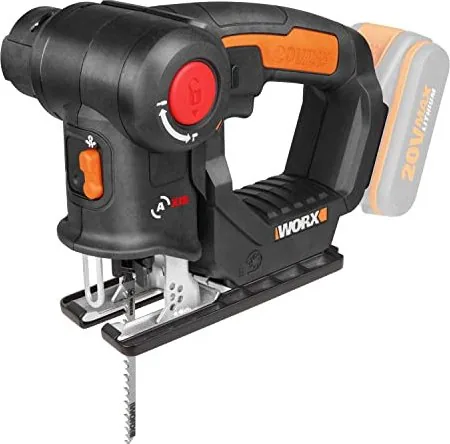
Worx WX550.9 Axis 20V PowerShare Cordless Orbital Jigsaw Solo incl. Accessories Manual
The Worx WX550.9 stands out as a practical 2-in-1 cutting solution for DIY users who want flexibility without carrying two separate tools. Designed around the 20V PowerShare platform, it combines a jigsaw and a reciprocating saw in one compact body, making it useful for straight cuts, curved cuts, and quick demolition-style work. The Worx WX550.9 Axis 20V PowerShare cordless orbital jigsaw solo incl. accessories Manual shows that this model is built for versatility first, with clear guidance for switching modes and using the correct blade for each task.
In jigsaw mode, the tool is well suited for detailed work on wood, plastic, aluminum, and light steel. In reciprocating mode, it becomes a more aggressive cutter for thicker sections such as wooden beams, plastic pipe, and steel pipe. The pendulum function helps improve cutting speed and efficiency, while the LED work light adds visibility in darker corners or under benches. A no-load speed of up to 3000/min and a 20 mm stroke length give it enough range for everyday workshop tasks.
What makes the WX550.9 appealing is its balance between convenience and control. The tool uses a pivoting head with a secure lock-off design, so the user can change working positions and blade direction with more confidence. The shoe/base support also helps keep the saw steady against the workpiece, which is important for cleaner cuts and less vibration. For best results, the instructions recommend moderate pressure, a firm grip, and matching the blade to the material being cut.
The manual also places strong emphasis on safety and maintenance. Hearing protection, eye protection, dust masks, and gloves are all recommended depending on the task. The battery system should be removed before changing accessories, and the tool should be kept clean and dry after use. There is no complex servicing required; a dry cloth and clean ventilation slots are usually enough to keep it in good condition.
Notes
- Best for users who want one tool for both precision cutting and rougher cutting jobs.
- Blade choice matters: wood, metal, aluminum, and reciprocating blades each serve a different purpose.
- The tool is designed to stay stable on the workpiece for cleaner, safer cuts.
Summary
Worx WX550.9 is a smart cordless multi-saw for flexible cutting tasks, backed by clear safety guidance, practical accessories, and a simple design that suits home workshops and renovation projects.
Search for 67,706 Manuals online


Type-in Brand or Model