
Weller WDD 81V Manual
PDF manual · 107 Pages
English



Quick check
Incorrect answer, please try again.
Chat with your Weller WDD 81V manual using AI
Get instant AI answers from your Weller WDD 81V manual
Ask anything about the Weller WDD 81V. Answers come from this manual, with the pages they are based on.
WDD 81V Maintenance Schedule
Empty the tin collection container, replace the glass tube filter, and check seals to ensure full suction performance.
Check the hose-mounted main filter regularly for dirt that affects airflow. Replace with a new original WELLER filter cartridge if necessary.
Use the cleaning tool (5 13 500 99) to clean the bore in the suction nozzle and the suction tube to maintain optimal suction.
Ask a Question
Do you recommend WDD 81V?
Yes NoFrequently Asked Questions
The station supports a digital temperature range from 50°C to 450°C (150°F to 850°F), allowing for both delicate and high-heat applications.
Is this answer helpful?
The auto-off function activates automatically after three consecutive setback periods (60 minutes total). You can enable or disable the standard setback function by holding the UP button during startup.
Is this answer helpful?
Yes, but only if you purchase the optional WCB 2 external input unit, which includes an RS-232 PC interface for data logging and remote control.
Is this answer helpful?
The unit requires dry, oil-free compressed air with an inlet pressure between 400 and 600 kPa (58 to 87 psi).
Is this answer helpful?
You should regularly check the main filter and replace it whenever it appears dirty or clogged to ensure maximum suction performance and protect the air converter.
Is this answer helpful?
The 3.5mm socket allows you to ground the soldering tip in four different ways (hard grounded, soft grounded, floating, or zero impedance) to prevent electrostatic discharge damage.
Is this answer helpful?
Advantages and Disadvantages
Advantages

- Microprocessor-controlled digital temperature regulation ensures high accuracy and stability.
- Wide range of compatible tools including specialized desoldering irons and tweezers.
- Optional external input units provide advanced features like locking and PC interfaces.
- Automatic standby mode saves energy and protects tips during long pauses.
- Maintenance-free internal air converter generates reliable vacuum pressure.
Disadvantages

- Requires dry, oil-free compressed air supply which may need additional filtration.
- Vacuum delay setting must be manually configured for optimal user experience.
- Some advanced functions require purchasing separate external input units.
- Filter replacement requires specific original parts for best performance.
- Initial setup involves multiple safety checks and potential bonding configurations.
Product Specification
Power
95W
Temperature
122-1022°F
Package Contents
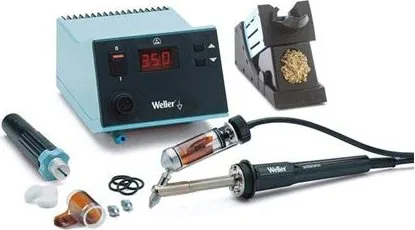
DSX 80 soldering iron, WDH 30 soldering iron stand, maintenance tool, DX 112 suction nozzle, DX 113 suction nozzle
Product Description
Weller WDD 81V Desoldering Station Set Manual: Your Ultimate Guide to Precision
The Weller WDD 81V Desoldering Station Set Manual is an essential resource for electronics professionals and hobbyists who demand precision in their soldering work. This comprehensive guide covers the operation, maintenance, and safety protocols for the Weller WDD 81V, a microprocessor-controlled desoldering station designed for industrial production, repair shops, and laboratories.
At the heart of this system is advanced digital control electronics that ensure precise temperature regulation at the soldering tip. The station features a high-quality sensor and heat exchange system within the soldering tool, guaranteeing optimal dynamic thermal behavior even under heavy load. Users can set temperatures ranging from 50°C to 450°C using simple Up and Down buttons, with real-time feedback provided by a digital display and an optical regulation monitor LED.
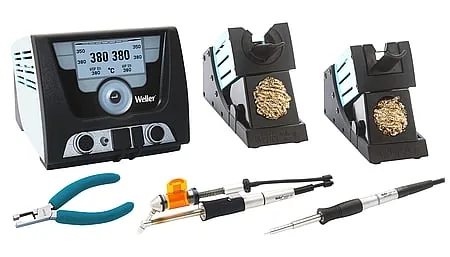
The manual details the various compatible tools included or available as accessories, such as the DSX 80 and DXV 80 desoldering irons, the WTA 50 tweezers for surface-mount components, and the versatile WP 80 soldering iron. Each tool is engineered for specific tasks, offering conical attachment systems for suction nozzles and integrated finger switches for vacuum activation. The system also supports optional external input units like the WCB 1 and WCB 2, which unlock advanced functions such as offset calibration, setback timers, lock modes, and PC connectivity via RS-232.
Proper maintenance is critical for longevity and performance. The manual emphasizes regular cleaning of the desoldering head, emptying tin collection containers, and replacing glass tube filters to maintain optimal airflow. It also explains how to configure equipotential bonding options to prevent static damage to sensitive components. Whether you are performing delicate SMD work or heavy-duty through-hole repairs, understanding the setup and troubleshooting steps outlined in this manual ensures reliable results and extends the life of your equipment.
Search for 67,732 Manuals online


Type-in Brand or Model