Manual.ly Logo

VTech BM2300B Manual

0.0 · 0 Ratings

PDF manual · 2 Pages

English

M: QW-35-FL
page

/ 2

Loading...
09633d84e6ca58147aba928f9dd794260780 page 2
When using your equipment, basic safety
precautions should always be followed to
reduce the risk of fire, electric shock and injury,
including the following:
Follow all warnings and instructions marked
on the product.
Adult setup is required.
This product is intended as an aid. It is not
a substitute for responsible and proper adult
supervision and should not be used as such.
This product is not intended for use as a
medical monitor.
Do not use this product near water. For
example, do not use it next to a bath tub, wash
bowl, kitchen sink, laundry tub or swimming
pool, or in a wet basement or shower.
6. CAUTION: Use only the batteries indicated in
this manual. There may be a risk of explosion
if a wrong type of battery is used for the parent
unit. Use only the supplied rechargeable battery
or replacement battery pack (BT166342/
BT266342) for the parent unit. Do not dispose
of batteries in a fire. They may explode.
7. Use only the adapters included with this
product. Incorrect adapter polarity or voltage
can seriously damage the product.
Baby unit power adapter:
Output: 6V DC 450mA;
Parent unit power adapter:
Output: 6V DC 450mA.
8. The power adapters are intended to be
correctly oriented in a vertical or floor mount
position. The prongs are not designed to hold
the plug in place if it is plugged into a ceiling,
under-the-table or cabinet outlet.
9. For pluggable equipment, the socket-outlet
shall be installed near the equipment and
shall be easily accessible.
10.Unplug this product from the wall outlet
before cleaning. Do not use liquid or aerosol
cleaners. Use a damp cloth for cleaning.
11.Unplug the power cords before replacing
batteries.
12.Do not cut off the power adapters to replace
them with other plugs, as this causes a
hazardous situation.
13.Do not allow anything to rest on the power
cords. Do not install this product where the
1.
2.
3.
4.
5.
cords may be walked on or crimped.
14.This product should be operated only from
the type of power source indicated on the
marking label. If you are not sure of the type
of power supply in your home, consult your
dealer or local power company.
15.Do not overload wall outlets or use an
extension cord.
16.Do not place this product on an unstable table,
shelf, stand or other unstable surfaces.
17.This product should not be placed in any
area where proper ventilation is not provided.
Slots and openings in the back or bottom
of this product are provided for ventilation.
To protect them from overheating, these
openings must not be blocked by placing the
product on a soft surface such as a bed, sofa
or rug. This product should never be placed
near or over a radiator or heat register.
18.Never push objects of any kind into this
product through the slots because they may
touch dangerous voltage points or create a
short circuit. Never spill liquid of any kind on
the product.
19.To reduce the risk of electric shock, do
not disassemble this product, but take it to
an authorised service facility. Opening or
removing parts of the product other than
specified access doors may expose you to
dangerous voltages or other risks. Incorrect
reassembling can cause electric shock when
the product is subsequently used.
20.You should test the sound reception every
time you turn on the units or move one of the
components.
21.Periodically examine all components
for damage.
22.Be aware of possible loss of privacy while
using public airwaves. Conversations may be
picked up by other nursery monitors, cordless
phones, scanners, etc.
23.Children should be supervised to ensure that
they do not play with the product.
24.The product is not intended for use by
persons (including children) with reduced
physical, sensory or mental capabilities,
or lack of experience and knowledge,
unless they have been given supervision or
instruction concerning use of the appliance
by a person responsible for their safety.
SAVE THESE INSTRUCTIONS
Important safety
instructions
Cautions
Use and store the product at a temperature
between 0
o
C and 40
o
C.
Do not expose the product to extreme cold,
heat or direct sunlight. Do not put the product
close to a heating source.
Batteries should not be exposed to excessive
heat such as bright sunshine or fire.
Make sure the baby unit and the adapter
cord are always out of reach of the baby,
at least 3 feet away from the baby or cot, to
avoid a possible strangulation hazard.
Never place the baby unit inside the baby’s
cot or playpen. Never cover the baby unit or
parent unit with anything such as a towel or
a blanket.
Other electronic products may cause
interference with your baby monitor. Try
installing your baby monitor as far away
from these electronic devices as possible:
wireless routers, radios, cellular telephones,
intercoms, room monitors, televisions,
personal computers, kitchen appliances and
cordless telephones.
1.
2.
3.
4.
5.
6.
Frequently asked questions
Why does the
baby monitor
not respond
normally?
Try the following (in the order
listed) for common cure:
1. Disconnect the power to the
baby unit and the parent unit.
2. Remove the batteries in the
parent unit. Then, install the
batteries again.
3. Wait a few minutes before
connecting power back to the
baby unit and the parent unit.
4. Turn on the baby unit and the
parent unit.
5. Wait for the parent unit to
synchronise with the baby unit.
Allow up to one minute for this
to take place.
Why doesn’t
the screen of
the parent unit
go on when I
switch on the
unit?
Perhaps the rechargeable battery
of the parent unit is empty and the
parent unit is not connected to the
power. Insert the appliance plug
into the parent unit and put the
adapter in a wall socket.
Why doesn’t the
POWER light
of the baby unit
go on when I
switch on the
unit?
Perhaps the baby unit is not
connected to the power. Connect
the baby unit to the power.
Why does the
baby monitor
produce a
high-pitched
noise?
The units may be too close to
each other. Make sure the parent
unit and the baby unit are more
than 2 metres (6.5 feet) away from
each other.
Why does the
parent unit react
too quickly to
other sounds?
The baby unit also detects other
sounds than those of your baby.
Adjust the sensitivity level to a
lower level or adjust the speaker
volume on the parent unit.
Why don’t I hear
a sound/Why
can’t I hear my
baby cry?
The volume of the parent unit
may have set too low. Press
to increase the volume level.
You may have set a low sound
sensitivity level. See Adjust the
sound sensitivity of the baby
unit to change the setting.
Why does the
parent unit
beep?
If the parent unit is in mute and
the sound alert feature is on,
there is sound detected from the
baby unit.
The baby unit may be out of
range. Move the parent unit
closer to the baby unit (but not
less than 6.5 feet).
If the parent unit is powered
by the provided battery, it may
not have enough charge for the
parent unit to perform normally.
Charge the battery in the parent
unit for up to 11 hours.
Why can’t I
establish a con-
nection? Why is
the connection
lost every now
and then? Why
are there sound
interruptions?
The baby unit may be out of
range. Move the parent unit
closer to the baby unit (but not
less than 6.5 feet).
Other electronic products may
cause interference with your baby
monitor. Try installing your baby
monitor as far away from these
electronic devices as possible.
Monitor the temperature
Your baby unit measures the surrounding
temperature. If the detected temperature falls
beyond a desired temperature range, the parent
unit screen will display LOW TEMP or HI TEMP.
You can change the settings for the
temperature format and range, as well as turn
the temperature alert on or off by the following
steps.
Temperature format
You can choose to display the temperature in
Celcius (
o
C) or Fahrenheit (
o
F).
Press when the parent unit is not in
use.
Press or to scroll to TEMPERATURE,
then press .
Press or to scroll to FORMAT, then
press .
Press or to choose CELSIUS? or
FAHRENHEIT?, then press to save.
Minimum temperature
Press when the parent unit is not in
use.
Press or to scroll to TEMPERATURE,
then press .
Press again to choose MINIMUM.
Press or to choose the desired
minimum temperature (11-20
o
C), then press
to save.
Maximum temperature
Press when the parent unit is not in
use.
Press or to scroll to TEMPERATURE,
then press .
Press or to scroll to MAXIMUM, then
press .
Press or to choose the desired
maximum temperature (21-30
o
C), then press
to save.
1.
2.
3.
4.
1.
2.
3.
4.
1.
2.
3.
4.
Customer service and
product warranty
IMPORTANT
Please retain this booklet with your sales receipt as
proof of the date of purchase.
Customer Service
Please call our Consumer Services Department on
01235 546810 (from UK) or +44 1235 546810
(outside UK) and a service representative will be
happy to help you.
This warranty is valid for the UK and Eire only. For products purchased outside
the UK and Eire, please contact your local distributor or place of purchase.
PRODUCT WARRANTY
PRODUCT REGISTRATION
P
R
O
D
U
C
T
W
A
R
R
A
N
T
Y
ONE
YEAR
Thank you for choosing this quality product from VTech.
We hope it will bring many hours of entertainment,
imaginative play and learning.
1. The product detailed above is covered by a one year warranty from the date of purchase,
against any defects in materials or workmanship.
2. The product may be returned to the place of purchase. Alternatively the product can be
returned to VTech Electronics Europe plc (see address below), with proof of purchase,
without proof of purchase no replacement will be provided.
3. VTech Electronics Europe plc will examine the product and if it is found to be defective
due to faulty materials or workmanship, will replace the product at their discretion.
4. If the product covered by this warranty is damaged due to misuse, modification or
unauthorised repair, or because of faulty batteries, battery discharge or incorrect
electrical connections, then this warranty becomes void.
5. This warranty is personal to the original purchaser and is not transferable.
6. Breakages to the LCD screen are not covered by the warranty.
7. Returns to VTech Electronics Europe plc should include a cheque or postal order for
£1.50 towards the cost of return postage and packaging.
8. Products returned to VTech Electronics Europe plc, should be addressed as follows and
packed carefully to avoid damage in transit (Please do not include batteries or adaptor).
Please include details of the fault together with your name and address.
9. To keep an online record of your warranty, please register your product online at www.
vtech.co.uk/warranty
Vtech Electronics EU PLC, c/o XPO Logistics, Warehouse 350, Cat & Fiddle Lane, West
Hallam, DE7 6HE
THIS WARRANTY IS OFFERED AS AN EXTRA BENEFIT AND DOES NOT AFFECT
CONSUMERS’ STATUTORY RIGHTS.
UK
Visit www.vtech.co.uk/clubvtech/login
to register your VTech product
By joining the VTech Club you can also enter competitions, find
out about news and events, seek expert advice for parents and
let your kids play fun learning games and activities.
Technical specifications
Frequency
control
Crystal controlled PLL synthesizer
Transmit
frequency
Baby unit: 2406 - 2475 MHz
Parent unit: 2406 - 2475 MHz
Channels 24
Nominal
effective
range
Actual operating range may
vary according to environmental
conditions at the time of use.
Power
requirements
Parent unit battery:
CORUN: NI-MHAAA550X2
2.4V 550mAh Ni-MH, or
GPI: VTRHCH53N006
2.4V 550mAh Ni-MH
Baby unit power adaptor:
VTPL Model: VT04EEU06045
Input: 100-240VAC, 50/60Hz, 150mA,
Output: 6VDC, 450mA
Or
Tenpao Model: S003GV0600045
Input: 100-240VAC, 50/60Hz, 150mA,
Output: 6VDC, 450mA
(UK version)
VTPL Model: VT04EUK06045
Input: 100-240VAC, 50/60Hz, 150mA,
Output: 6VDC, 450mA
Or
Tenpao Model: S003GB0600045
Input: 100-240VAC, 50/60Hz, 150mA,
Output: 6VDC, 450mA
Parent unit power adaptor:
VTPL Model: VT04EEU06045
Input: 100-240VAC, 50/60Hz, 150mA,
Output: 6VDC, 450mA
Or
Tenpao Model: S003GV0600045
Input: 100-240VAC, 50/60Hz, 150mA,
Output: 6VDC, 450mA
(UK version)
VTPL Model: VT04EUK06045
Input: 100-240VAC, 50/60Hz, 150mA,
Output: 6VDC, 450mA
Or
Tenpao Model: S003GB0600045
Input: 100-240VAC, 50/60Hz, 150mA,
Output: 6VDC, 450mA
For pluggable equipment, the
socket-outlet (power adaptor) shall
be installed near the equipment and
shall be easily accessible.
Disposal of batteries and
product
The crossed-out wheelie bin symbols
on products and batteries, or on their
respective packaging, indicates they
must not be disposed of in domestic
waste as they contain substances that
can be damaging to the environment
and human health.
The chemical symbols Hg, Cd or Pb,
where marked, indicate that the battery
contains more than the specified value
of mercury (Hg), cadmium (Cd) or
lead (Pn) set out in Battery Directive
(2006/66/EC).
The solid bar indicates that the product
was placed on the market after 13th
August, 2005.
Help protect the environment by
disposing of your product or batteries
responsibly.
Storage
When you are not going to use the baby monitor for
some time, remove the rechargeable battery from the
parent unit. Store the parent unit, the baby unit and
the adapters in a cool and dry place.
General product care
To keep this product working well and looking good,
follow these guidelines:
Avoid putting it near heating appliances and devices
that generate electrical noise (for example, motors or
fluorescent lamps).
DO NOT expose it to direct sunlight or moisture.
Avoid dropping the product or treating it roughly.
Clean with a soft cloth.
DO NOT immerse the parent unit and the baby unit
in water and do not clean them under the tap.
DO NOT use cleaning spray or liquid cleaners.
•
•
•
•
•
•
Temperature alert
Press when the parent unit is not
in use.
Press or to scroll to TEMPERATURE,
then press .
Press or to scroll to ALERT ON/OFF,
then press .
If the current temperature alert setting is
OFF, the screen displays ON? If the current
temperature alert setting is ON, the screen
displays OFF?.
Press to confirm your selection.
The screen displays SAVED. You hear a
confirmation tone.
-OR-
Press to exit the menu. The current
setting remains unchanged.
ECO range
You can change the setting of the ECO range.
The shorter the ECO range, the lower the
radiation will be emitted, so as the operating
range will be reduced.
To change the ECO range:
Press when the parent unit is not in
use.
Press or to scroll to ECO range, then
press .
Press or to scroll to FULL RANGE,
HALF RANGE, ONE ROOM, and DESK.
Press to confirm your selection.
The screen displays SAVED. You hear a
confirmation tone.
-OR-
Press to exit the menu. The current
setting remains unchanged.
1.
2.
3.
4.
5.
1.
2.
3.
4.
Extended ECO
You can turn on the extended ECO mode so
that the radiation emitted will be lowered to the
minimum, so as the operating range will be
reduced to the minimum.
To turn on the Extended ECO:
Press when the parent unit is not in
use.
Press or to scroll to Extended ECO,
then press . The screen displays ON?
Press to confirm turning on the
Extended ECO. The screen displays
SAVED. You hear a confirmation tone.
-OR-
Press to exit the menu. The current
setting remains unchanged.
Reset
You can restore all the adjustable settings back
to their original factory settings.
To reset the baby monitor:
Press when the parent unit is not in
use.
Press or to scroll to RESET, then press
.
The screen displays CONFIRM? Press
to confirm. The screen displays SAVED. You
hear a confirmation tone.
-OR-
Press to exit the menu. The current
setting remains unchanged.
1.
2.
3.
1.
2.
3.
Talk to the baby unit
You can broadcast messages from a parent
unit to the baby unit and the other parent unit.
If you have two parent units, you can use both
of them at the same time to talk to the baby
unit.
Press and hold on the side of the
parent unit. The screen displays when
the voice connection to the baby unit is
made. Speak towards the microphone on
the parent unit. Your voice is broadcast to
the baby unit and the other parent unit.
NOTES
When a parent unit is talking to the baby unit,
it is also broadcast to the other parent unit.
However, sounds from the baby unit cannot be
transmitted to the parent units at the moment.
If speaker volume of the parent unit has been
turned off before the talk, it will change to
default volume level after the talk finished.
Find/page the parent unit
Use this feature to find misplaced parent units.
Press on the baby unit. All idle parent
units ring and display PAGING.
To end paging, press any key on the
parent unit, or press on the baby unit.
NOTES
Paging rings all parent units even if the speaker
volume of parent unit is set to VOLUME OFF.
The baby unit cannot page any parent unit that
is turned off, out of range or talking to the baby
unit.
•
•
•
1.
2.
•
•
Nightlight
When this feature is turned on, the nightlight on
the baby unit gives a soft glow for comfort and
allows easy location in the dark.
To set the nightlight:
Press when the parent unit is not in
use.
Press or to scroll to NIGHTLIGHT, then
press .
If the current nightlight setting is OFF, the
screen displays ON? If the current nightlight
setting is ON, the screen displays OFF?.
Press to confirm your selection.
The screen displays SAVED. You hear a
confirmation tone.
-OR-
Press to exit the menu. The current
setting remains unchanged.
Vibration alert
You can turn on the vibration alert so that the
parent unit vibrates when the baby unit detects
sounds which light up four sound level indicators
on the parent unit.
When the vibration alert of the parent unit is
turned on, displays. The vibration alert is
preset to OFF.
Press when the parent unit is not in
use.
Press or to choose VIBE ALERT, then
press .
Press or to choose ON or OFF.
Press to confirm your selection. The
screen displays SAVED and you hear a
confirmation tone.
NOTES
Each time you set the vibration alert to ON,
the parent unit vibrates briefly after you press
SELECT.
The vibration alert setting on each parent unit is
independent.
Night light
You can turn the night light on or off by pressing
manually on the baby unit.
When the night light is turned on, the parent unit
displays .
1.
2.
3.
4.
1.
2.
3.
4.
•
•
Declaration of Conformity
This product is intended for use within Europe.
This equipment compiles with the essential
requirements for the Radio Equipment and
Telecommunications Terminal Equipment Directive
1999/5/EC.
Vtech Telecommunications Ltd. hereby declares that this
Digital Audio Baby Monitor BM2300 is in compliance
with the essential requirements and other relevant
provisions of Directive 1999/5/EC.
The Declaration of Conformity for the BM4200 is
available from http://www.vtech.com/rtte-directive.
Credits:
The Background Noise sound file was created by Caroline Ford,
and is used under the Creative Commons license.
The Stream Noise sound file was created by Caroline Ford, and
is used under the Creative Commons license.
The Crickets At Night sound file was created by Mike Koenig,
and is used under the Creative Commons license.
The Heart Beat sound file was created by Zarabadeu, and is
used under the Creative Commons license.
Specifications are subject to change without notice.
2016 for VTech Telecommunications, Inc.
All rights reserved. 05/16. BM2300_UK_CIB_V1.0

Chat with your VTech BM2300B manual using AI

Get instant AI answers from your VTech BM2300B manual

Ask anything about the VTech BM2300B. Answers come from this manual, with the pages they are based on.

BM2300B Maintenance Schedule

Every time you turn on or move units
Test sound reception

You should test the sound reception every time you turn on the units or move one of the components.

Periodically
Examine components for damage

Periodically examine all components for damage.

As needed
Clean with soft cloth

Unplug before cleaning. Use a damp soft cloth only; do not use liquid or aerosol cleaners or immerse in water.

M: qwen/qwen3.8-flash

Ask a Question

0/1000

Do you recommend BM2300B?

Yes No

Frequently Asked Questions

A

This usually happens when the parent and baby units are too close. Move them at least two meters apart or lower the volume to stop the feedback loop.

Is this answer helpful?

A

Press MENU on the parent unit, select SOUND SENSITIVITY, and use the volume buttons to choose a level from one to five before confirming with SELECT.

Is this answer helpful?

A

Move the parent unit closer to the baby unit but keep it more than two meters away. Check for interference from other electronics like routers or cordless phones.

Is this answer helpful?

A

Yes, you can mute the speaker volume. If Sound Alert is enabled, the unit will beep and flash lights when noise is detected despite the mute setting.

Is this answer helpful?

A

A full charge typically takes eleven hours of continuous charging. Turn the unit off while charging to speed up the process slightly.

Is this answer helpful?

A

Yes, the baby unit measures the ambient temperature. You can set minimum and maximum thresholds to receive alerts if the room gets too hot or cold.

Is this answer helpful?

M: QW-35-FL

Advantages and Disadvantages

Advantages

  • Adjustable sound sensitivity levels allow customization for different noise environments
  • Visual sound indicators provide silent monitoring options for sleeping babies
  • Built-in temperature sensor alerts parents to unsafe room temperatures
  • Talk-back feature enables parents to comfort their child remotely
  • ECO mode reduces wireless radiation emission when full range is not needed
VS

Disadvantages

  • Battery alone provides limited runtime compared to continuous AC power use
  • Operating range decreases significantly indoors due to walls and obstacles
  • High-pitched screeching can occur if units are placed too close together
  • Screen display language is preset to English and requires menu navigation to change
  • Lullabies play for a fixed duration of twenty minutes without infinite repeat
M: QW-35-FL

Product Specification

Operating Mode

Battery-powered (2x AAA battery), Mains-powered

Transmission

digital, DECT

Range

984ft

Display

LCD

Features

Charging indicator light, Temperature display, Volume display, Lullaby function, Intercom function, Alarm function, Noise sensor, Volume adjustment, Range check, Adjustable sensitivity levels, Mute function, Night light, Eco-mode, Belt clip

Package Contents

2x Power adapter, 1x Transmitter, 1x Receiver

M: QW-35-FL

Product Description

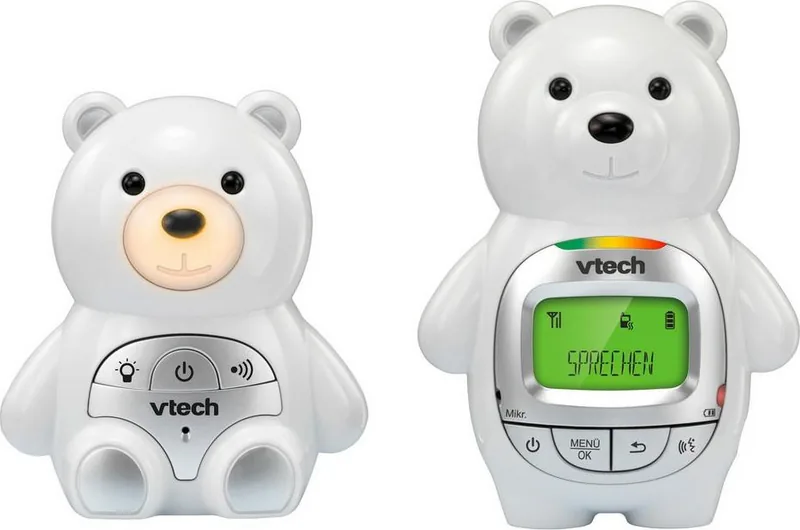
VTech BM 2300B Babyphone Digital: A Comprehensive Review

The VTech BM 2300B Babyphone Digital stands as a reliable companion for modern parents seeking peace of mind. This digital audio monitor is designed to provide clear sound transmission while minimizing interference from other household devices. With its intuitive interface and robust feature set, it allows caregivers to keep a close watch on their little ones without being tethered to a single location.

One of the standout features of this device is its advanced sound sensitivity control. Parents can adjust the microphone sensitivity from Level 1 to Level 5, ensuring they hear only what matters. Whether you need to detect soft babbling or loud crying, the system adapts to your needs. The parent unit displays visual indicators with green and red lights that correspond to the noise level detected by the baby unit, offering an instant visual cue even when the volume is muted.

Safety and convenience are woven into every aspect of the design. The unit includes a built-in night light that provides a gentle glow in dark nurseries, helping parents check on their child without disturbing sleep. Temperature monitoring is another critical function; the system alerts you if the room temperature falls outside your preferred range, displaying LOW TEMP or HI TEMP messages on the screen. Additionally, the ECO mode allows users to reduce radiation emissions by limiting the operating range, which is particularly useful for those concerned about wireless exposure.

The battery life of the parent unit is optimized for long-term use, though connecting it to AC power is recommended for continuous monitoring. Charging takes approximately eleven hours for a full cycle. The device also supports talk-back functionality, enabling parents to soothe their baby remotely with a simple voice message. For added security, the system includes a paging feature to locate misplaced parent units instantly. While the operating range can reach up to 300 meters outdoors, indoor performance may vary due to walls and obstructions. Overall, the VTech BM 2300B offers a balanced mix of technology and practicality for nursery safety.

Important Notes

  • Always keep the baby unit at least one meter away from the crib.
  • Maintain a distance of two meters between the parent and baby units to prevent feedback squeals.
  • Use only the supplied adapters and batteries to ensure safety and warranty validity.
M: QW-35-FL

© Copyright 2026 Manual.ly