Manual.ly Logo

VTech BM2300B Manual

0.0 · 0 Ratings

PDF manual · 2 Pages

English

M: QW-35-FL
page

/ 2

Loading...
09633d84e6ca58147aba928f9dd794260780 page 1
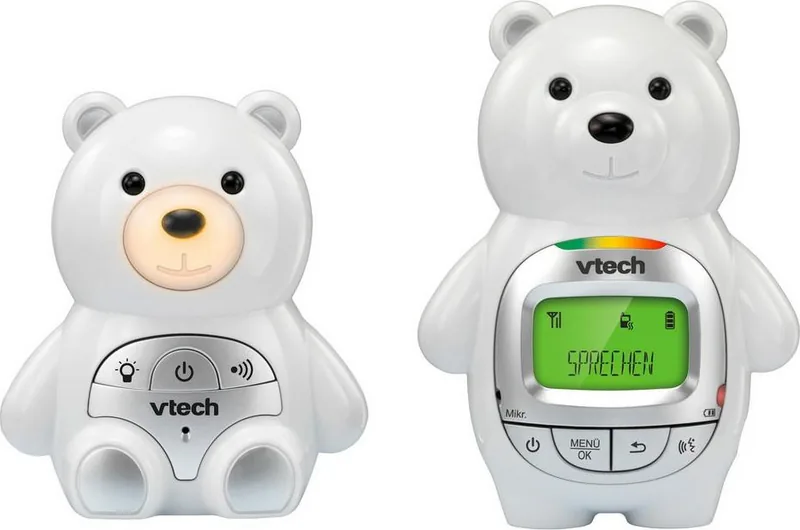
Baby unit overview
1
Press to decrease the speaker
volume.
•
2
On/off
Press and hold to power on or off.•
3
Microphone
4
Night light
On when night light is turned on
manually.
Off when night light is turned off
manually.
•
•
5
Press to increase the speaker volume.•
6
Press to turn the night light on or off.•
7
Press to start or stop paging parent
unit.
•
8
Speaker
9
Temperature sensor
10
Power jack
Overview
The parent unit runs on rechargeable battery or
AC power. To continuously monitor your baby,
make sure you use both battery and AC power
at the same time. With the battery alone, the
parent unit can cordlessly run for a short time
only.
NOTES
Use only the battery supplied with this product.
The operating time for using the rechargeable
battery is short. If you want to monitor your baby for
a long time, we recommend you connect the parent
unit to AC power.
If the parent unit will not be used for a long time,
disconnect and remove the battery to prevent
possible leakage.
CAUTION: Risk of xplosion if battery is replaced
by an incorrect type. Dispose of used batteries
according to the instructions
Install the battery as shown below
•
•
•
•
Install the battery
Replace the battery
To replace the battery, pull out the battery
compartment cover, and then lift up the battery.
Follow the previous steps to install the battery.
Charge the parent unit battery
When you have connected the parent unit and
installed its battery for the first time, it powers
on automatically. The battery icon indicates the
battery status (see the following table).
NOTES
The parent unit battery is fully charged after 11
hours of continuous charging.
It takes longer to charge the battery when the
parent unit is turned on. To shorten the charging
time, turn the parent unit off while charging.
The standby time varies depending on the
sensitivity level you set, your actual use and the
age of the battery.
Battery
indicators
Battery
status
Action
The battery
icon is off.
No battery is
installed but
operates using
AC power.
Install the
parent unit
battery.
Charge without
interruption
(at least 30
minutes).
The screen
displays
LOW
BATTERY
and .
The
light
flashes.
The battery
has very little
charge and
may be used
for only a short
time.
Charge
without
interruption
(about 30
minutes).
The battery
icon
becomes
solid .
The battery is
fully charged.
To keep
the battery
charged,
connect it to AC
power when not
in use.
•
•
•
NOTE
This baby monitor is intended as an aid. It is not a
substitute for proper adult supervision, and should
not be used as such.
Test your baby monitor
You may test the baby monitor before initial use,
and at regular times thereafter.
CAUTION
For hearing protection, make sure the parent
unit is more than 2 metres (6.5 feet) away
from the baby unit. If you hear any
high-pitched noice, move the parent unit
further until the noise stops. You can also
press VOL on the parent unit to lower or
mute the noise.
Make sure your baby unit and parent unit are
on.
Speak towards the microphone of the baby
unit. You will hear the sound at the parent
unit, and see the visual sound indicators
light up.
NOTE
When the parent unit displays NOT LINKED and
flashes, move the parent unit closer to the baby
unit (observe the minimum distance of 2 metres/
6.5 feet). You can also check if the baby monitor is
connected to a live power socket and switched on.
TIP
Increase the speaker volume of the parent unit if
you cannot hear the sounds transmitted from the
baby unit.
•
•
1.
2.
•
•
Before use
Parent unit overview
1
LCD panel
2
On/off
Press and hold to power on or off.
While in a menu, press to return to
idle screen.
•
•
3
Microphone
4
Press to decrease the speaker vol-
ume.
While in a menu, press to scroll down.
•
•
5
Visual sound indicator
The visual sound indicator has two
functions. One is to show the sound level
detected by the baby unit. The other
one is to show the volume level during
speaker volume setting.
Sound level detected by the baby unit
One to three green
lights indicate a moderate sound level
detected by the baby unit.
Additional red
lights indicate a higher sound level
detected by the baby unit (e.g. baby
crying loudly).
Speaker volume level
One to three green
lights indicate Level 1 to Level 3 of the
speaker volume setting.
Additional red
lights indicate Level 4 to Level 5 of
the speaker volume setting.
•
•
•
•
6
Press to enter the menu while idle.
While in a menu, press to choose an
item, or save a setting.
•
•
7
While in a menu, press to return to the
previous screen.
Press to return to idle screen.
•
•
8 Battery level indicator
Light on when the battery is being
charged.
Light flashes when the battery is low
and needs charging.
Light off when no battery is installed.
•
•
•
9
Press to increase the speaker volume.
While in a menu, press to scroll up.
•
•
10
Press and hold to talk to the baby unit;
release to stop talking.
While in a menu, press to return to
idle screen.
•
•
11
Power jack
12
Speaker
13
Belt clip
14
Battery compartment cover
What’s in the box
Connect the baby monitor
NOTES
Use only the power adapters supplied with this
product.
Make sure the electrical outlets are not controlled
by wall switches.
The power adapters are intended to be correctly
oriented in a vertical or floor mount position. The
prongs are not designed to hold the plug in place if
it is plugged into a ceiling, under-the-table or cabinet
outlet.
Make sure the parent unit, the baby unit and the
power adapter cords are out of reach of children.
•
•
•
•
Connect and charge the
battery
Parent unit display icons
Connection status
displays when strong signal
strength is detected between the
baby unit and the parent unit.
displays when moderate signal
strength is detected between the
baby unit and the parent unit.
displays when the weak signal
strength is detected between the
baby unit and the parent unit.
flashes when the link between the
baby unit and the parent unit is lost.
•
•
•
•
Full ECO mode
Displays when Full ECO Mode is
turned on.
•
Night light
On when the night light is turned on. •
Sound alert
Displays when the sound alert of the
parent unit is turned on.
Flashes when there are loud sounds
detected from the baby unit and the
parent unit is in mute.
•
•
Vibration alert
Displays when the vibration alert of
the parent unit is turned on.
Flashes when there are loud sounds
detected from the baby unit.
•
•
Mute
Displays when the volume is turned
off.
•
Battery status
animates when
the battery is charging.
displays solid when the battery is
fully charged.
flashes when the battery is charged
with AC adaptor, or charging failure.
flashes when the battery is in low
level and needs charging.
No battery icon displays when there
is no battery installed.
•
•
•
•
•
Positioning the baby monitor
CAUTION
Keep the baby unit out of the reach of the baby.
Never place or mount the baby unit inside the
baby’s cot or playpen.
Place the baby unit more than 1 metre
(3 feet) away from your baby.
2. Place the parent unit more than 2 metres
(6.5 feet) away from the baby unit.
CAUTION
The default volume of your parent unit is level 3. If
you experience high-pitched screeching noise from
your baby monitor while positioning:
Make sure your baby unit and parent unit are
more than 2 metres (6.5 feet) apart, OR
Turn down the volume of your parent unit.
Operating range
The operating range of the baby monitor is up to
300 metres (1,000 feet) outdoors or 50 metres
(160 feet) indoors. The actual operating range
may vary depending on the environmental
conditions, and other interferences such as
walls, doors, and other obstructions.
•
1.
•
-
-
l
m
n
k
j
>
2m (6.5ft)
>
1m (3ft)
<
2m (6.5ft)
User’s manual
BM2300
Safe & Sound
®
Digital Audio Baby Monitor
Congratulations
on purchasing your new VTech product. Before
using this product, please read Important safety
instructions.
This manual has all the feature operations and
troubleshooting necessary to install and operate
your new VTech product. Please review this
manual thoroughly to ensure proper installation
and operation of this innovative and feature rich
VTech product.
Adjust the sound sensitivity of the baby unit
You can choose to hear sounds from the baby
unit all the time, or to hear sounds that exceed
a certain level. You can use the parent unit to
adjust the microphone sensitivity of your baby
unit. The higher the sensitivity level, the more
sensitive the baby unit is in detecting sounds
for transmitting to the parent unit. The sound
sensitivity is preset to LEVEL 5.
Sound sensitivity table for reference
Display Sensitivity Description
LEVEL 5
High
sensitivity
Low
sensitivity
High sensitivity level
The parent unit speaker is
constantly on, and you will
hear all sounds (including
background noises) from
your baby’s room.
LEVEL 4
Medium high
sensitivity level
The parent unit speaker
turns on for soft babbling
and louder sounds from
your baby. It remains
quiet when your baby
sleeps soundly.
LEVEL 3
Medium sensitivity level
The parent unit speaker
turns on for loud babbling
and louder sounds from
your baby. It remains quiet
when your baby makes
soft sounds.
LEVEL 2
Medium low sensitivity
level
The parent unit speaker
turns on for crying and
louder sounds from your
baby. It remains quiet
when your baby makes
soft sounds.
LEVEL 1
Low sensitivity level
The parent unit speaker
turns on for loud crying or
screeching sounds from
your baby. It remains quiet
when your baby makes
soft sounds.
Press MENU when the parent unit is not
in use.
Press SELECT.
Press VOL or VOL to choose the
sensitivity level.
Press SELECT to confirm your selection.
The screen displays SAVED and you hear a
confirmation tone.
1.
2.
3.
4.
Power the baby unit on or off
Press to power on the baby unit. The
power light turns on.
Press and hold to power off the baby unit.
The power light turns off.
Power the parent unit on or off
Press to power on the parent unit. The
screen turns on.
Press and hold to power off the parent
unit. The screen turns off.
NOTE
The parent unit powers on automatically once
it is connected to AC power or battery installed.
The baby unit also powers on automatically once
connected to AC power.
Adjust the speaker volume for baby unit
Press VOL or on the baby unit at any
time.
Adjust the speaker volume for parent unit
You can adjust the speaker volume from
VOLUME 1 toto VOLUME 5, or turn it off. The
speaker volume is preset to VOLUME 3.
Press or when the parent unit is not in
use.
When the speaker volume is set to off, the
screen displays .
•
•
•
•
•
•
•
Using the baby monitor
NOTE
To enter the sensitivity menu of the parent unit,
the baby unit must be turned on.
Language
You can select a language to be used in all
screen displays. The screen display language
is preset to English.
To change the language:
Press when the parent unit is not in
use.
Press or to scroll to LANGUAGE, then
press .
Press or to choose your desired
language, then press MENU to confirm your
selection.
The screen displays SAVED. You hear a
confirmation tone.
Lullaby
You can play lullabies on the baby unit to
comfort your baby. There are 5 lullabies to
choose from. The selected lullaby plays
repeatedly for approximately 20 minutes.
Press when the parent unit is not in
use.
Press or to scroll to LULLABY, then
press .
Press or to choose your desired lullaby,
then press to play the lullaby.
Sound alert
Sound alert feature works only when the parent
unit is in mute.
If you turn on the sound alert, the parent unit beeps
when the baby unit detects sounds which light up
four sound level indicators on the parent unit.
When the sound alert of the parent unit is turned
on, displays. The sound alert is preset to
OFF.
Press when the parent unit is not in
use.
Press VOL or VOL to choose
SOUND ALERT, then press .
Press VOL or VOL to choose ON or
OFF.
Press to confirm your selection. The
screen displays SAVED and you hear a
confirmation tone.
NOTE
The sound alert setting on each parent unit is
independent.
•
1.
2.
3.
1.
2.
3.
1.
2.
3.
4.
•
b
a
c
f
e
d
Parent unit display screen
messages
LINKED
The link between the parent
unit and the baby unit is
established.
LOW
BATTERY
The parent unit uses only the
rechargeable battery pack and
it needs to be recharged.
NOT
LINKED
The link between the parent
unit and the baby unit is lost
continuously for over 10
seconds.
PAGING
All idle parent units are being
paged by the baby unit.
SAVED
Your selection has been
saved.
SEARCHING
The parent unit is out of range
of the baby unit, or the baby
unit is out of power.
TALK
The parent unit is talking to
the baby unit.
TALKBACK
The other parent unit is talking
to the baby unit.
HI TEMP
The temperature detected
from the selected baby unit
is above the set maximum
temperature.
LOW TEMP
The temperature detected
from the selected baby unit
is below the set minimum
temperature.
o
F /
o
C
The real-time temperature
detected by the baby unit in
Celcius (
o
C) or Fahrenheit
(
o
F) (e.g. 14
o
C or 57
o
F).
>
2m (6.5ft)
>
1m (3ft)
<
2m (6.5ft)
g
b
a
c
f
e
d
h
i
2
1
2
1
2
1
2
1
2
1
2
1
2
1
2
1
2
1
2
1
g
h
i
g
h
i

Chat with your VTech BM2300B manual using AI

Get instant AI answers from your VTech BM2300B manual

Ask anything about the VTech BM2300B. Answers come from this manual, with the pages they are based on.

BM2300B Maintenance Schedule

Every time you turn on or move units
Test sound reception

You should test the sound reception every time you turn on the units or move one of the components.

Periodically
Examine components for damage

Periodically examine all components for damage.

As needed
Clean with soft cloth

Unplug before cleaning. Use a damp soft cloth only; do not use liquid or aerosol cleaners or immerse in water.

M: qwen/qwen3.8-flash

Ask a Question

0/1000

Do you recommend BM2300B?

Yes No

Frequently Asked Questions

A

This usually happens when the parent and baby units are too close. Move them at least two meters apart or lower the volume to stop the feedback loop.

Is this answer helpful?

A

Press MENU on the parent unit, select SOUND SENSITIVITY, and use the volume buttons to choose a level from one to five before confirming with SELECT.

Is this answer helpful?

A

Move the parent unit closer to the baby unit but keep it more than two meters away. Check for interference from other electronics like routers or cordless phones.

Is this answer helpful?

A

Yes, you can mute the speaker volume. If Sound Alert is enabled, the unit will beep and flash lights when noise is detected despite the mute setting.

Is this answer helpful?

A

A full charge typically takes eleven hours of continuous charging. Turn the unit off while charging to speed up the process slightly.

Is this answer helpful?

A

Yes, the baby unit measures the ambient temperature. You can set minimum and maximum thresholds to receive alerts if the room gets too hot or cold.

Is this answer helpful?

M: QW-35-FL

Advantages and Disadvantages

Advantages

  • Adjustable sound sensitivity levels allow customization for different noise environments
  • Visual sound indicators provide silent monitoring options for sleeping babies
  • Built-in temperature sensor alerts parents to unsafe room temperatures
  • Talk-back feature enables parents to comfort their child remotely
  • ECO mode reduces wireless radiation emission when full range is not needed
VS

Disadvantages

  • Battery alone provides limited runtime compared to continuous AC power use
  • Operating range decreases significantly indoors due to walls and obstacles
  • High-pitched screeching can occur if units are placed too close together
  • Screen display language is preset to English and requires menu navigation to change
  • Lullabies play for a fixed duration of twenty minutes without infinite repeat
M: QW-35-FL

Product Specification

Operating Mode

Battery-powered (2x AAA battery), Mains-powered

Transmission

digital, DECT

Range

984ft

Display

LCD

Features

Charging indicator light, Temperature display, Volume display, Lullaby function, Intercom function, Alarm function, Noise sensor, Volume adjustment, Range check, Adjustable sensitivity levels, Mute function, Night light, Eco-mode, Belt clip

Package Contents

2x Power adapter, 1x Transmitter, 1x Receiver

M: QW-35-FL

Product Description

VTech BM 2300B Babyphone Digital: A Comprehensive Review

The VTech BM 2300B Babyphone Digital stands as a reliable companion for modern parents seeking peace of mind. This digital audio monitor is designed to provide clear sound transmission while minimizing interference from other household devices. With its intuitive interface and robust feature set, it allows caregivers to keep a close watch on their little ones without being tethered to a single location.

One of the standout features of this device is its advanced sound sensitivity control. Parents can adjust the microphone sensitivity from Level 1 to Level 5, ensuring they hear only what matters. Whether you need to detect soft babbling or loud crying, the system adapts to your needs. The parent unit displays visual indicators with green and red lights that correspond to the noise level detected by the baby unit, offering an instant visual cue even when the volume is muted.

Safety and convenience are woven into every aspect of the design. The unit includes a built-in night light that provides a gentle glow in dark nurseries, helping parents check on their child without disturbing sleep. Temperature monitoring is another critical function; the system alerts you if the room temperature falls outside your preferred range, displaying LOW TEMP or HI TEMP messages on the screen. Additionally, the ECO mode allows users to reduce radiation emissions by limiting the operating range, which is particularly useful for those concerned about wireless exposure.

The battery life of the parent unit is optimized for long-term use, though connecting it to AC power is recommended for continuous monitoring. Charging takes approximately eleven hours for a full cycle. The device also supports talk-back functionality, enabling parents to soothe their baby remotely with a simple voice message. For added security, the system includes a paging feature to locate misplaced parent units instantly. While the operating range can reach up to 300 meters outdoors, indoor performance may vary due to walls and obstructions. Overall, the VTech BM 2300B offers a balanced mix of technology and practicality for nursery safety.

Important Notes

  • Always keep the baby unit at least one meter away from the crib.
  • Maintain a distance of two meters between the parent and baby units to prevent feedback squeals.
  • Use only the supplied adapters and batteries to ensure safety and warranty validity.
M: QW-35-FL

© Copyright 2026 Manual.ly