

Voltcraft BS-26 Manual
PDF manual · 12 Pages
English



Quick check
Incorrect answer, please try again.
Chat with your Voltcraft BS-26 manual using AI
Get instant AI answers from your Voltcraft BS-26 manual
Ask anything about the Voltcraft BS-26. Answers come from this manual, with the pages they are based on.
BS-26 Maintenance Schedule
After every use in liquids, rinse the camera and USB cable thoroughly with clean water and dry them before storing.
Always disconnect the USB plug from the computer or any other connected device before cleaning the product.
Ask a Question
Do you recommend BS-26?
Yes NoFrequently Asked Questions
No, the device must only be used on voltage-free installations to prevent short circuits and ensure personal safety. The camera head is made of metal.
Is this answer helpful?
Yes, the camera head and cable have an IP67 rating allowing immersion in water. However, the USB plug and OTG cable are not waterproof.
Is this answer helpful?
The included ViewPlayCap software is required. It must be installed via the provided CD and needs administrator rights on the computer.
Is this answer helpful?
Yes, the Voltcraft OTG Scope app works with Android devices supporting the OTG function version 4.4 or higher.
Is this answer helpful?
The minimum bending radius is forty-five millimeters. Exceeding this limit may damage the internal cables and affect functionality.
Is this answer helpful?
The package includes a magnet attachment for small metal parts, a hook for retrieval, and a mirror for viewing around corners.
Is this answer helpful?
No, modifications void the warranty and may cause damage or safety hazards like fire or electric shock.
Is this answer helpful?
Advantages and Disadvantages
Advantages

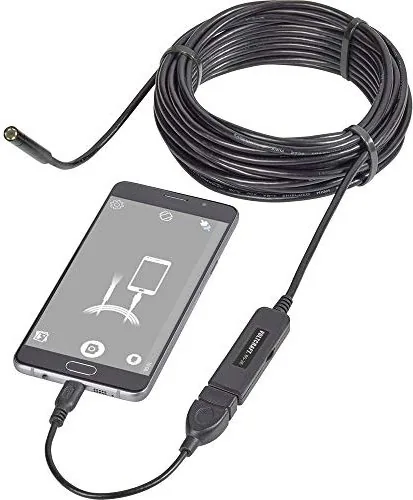
- Long USB cable of approximately ten meters allows extended reach.
- IP67 waterproof rating permits use in liquids up to marked level.
- Compatible with Windows and Android software for flexible inspection.
- Includes hook, magnet, and mirror attachments for diverse tasks.
- High resolution camera sensor captures clear images in dark areas.
Disadvantages

- USB plug is not waterproof and must stay dry.
- Minimum bending radius restriction of forty-five millimeters limits flexibility.
- Camera head is metal and can cause short circuits.
- Software installation requires administrative rights on Windows systems.
- Cannot be used on energized electrical systems for safety.
Product Specification
Camera
1600x1200 (max. Sensor resolution)
Features
LED work light
Weight
0.71 lbs
Package Contents
Camera cable (Dia 0.31 inches)
Product Description
Exploring the Versatility of the Voltcraft BS-26 USB Inspection Camera
The Voltcraft BS-26 USB Inspection Camera Manual serves as a comprehensive guide for users seeking a reliable tool for visual inspections. Designed for professionals and hobbyists alike, this device bridges the gap between inaccessible locations and detailed observation seamlessly. With an eight-millimeter camera head and high-quality imaging capabilities, users can navigate tight spaces effortlessly without damaging the equipment. The included software allows for live streaming and recording directly to your computer or mobile device. This versatility ensures accurate diagnostics in confined areas. The device requires simple power via USB connection for operation.
Connectivity and Software Options
Connectivity is straightforward with the USB interface supporting both Windows and Android systems widely available today. The Windows software known as ViewPlayCap offers extensive features for capturing still images and videos in various formats like AVI or JPEG. For Android users, the Voltcraft OTG Scope app provides seamless integration. This flexibility ensures you can document findings immediately without needing a laptop in the field constantly. The manual emphasizes proper setup to avoid connection errors when multiple devices are present simultaneously. Windows XP through 10 is supported for optimal performance. Settings allow adjustment of brightness levels easily.
Durability and Design Specifications
Construction is robust for industrial environments and general maintenance tasks. The camera head and cable boast an IP67 rating, allowing immersion in water up to the designated level safely. This makes the tool ideal for plumbing inspections or automotive diagnostics where liquids are common during operations. Six white LED lights illuminate dark areas effectively for clear visibility. Users must remain cautious near sensitive surfaces as the housing may react chemically with certain furniture polishes. Safety protocols regarding voltage-free inspection are paramount in the documentation provided. Always check for condensation if moving from cold to warm environments.
Accessories and Utility Features
The package includes versatile attachments such as a magnet, hook, and mirror for extra functionality. These extensions transform the endoscope into a multi-purpose tool capable of retrieving small objects or viewing around corners easily. Regular maintenance involves cleaning with a dry cloth and rinsing the waterproof components thoroughly after use. Proper storage ensures longevity of the product for future tasks. Always consult the Voltcraft BS-26 USB Inspection Camera Manual before making modifications to ensure safety standards are met completely. This device represents a significant upgrade for visual troubleshooting in modern settings. The cable length is approximately ten meters for extended reach.
Important Notes
Remember to avoid bending the cable below forty-five millimeters to prevent damage. Keep the USB plug dry as it is not waterproof. Do not use near electricity while connected. Avoid aggressive cleaning agents on the housing. Store accessories in a safe place when finished. Contact technical support if doubts arise regarding connection.
Search for 67,706 Manuals online


Type-in Brand or Model
Julia Schmidt
5 months ago
Does this endoscope work reliably with iPads or specific Android models like Pixel? I read some users reported app crashes and iPad incompatibility. What should I check before buying to ensure stability on my device?
Manual.ly
5 months ago
Thank you for your inquiry. This endoscope requires a compatible OTG adapter for iPads and specific Android versions. If crashes occur on Pixel devices, updating the Voltgraft OTG app often resolves the issue. Please verify your device supports USB OTG. We recommend consulting the compatibility list on our website for your specific model to ensure full functionality without interruptions during operation.