

PowerWalker VI 1200 RLE Manual
PDF manual · 6 Pages
English



Quick check
Incorrect answer, please try again.
Chat with your PowerWalker VI 1200 RLE manual using AI
Get instant AI answers from your PowerWalker VI 1200 RLE manual
Ask anything about the PowerWalker VI 1200 RLE. Answers come from this manual, with the pages they are based on.
VI 1200 RLE Maintenance Schedule
In high temperature locations, repeat the charging process every 2 months during extended storage.
For extended storage in moderate climates, charge the battery for 12 hours every 3 months by plugging into a wall outlet and turning on the main switch.
Free maintenance reminders
Timed to your purchase date. Always free, unsubscribe anytime.
Ask a Question
Do you recommend VI 1200 RLE?
Yes NoFrequently Asked Questions
It is a line-interactive UPS designed to protect electronics from outages, surges, and voltage fluctuations. The built-in AVR helps correct power changes before the unit needs to switch heavily to battery mode.
Is this answer helpful?
It is a good fit for desktop computers, monitors, external storage, modems, routers, and similar office or home office equipment. It is not recommended for medical, life-support, or other non-computer devices.
Is this answer helpful?
They allow the UPS to communicate with a computer or monitoring software. That makes it easier to track status, manage shutdowns, and check battery or power conditions during outages.
Is this answer helpful?
The manual recommends charging the battery for at least 8 hours before regular use. This helps ensure the battery reaches its maximum charge capacity after shipping or storage losses.
Is this answer helpful?
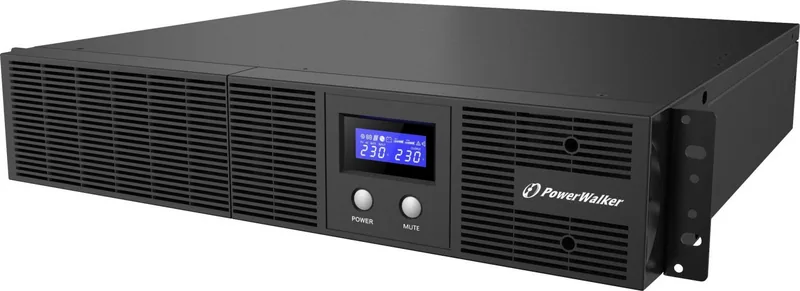
The LCD shows important operating data such as input voltage, output voltage, runtime, battery level, load percentage, and whether the unit is running on line power or battery power.
Is this answer helpful?
Store it in a cool, dry place with a fully charged battery. For long storage periods, recharge it every 3 months in moderate climates, and more often in hotter environments.
Is this answer helpful?
Advantages and Disadvantages
Advantages

- Line-interactive design helps stabilize common voltage swings without overusing the battery.
- USB and serial ports support software monitoring and controlled shutdowns.
- LCD display gives clear live data on load, battery, runtime, and power status.
- AVR boost and buck functions improve power quality for connected equipment.
Disadvantages

- Battery runtime depends on load, so heavy equipment may reduce backup time.
- The unit is intended for computer and network gear, not medical or life-support devices.
- Regular battery charging is needed during storage to maintain long-term health.
- Overload or poor ventilation can trigger shutdowns or fault codes if not managed carefully.
Product Specification
Type
Rackmount
Classification
VI (Line-Interactive)
Apparent Power
1200VA
Active Power
720W
Voltage
230V
Input
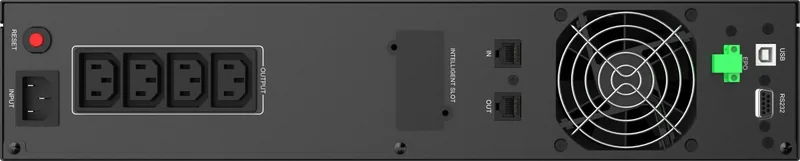
C14
Outputs
4x C13
Interfaces
USB, serial
Data Line Protection
RJ-11, RJ-45
Runtime
11.5min (50%), 3.1min (100%)
Charging Time
4h (90%)
Weight
32.41lb
Dimensions (WxHxD)
17.24x3.46x16.93in
Rack Units
2U
19" Rackmount Depth
16.93in
Features
LCD
Product Description
BlueWalker PowerWalker VI 1200 RLE, USB/serial Manual: Practical Power Protection for Everyday Systems
The BlueWalker PowerWalker VI 1200 RLE, USB/serial Manual presents a compact line-interactive UPS designed to keep essential electronics running when the power gets unstable. This model is built for users who want dependable backup, surge protection, and clear status monitoring in one straightforward solution. With USB and serial connectivity, it also fits neatly into setups that need basic communication with a computer or management software.
What stands out most is the balance between simplicity and useful protection. The UPS uses AVR boost and buck functions to correct voltage fluctuations without switching to battery too often, which helps preserve battery life. It delivers a sine wave output on battery, making it a solid match for desktops, monitors, networking gear, and external storage devices. For a home office or small business workspace, that kind of stable output can make a big difference during short outages and frequent voltage dips.
The front panel LCD makes day-to-day use easier by showing key operating details such as input voltage, output voltage, battery level, load percentage, and runtime estimates. That means users can quickly understand whether the unit is charging, running on battery, or reporting a fault. The audible alarm can also be muted when needed, adding a bit of convenience in quieter environments.
Another practical strength is the communication support. The USB and serial ports let the UPS work with monitoring software, giving users a clearer view of power status and shutdown coordination. For anyone who values orderly shutdowns and data protection, that is an important advantage. The PowerWalker VI series also includes protection against overload, short circuits, and overtemperature situations, which adds confidence in daily operation.
Maintenance is uncomplicated. The battery can be recharged while the unit is on or off, and the manual recommends regular charging during storage to help extend battery life. With a sealed lead-acid battery and automatic restart support, the system is designed to recover smoothly after outages.
Notes
- Keep the load below 80% for better performance.
- Recharge the battery for at least 8 hours before first use.
- Store the UPS in a cool, dry place when not used for long periods.
Search for 67,706 Manuals online


Type-in Brand or Model