
PeakTech 3360 Manual
PDF manual · 162 Pages
English



Quick check
Incorrect answer, please try again.
Chat with your PeakTech 3360 manual using AI
Get instant AI answers from your PeakTech 3360 manual
Ask anything about the PeakTech 3360. Answers come from this manual, with the pages they are based on.
3360 Maintenance Schedule
Replace the battery as soon as the 'BAT' indicator appears to avoid inaccurate readings and potential electric shock.
Wipe the cabinet with a damp cloth and mild detergent. Do not use abrasives or solvents.
Check test leads and probes for faulty insulation, bare wires, or damage before connecting to equipment.
Keep the meter dry. If it gets wet, wipe it off immediately to prevent damage.
Ask a Question
Do you recommend 3360?
Yes NoFrequently Asked Questions
The main differences lie in the display resolution and advanced features. The P3360 offers a 4 ¾ digit display with 40,000 counts compared to the P3355's 3 ¾ digits (4,000 counts). Additionally, the P3360 includes True RMS measurement, a bar graph display, and the ability to disable auto-power off, which are not present in the P3355.
Is this answer helpful?
Yes, the PeakTech 3360 is rated for Overvoltage Category III up to 1000V and Category IV up to 600V. However, always follow safety guidelines, use appropriate test leads with protective caps for CAT IV, and never exceed the maximum input ratings to ensure personal safety and equipment integrity.
Is this answer helpful?
First, turn off the meter and disconnect all test leads. Unscrew the battery compartment cover, remove the old 9V battery, and insert a new one ensuring correct polarity. Secure the cover tightly before resuming operation. Always replace batteries promptly when the low battery indicator appears.
Is this answer helpful?
Yes, the PeakTech 3360 can measure capacitance ranging from 40 nF up to 40 mF. Ensure the circuit is de-energized and capacitors are fully discharged before connecting the test leads to avoid damaging the meter or receiving inaccurate readings.
Is this answer helpful?
Selecting the wrong position, such as measuring current while set to voltage, can blow the internal fuses or damage the meter. Always verify the function switch setting and connect leads to the correct terminals before applying power to the circuit under test.
Is this answer helpful?
On the P3360, the backlight can be activated by holding the HOLD button for two seconds but will automatically turn off after 30 seconds to save battery. On the P3355, it also requires holding the backlight button. You can turn it off manually by holding the button again.
Is this answer helpful?
Advantages and Disadvantages
Advantages

- True RMS technology ensures accurate readings on complex waveforms
- High resolution 40,000 count display with bar graph visualization
- CAT III 1000V safety rating suitable for industrial applications
- Includes Min/Max/Peak hold functions for detailed analysis
- Backlit LCD screen enhances visibility in low light conditions
Disadvantages

- Auto-power off feature cannot be disabled on the P3355 model
- Requires specific fuse replacements which may need ordering
- Test leads do not have protective caps included for CAT IV use
- Temperature probe accuracy depends on external sensor quality
- No built-in Bluetooth or data logging capabilities mentioned
Product Specification
Measurement range
max. 10A, max. 1000V, max. 40MΩ
Package contents
Case, test leads
Product Description
PeakTech 3360 True RMS Digital Multimeter Review
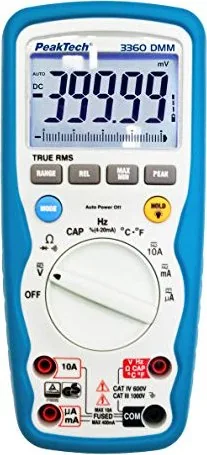
The PeakTech 3360 True RMS Digital Multimeter stands out as a versatile tool for professionals and hobbyists alike. This device is designed to deliver precise measurements across a wide range of electrical parameters, making it an essential addition to any toolkit. Unlike standard multimeters, the P3360 features True RMS technology, which ensures accurate readings even when dealing with complex waveforms and non-linear loads. This capability is crucial for modern electronics where power quality can vary significantly.
Equipped with a high-resolution 4 ¾-digit LCD display, the PeakTech 3360 offers exceptional clarity. The screen includes a 42-segment bar graph that provides visual feedback on changing values, allowing users to spot trends instantly. Additional features like automatic ranging simplify operations, while manual range selection offers control for experienced technicians. The inclusion of a backlight ensures readability in dimly lit environments, a common challenge during field work.
Safety is paramount in electrical testing, and this meter adheres to strict international standards. It supports Overvoltage Category III up to 1000V, ensuring reliable performance in industrial settings. The robust design includes protection against overloads in all measurement ranges, safeguarding both the user and the instrument. With functions covering voltage, current, resistance, capacitance, frequency, duty cycle, diode testing, and temperature, the P3360 is a comprehensive solution for diverse diagnostic needs.
Key Highlights
- True RMS Measurement: Accurately measures AC signals regardless of waveform shape.
- High Resolution Display: 40,000 counts with a bargraph for real-time data visualization.
- Advanced Safety Ratings: CAT III 1000V and CAT IV 600V compliance for safe operation.
- Comprehensive Functions: Includes Min/Max/Peak hold and relative measurement modes.
- User-Friendly Interface: Auto-ranging option combined with manual controls for flexibility.
Important Notes
Always ensure test leads are properly connected before taking measurements. Avoid measuring voltages above the rated limits to prevent damage. Replace fuses only with specified ratings to maintain safety integrity.
Search for 67,706 Manuals online


Type-in Brand or Model