
Bresser Weather Center 5-in-1 Manual
PDF manual · 20 Pages
English



Quick check
Incorrect answer, please try again.
Chat with your Bresser Weather Center 5-in-1 manual using AI
Get instant AI answers from your Bresser Weather Center 5-in-1 manual
Ask anything about the Bresser Weather Center 5-in-1. Answers come from this manual, with the pages they are based on.
Weather Center 5-in-1 Maintenance Schedule
Rotate collector 30 degrees anticlockwise, remove, clean debris and insects, then reinstall when fully dry.
Remove radiation shield screws, pull out shield, clean casing and shield parts carefully ensuring sensors stay dry.
Ask a Question
Do you recommend Weather Center 5-in-1?
Yes NoFrequently Asked Questions
Press the reset button on the bottom of the sensor or the main unit to clear errors. For the sensor, hold the button until the light indicates action. This clears historical data and re-establishes the pairing code.
Is this answer helpful?
The base station is for indoor use with a clear display. The sensor remains outdoors for accurate environmental readings. Ensure the indoor unit is placed away from direct heat sources.
Is this answer helpful?
Batteries typically last several months depending on usage. Low battery indicators appear on the display near the time or temperature reading requiring replacement with fresh AA batteries.
Is this answer helpful?
Yes the sensor measures current direction and trends from the last hour. It displays 16 directions on the LCD with the compass rose for better orientation.
Is this answer helpful?
Accuracy depends on proper leveling and cleaning of the funnel components regularly. Ensure the sensor is level and clear of insects for precise tracking.
Is this answer helpful?
Pressure based forecasts are generally accurate around 70 to 75 percent of the time. It should be used as a guide rather than absolute weather prediction.
Is this answer helpful?
Yes you can switch between metric and imperial units for temperature and wind. Use the buttons on the main unit to toggle between Celsius and Fahrenheit.
Is this answer helpful?
Advantages and Disadvantages
Advantages

- 1. Wireless transmission up to 150 meters ensures flexible placement for sensors.
- 2. 12-hour weather forecast provides reliable planning tools for daily activities.
- 3. Includes indoor and outdoor measurement for total comfort and climate monitoring.
- 4. Max/Min memory captures historical weather data for pattern analysis.
- 5. Radio-controlled clock keeps time accurate automatically without manual adjustment.
Disadvantages

- 1. Signal range reduces significantly with building obstructions or metal interference.
- 2. Sensor requires manual reset after battery replacement to re-establish connection.
- 3. No app integration for remote smartphone access to view current data.
- 4. Rain collector needs frequent cleaning to stay accurate and prevent debris.
- 5. Wind sensor must be mounted at least 1.5 meters high for correct reading.
Product Specification
Type
digital
Temperature
indoor and outdoor
Humidity
indoor and outdoor
Outdoor temperature range
-40°F to 176°F
Product Description
Discover Precision Weather Monitoring
Welcome to the world of home weather stations. The Bresser 5-in-1 Weather Forecast Center Digital Manual guides users through advanced meteorological tracking capabilities. This device transforms your home into a personal observatory capable of providing real-time atmospheric data. It is designed for privacy and detailed analysis of environmental conditions.
Advanced Sensing Technology
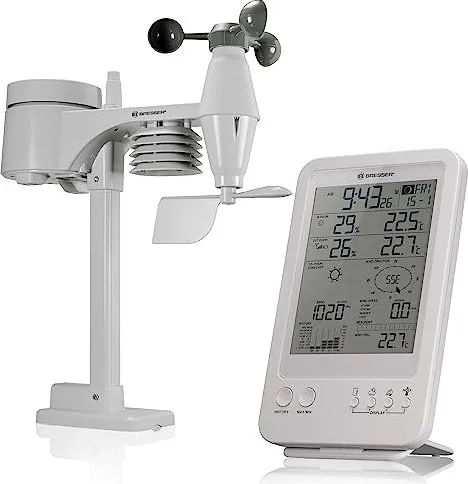
At the core lies the 5-in-1 outdoor sensor which captures wind speed, direction, rainfall, temperature, and humidity simultaneously. Data transfer to the base station happens wirelessly up to 150 meters under line of sight conditions. This range allows flexible placement away from heavy obstructions like trees or walls. The base station features a clear LCD display with a backlight for night viewing. Users can view moon phases, calendar dates, and weather trends for the next twelve hours dynamically. Barometric pressure tracking enables reliable forecasts based on atmospheric changes. Indoor and outdoor climates are monitored independently for comprehensive comfort levels using the comfort indicator. Wind chill factors are also calculated for accurate perception of how cold it feels outside.
User-Friendly Operation
Setting up the system is straightforward for most users. Batteries power both the main unit and the remote sensor independently. Once activated, the device syncs automatically within minutes without complex pairing. Users can adjust settings for metric or imperial units easily. The interface displays comfort indices based on specific indoor climate conditions. High and low alarms alert you to extreme temperatures or rainfall amounts immediately. A history function records data from the previous twenty-four hours for review. You can retrieve past weather patterns to analyze trends over time effectively. The clock includes a radio-controlled function for accurate timekeeping. The Beaufort scale helps understand wind force levels visually. You can also reset max and min values as needed for fresh data.
Maintenance and Reliability
Regular cleaning ensures accuracy over prolonged usage periods. The rain collector requires periodic clearing of leaves and debris to prevent blockages. The wind cups must remain unobstructed to measure gusts correctly without error. The manufacturer recommends using fresh batteries for optimal range and performance. Proper grounding of the sensor is essential for electrical safety during storms. The weather station withstands various conditions with durable materials suitable for outdoors. Ensure the sensor points north in the Northern hemisphere. Cleaning the thermo sensor housing prevents insects from entering the casing and damaging components. Always check the sealing rings to maintain water resistance.
Conclusion
Homeowners seeking precise data will appreciate this robust system greatly. Whether tracking severe weather or monitoring everyday changes, the station delivers consistent results. It integrates seamlessly into daily routines without requiring professional installation services. Following the setup steps guarantees connectivity stability throughout the operation season. Enjoy informed decisions regarding outdoor activities and planning. This tool serves as an invaluable asset for weather enthusiasts globally. Keep the device dry and clean for long life and accuracy.
Search for 67,706 Manuals online


Type-in Brand or Model