
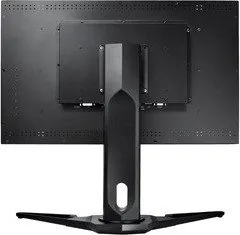
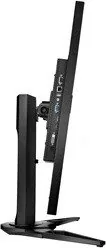
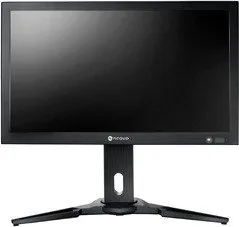
AG Neovo QX-28 Manual
PDF manual · 61 Pages
English



Quick check
Incorrect answer, please try again.
Chat with your AG Neovo QX-28 manual using AI
Get instant AI answers from your AG Neovo QX-28 manual
Ask anything about the AG Neovo QX-28. Answers come from this manual, with the pages they are based on.
QX-28 Maintenance Schedule
Disconnect power before cleaning. Wipe with a soft dry cloth or one dampened with mild detergent solution; do not use solvents.
Wipe with a dry cloth if wet; do not allow water to splash on it and avoid strong shock or heat.
Remove dead batteries immediately to prevent leakage; remove batteries if not used for a long period.
Ask a Question
Do you recommend QX-28?
Yes NoFrequently Asked Questions
It combines 4K resolution, multiple input options, multi-window viewing, and tools like anti-burn-in and scheduling. That mix makes it useful for office work, monitoring, signage, and mixed-source setups.
Is this answer helpful?
It supports VGA, DVI-D, HDMI, DisplayPort, audio input, USB for firmware updates, RS232, and RJ-45 network control. This gives it broad compatibility with both older and newer equipment.
Is this answer helpful?
Yes. It supports both PIP and PBP modes, including multiple side-by-side window layouts. This is helpful when you need to compare sources or keep one feed visible while using another.
Is this answer helpful?
Yes. The QX-28 can be used in portrait mode and also supports VESA wall mounting. That makes it flexible for signage, narrow spaces, and custom installation needs.
Is this answer helpful?
It includes modes such as Standard, Text, Eco, CCTV, Signage-Graphics, and Signage-Video. These presets help tune the image for reading, energy saving, surveillance, or presentation use.
Is this answer helpful?
The display includes anti-burn-in features, and the manual recommends using screen savers, lowering brightness, and turning the screen off when not in use. These steps help reduce static-image retention.
Is this answer helpful?
Advantages and Disadvantages
Advantages

- 28-inch UHD 3840 x 2160 panel delivers crisp detail for text, graphics, and split-screen work.
- Wide connectivity includes VGA, DVI, HDMI 2.0, DisplayPort 1.2a, RS232, RJ-45, and USB update support.
- PIP/PBP multi-window modes make it easy to monitor multiple sources at once.
- Useful display controls such as blue light filter, auto brightness, anti-burn-in, and scheduling improve long-term use.
Disadvantages

- Uses an external power adapter, which adds one more component and extra cable management.
- 300 cd/m² brightness is good indoors, but not especially strong for very bright environments.
- QX-28 has a more limited tilt range than smaller models, so ergonomic adjustment is narrower.
- Advanced features can require menu navigation and may vary depending on the active input source.
Product Specification
Function
Monitor (stationary)
Diagonal
28" (71.1cm)
Resolution
3840x2160 (4K UHD), 16:9, 157ppi
Panel
TN
Backlight
LED
Brightness
300cd/m² (typical)
Contrast
1,000:1 (static)
Response Time
3ms (GtG)
Refresh Rate
60Hz (3840x2160)
Signal Frequency
28-160kHz (H) / 45-85Hz (V)
Connections
1x VGA, 1x HDMI 2.0, 1x DisplayPort 1.2a, 1x DVI, 1x USB-A (Service Port), 1x 3.5mm Jack (Line-Out), 1x 3.5mm Jack (Line-In), 1x RJ-45 1Gb LAN, 1x DC-In Barrel Jack (Power Connection)
Form
straight (flat)
Viewing Angle
170°/160°
Coating
non-glare (matte), Protective Glass
Color Depth
10bit (1.07 Billion Colors)
FRC
yes (8bit+2bit)
Speakers
Speakers (2x 3W)
Operation
mechanical buttons, remote control included
Ergonomics
with stand, height adjustable (3.94in), Pivot (+90°), swivel (+45°), tilt (+18°/-0°)
VESA
100x100/100x200 (occupied)
Power Consumption
60W (typical)
Energy Efficiency SDR (A to G)
29kWh/1000h (G)
Special Features
Security Lock (Kensington Security Slot), Light Sensor
Screen-to-Body Ratio
Inf% (calculated)
Dimensions
26.81x21.30x10.63in (WxHxD) with stand compressed
Color
black (display frame) / black (lower bezel) / black (stand)
Weight
29.32lb (with stand)
Power Supply
external
Warranty
three years
USB Nomenclature
Link
Product Description
AG Neovo QX-28 28" Manual: A Practical 4K Display for Flexible Workspaces
Based on the AG Neovo QX-28, 28" Manual, this display comes across as a thoughtful choice for people who need more than a basic monitor. The QX-28 combines a 28-inch UHD panel with a professional feature set, making it a strong fit for office setups, control desks, signage tasks, and other environments where image clarity and reliability matter.
What immediately stands out is its balance of modern and legacy connectivity. With VGA, DVI, HDMI 2.0, DisplayPort 1.2a, audio input, RS232, RJ-45 network control, and USB support for firmware updates, the QX-28 is ready for a wide range of devices. That flexibility makes integration easier whether you are upgrading an older installation or building a newer digital workflow from scratch.
The viewing experience is equally versatile. The QX-28 supports picture presets such as Standard, Text, Eco, CCTV, Signage-Graphics, and Signage-Video, helping the screen adapt to different content types without much effort. Features like auto brightness, blue light filtering, overdrive, and anti-burn-in protection show that AG Neovo designed this model with long-hour use in mind. For users who keep static content on screen, those safeguards are especially valuable.
Another highlight is multi-window support. PIP and PBP modes let you view more than one source at the same time, which is useful for monitoring systems, presentations, or mixed-content workstations. Add in portrait mounting support, VESA compatibility, scheduling, and OSD-based network settings, and the QX-28 becomes a display that can do far more than simply show an image.
Why It Works Well
The AG Neovo QX-28 feels built for practicality. It offers the sharpness of 4K resolution, the convenience of multiple input options, and the control features needed in professional spaces. Its 300 cd/m² brightness is suited to indoor use, while the included remote control, built-in speakers, and adjustable stand add everyday convenience.
For buyers who want a dependable 28-inch display with a professional edge, the QX-28 is an appealing option. It is not overly complicated, yet it provides enough depth to support demanding setups and mixed usage scenarios.
Notes
- Best suited for business, signage, monitoring, and multi-source setups.
- 4K performance is available through HDMI or DisplayPort with the proper cable.
- Use screen protection tools for static content to reduce burn-in risk.
Search for 67,706 Manuals online


Type-in Brand or Model