
Zotac ZBOX QCM7T3000 Manual
PDF manual · 57 Pages
English



Quick check
Incorrect answer, please try again.
Chat with your Zotac ZBOX QCM7T3000 manual using AI
Get instant AI answers from your Zotac ZBOX QCM7T3000 manual
Ask anything about the Zotac ZBOX QCM7T3000. Answers come from this manual, with the pages they are based on.
Ask a Question
Do you recommend ZBOX QCM7T3000?
Yes NoFrequently Asked Questions
Locate the SO-DIMM slots on the motherboard. Insert the memory module at a 45 degree angle into the slot. Gently press down until it locks into place with the arms of the memory slot. Ensure the rubber feet are facing upwards before sliding off the cover to access the insides.
Is this answer helpful?
The package contains one ZOTAC ZBOX unit, one AC adapter, one power cord, one warranty card, one user manual in multiple languages, an optional Windows Driver DVD, one USB flash drive with Windows drivers, and two WiFi antennas for connectivity.
Is this answer helpful?
Use the available HDMI and DP ports on the rear panel to connect your monitors. Connect the appropriate DisplayPort or HDMI cables from your screen to the ZBOX. You can also use the front USB ports to connect peripherals if needed.
Is this answer helpful?
Yes, the unit includes two WiFi antennas. You connect these to the rear panel antenna connectors. This allows you to establish a wireless network connection without needing external USB dongles for internet access.
Is this answer helpful?
Place the unit on a flat surface with rubber feet up. Find and remove the two thumb screws. Slide the cover in the direction of the arrow to remove it. This grants access to the memory and storage slots for upgrades or maintenance.
Is this answer helpful?
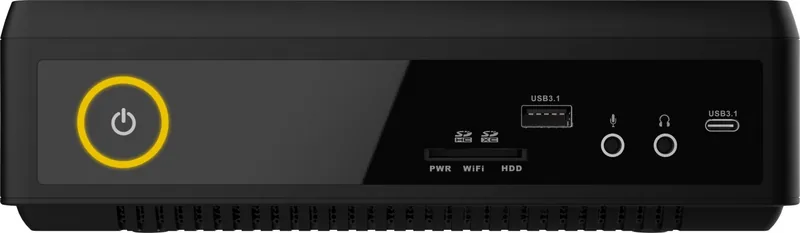
The front panel features the power button, a memory card reader for SD/SDHC/SDXC, a USB 3.1 Type-C port, a microphone jack, and a headphone audio output jack for local audio connection.
Is this answer helpful?
Yes, storage is upgradeable. The unit supports 2.5-inch SATA hard disks or SSDs installed in a bracket. It also has a dedicated M.2 SSD slot for faster storage speeds. Both require removing screws to install or upgrade.
Is this answer helpful?
Advantages and Disadvantages
Advantages

- Compact design suitable for various spaces like offices or home theaters
- Supports dual memory slots for high capacity RAM upgrades using SO-DIMM
- Multiple display outputs available including HDMI and DisplayPort connections
- USB 3.1 Type-C port allows for fast data transfer and versatile connectivity
- Easy access with slide cover allows for simple hardware storage upgrades
Disadvantages

- Manual requires attention to ensure correct installation steps are followed
- Power adapter is external and can be bulky to manage
- Optional drivers may not include all specific hardware components
- USB 3.0 ports are limited on the rear panel compared to front
- Requires specific 45 degree angle for memory insertion to lock securely
Product Specification
Type
Mini-PC
Socket
N/A
CPU
Intel Core i7-10750H, 6C/12T, 2.60-5.00GHz, 12MB+1.5MB Cache, 45W TDP, 35W cTDP, Codename "Comet Lake-H" (Comet Lake, Intel 14nm++)
RAM
2x DDR4 SO-DIMM, dual PC4-23466S/DDR4-2933, max. 64GB (UDIMM)
Storage
1x SATA 6Gb/s, 1x M.2/M-Key (PCIe 3.0 x4/SATA, 2280/2242), 1x M.2/M-Key (PCIe 3.0 x4, 2280/2242)
External Bays
N/A
Internal Bays
1x 2.5-inch
Graphics
NVIDIA Quadro RTX 3000 - 6GB GDDR6 - Mobile, 36SM/2304SP, Codename "TU106" (Turing, TSMC 12nm)
GPU Ports
2x DisplayPort 1.4, 2x HDMI 2.0
Rear Ports
1x USB-C 3.1 (10Gb/s), 1x USB-A 3.1 (10Gb/s), 4x USB-A 3.0 (5Gb/s), 1x RJ-45 2.5Gb LAN, 1x RJ-45 1Gb LAN, 2x 3.5mm Audio Jack, 1x Barrel Jack (Power)
Front/Side Ports
1x SD Card
Expansion Slots
N/A
Wireless
Wi-Fi 6 (WLAN 802.11a/b/g/n/ac/ax, 2x2, Intel Killer AX1650), Bluetooth 5.2
Card Reader
SD Card
Power Supply
External, 1x Barrel Plug (330W/19.5V)
VESA Mount
N/A
Dimensions (WxHxD)
7.99 x 2.45 x 8.27 in
Volume
164.76 cu in
CPU Cooler
Included
Features
Security Lock (Kensington)
Manufacturer Warranty
Five years with warranty extension (if registered within 28 days of purchase)
USB Notation
Link
Product Description
The Zotac ZBOX QCM7T3000 Experience
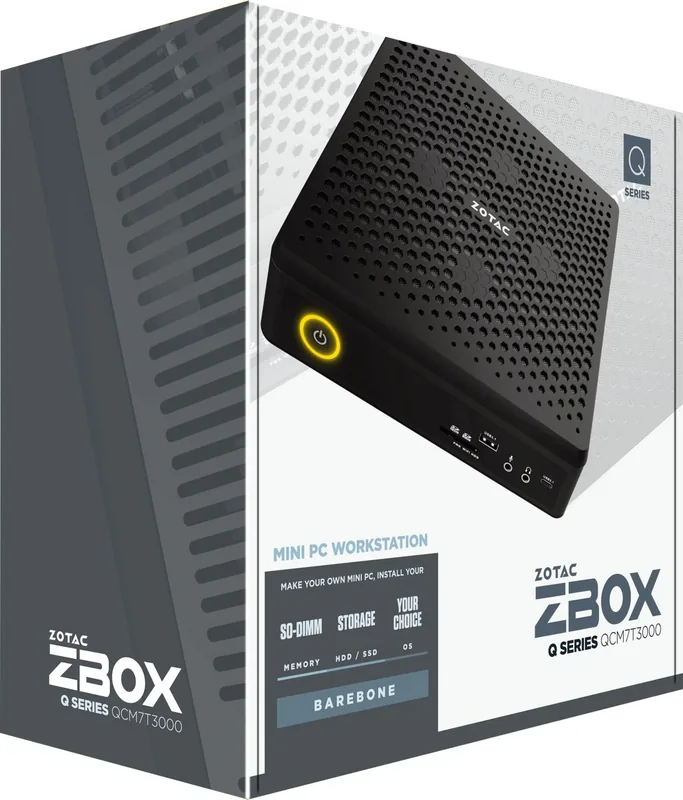
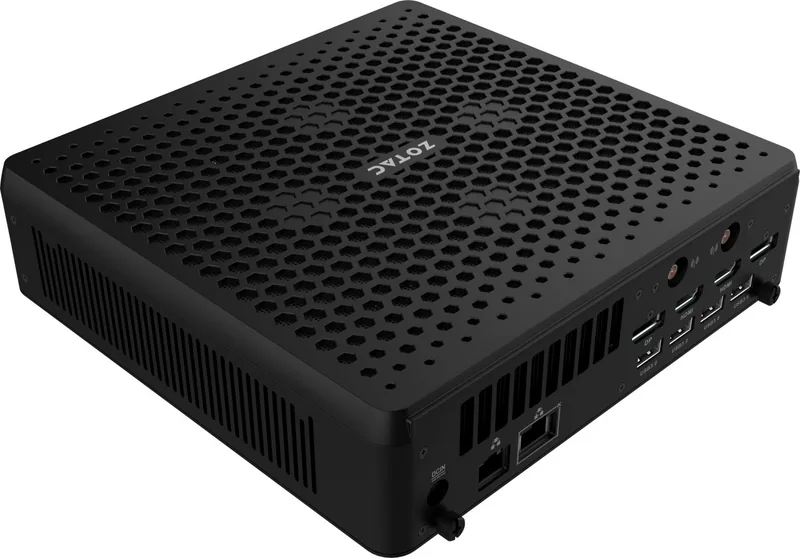
The Zotac ZBOX QCM7T3000 represents a significant advancement in compact computing technology. It offers users a powerful alternative to bulky desktop towers while maintaining robust performance capabilities. This device is ideal for home entertainment centers or professional workstations where space is at a premium. The associated user documentation helps you navigate the setup process with confidence. By following the instructions found within the Zotac ZBOX QCM7T3000 Manual, you can customize your experience perfectly. Connectivity is a major strength of this unit. The front panel features essential buttons and inputs for daily use. You will locate the power button prominently alongside a microphone input and headphones output. A memory card reader supports standard formats including SD, SDHC, and SDXC for easy photo transfers. USB 3.1 ports are available on both the front and rear for high speed data connections. The rear panel hosts the main networking and display connections. Here you will find HDMI and DisplayPort outputs for monitors, along with a LAN RJ45 port for wired internet access. A DC 19.5V input handles the power supply needs.
Customization is made easy with slide out access to the internals. The package includes an AC adapter, power cord, and two WiFi antennas for wireless convenience. You can install up to two memory modules using the SO DIMM slots. This requires sliding the cover off in the direction of the arrow after removing thumb screws. Memory modules must be inserted at a 45 degree angle to lock into place correctly. For storage, the unit supports 2.5 inch SATA hard disks. You simply place the disk in a bracket and secure it with screws. An M.2 SSD slot is also present for faster storage speeds. The installation involves inserting the module at an angle and fixing it with a screw. LED indicators provide visual feedback on system status. The power light shows current activity, while the disk LED signals read or write operations. The WiFi light confirms network connection. Users appreciate the quiet nature of this mini PC. It is suitable for offices where noise is a concern. The compact design allows for cable management under a desk. You should connect the power cable to the DC 19.5V input for stable operation. Ensure the AC adapter is used to prevent damage. The manual covers troubleshooting steps for common issues. It explains how to reset the system if necessary. You can also find driver installation guides for Windows. Compatibility with external monitors is excellent. Just match the resolution settings in your operating system. The antenna connectors are located on the rear for better signal. You can adjust them to point towards the router. This setup ensures maximum throughput for wireless tasks. The build quality ensures longevity for years of use. Warranty terms are usually printed on the card included.
Search for 67,732 Manuals online


Type-in Brand or Model