
Zotac ZBOX PI430AJ pico Manual
PDF manual · 17 Pages
English



Quick check
Incorrect answer, please try again.
Chat with your Zotac ZBOX PI430AJ pico manual using AI
Get instant AI answers from your Zotac ZBOX PI430AJ pico manual
Ask anything about the Zotac ZBOX PI430AJ pico. Answers come from this manual, with the pages they are based on.
Ask a Question
Do you recommend ZBOX PI430AJ pico?
Yes NoFrequently Asked Questions
The device features an Intel Core i3-N300 Processor with 8 cores operating between 0.8GHz and 3.8GHz for efficient performance.
Is this answer helpful?
Yes, it supports high resolutions via HDMI 2.0 and DisplayPort 1.4, with a maximum resolution of 3840x2160 at 60Hz.
Is this answer helpful?
Yes, it includes Intel WiFi 6 and Bluetooth 5.2 for modern wireless networking capabilities.
Is this answer helpful?
Use the included VESA 75/100 compliant bracket to attach it to the back of an LCD monitor securely.
Is this answer helpful?
Barebone versions do not ship with an operating system, while PLUS or Windows models include it pre-installed.
Is this answer helpful?
Yes, you can expand storage using an M.2 PCIe x4 SATA SSD slot or a micro SDHC/SDXC card reader.
Is this answer helpful?
The system should be used in environments with ambient temperatures between 0 degrees Celsius and 35 degrees Celsius.
Is this answer helpful?
Advantages and Disadvantages
Advantages

- Compact size allows for hidden installations and space savings.
- Intel WiFi 6 provides fast wireless speeds and connectivity.
- VESA mount compatibility simplifies setup on monitors.
- Multiple display outputs support multitool screens.
- Expandable storage via M.2 and SD slots.
Disadvantages

- No operating system on barebone models.
- Power adapter may get warm during use.
- Limited USB ports for large peripheral setups.
- No traditional microphone support on combo jack.
- Requires specific ventilation to prevent overheating.
Product Specification
Form Factor
Mini-PC
CPU
Intel Core i3-N300, 0C+8c/8T, 0.80-3.80GHz, 6MB+4MB Cache, 7W TDP, Codename "Alder Lake-N" (Gracemont, Intel 7)
RAM
8GB LPDDR5 (8GB soldered, not expandable)
HDD
N/A
Flash
N/A
SSD/HDD Slots
1x M.2 PCIe 3.0 x4/SATA (2280/2242/2230)
Graphics
Intel UHD Graphics (iGPU), 2Xe/32EU/256SP, 1.25GHz, Architecture "Xe-LP / Gen 12.2" (Alder Lake GT1)
Rear Ports
1x HDMI 2.0, 1x DisplayPort 1.4, 1x 3.5mm Jack, 1x RJ-45 1Gb LAN, 1x DC-In Barrel Socket (Power Input)
Front/Side Ports
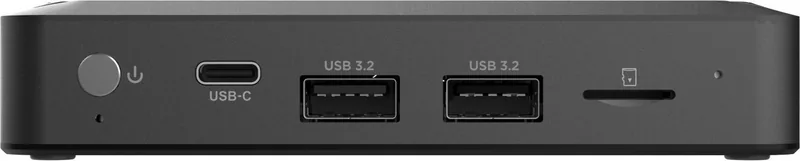
1x USB-C 3.1 (10Gb/s), 2x USB-A 3.1 (10Gb/s), 1x microSD
Wireless
Wi-Fi 6 (WLAN 802.11a/b/g/n/ac/ax), Bluetooth 5.2
Optical Drive
N/A
Camera
N/A
Power Supply
External 25W, 1x Barrel Connector (5V/5A)
Dimensions
4.52x0.94x2.99 in (WxHxD)
Volume
12.20 cu in (calculated)
Features
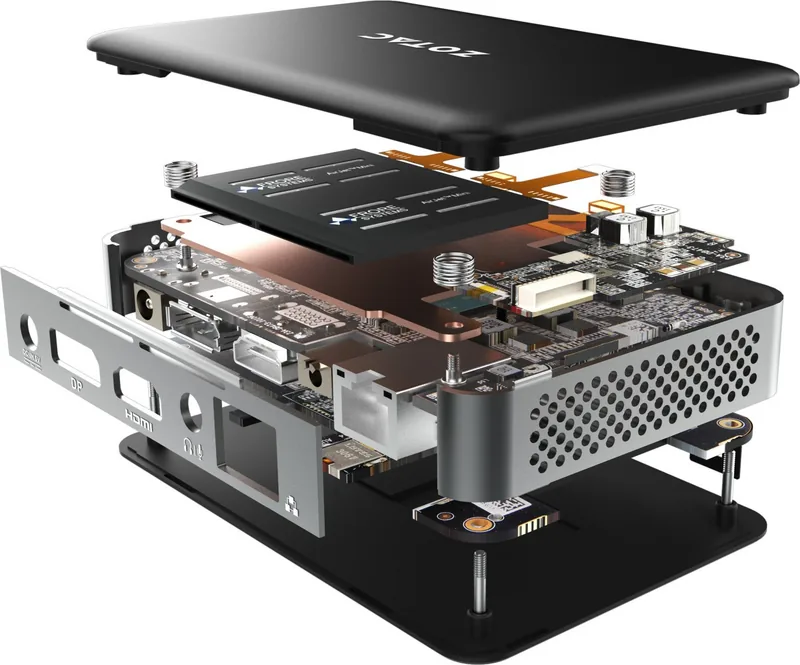
passive cooling (fanless), Solid State Cooling (Frore Systems AirJet Mini), VESA Mount (2.95x2.95/3.94x3.94 in)
Warranty
5 Years with warranty extension (if registered within 28 days of purchase)
USB Notation
Link
Product Description
Discover the Zotac ZBOX PI430AJ pico with AirJet Manual
The Zotac ZBOX PI430AJ pico with AirJet Manual represents a significant advancement in mini computer technology. This device packs powerful performance into an incredibly small chassis. Measuring just 114.8mm by 76mm by 23.8mm, it fits anywhere without cluttering your desk. The unit is designed for users who demand efficiency and space savings. It serves as an excellent digital signage player or home office workstation for any enterprise. The welcome section details the package contents clearly to ensure nothing is missed upon unboxing. Careful handling is recommended to avoid damage.
Inside the compact frame lies an Intel Core i3-N300 Processor. This eight-core chip operates between 0.8GHz and 3.8GHz, ensuring smooth multitasking. Graphics are managed by Intel UHD Graphics, supporting high resolutions via HDMI 2.0 and DisplayPort 1.4. You can output up to 3840x2160 at 60Hz, perfect for media consumption or desktop productivity. Memory is ample with 8 GB LPDDR5 onboard, providing speed and responsiveness. This ensures applications load quickly without bottlenecks or delays in performance. The system operates under Windows 11 ready specifications for modern compatibility.
Connectivity is robust with three USB 3.2 ports, including one Type-C variant. This allows for fast data transfers and potential video output to external screens. Wireless capabilities are state of the art with Intel WiFi 6 and Bluetooth 5.2. Networking is also supported via a Gigabit Ethernet port for stable connections. Storage is expandable through an M.2 slot supporting NVMe PCIe 3.0 or SATA drives. This flexibility allows users to customize their system according to their specific needs. You can add a micro SDHC or SDXC card easily for extra storage without opening the case ever. Note that the power adapter may get warm or hot when in use.
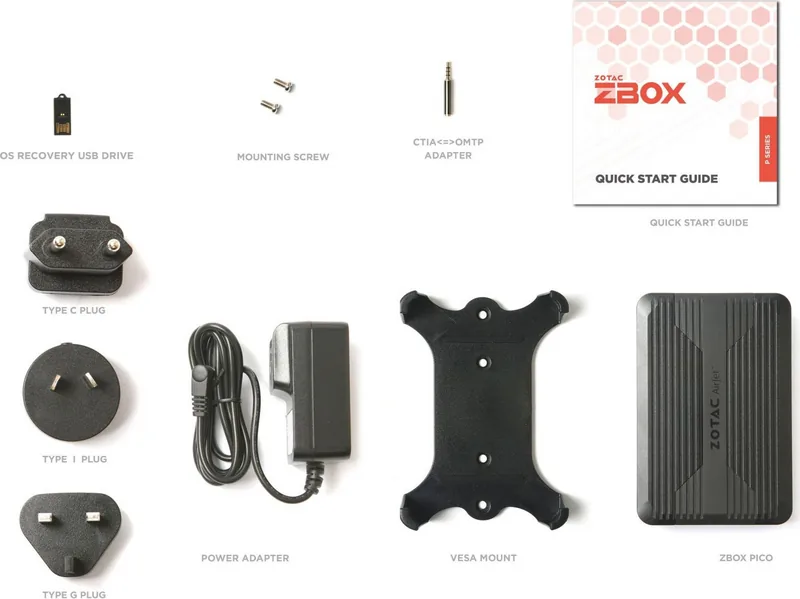
Mounting options are versatile. A VESA 75/100 compliant bracket allows attachment to the back of an LCD monitor. This keeps cables hidden and the workspace clean and organized. The system includes a power adapter, mounting screws, and a quick start guide. Some configurations come with an operating system pre-installed, while barebone versions require user setup. Refer to the Zotac ZBOX PI430AJ pico with AirJet Manual for detailed driver installation and safety guidelines. Safety instructions emphasize ventilation and correct power usage. The device ensures FCC compliance for safety in residential environments. The combo headphone jack allows audio output to amplified speakers. Overall, this pico PC offers a compelling blend of size and power for modern computing demands and needs. It requires a stable surface, safe ambient temperatures between zero and 35 degrees Celsius, and a 5V 5A power supply for continuous operation without interruption.
Search for 67,732 Manuals online


Type-in Brand or Model