
Zotac ZBOX edge CI34x Manual
PDF manual · 18 Pages
English



Quick check
Incorrect answer, please try again.
Chat with your Zotac ZBOX edge CI34x manual using AI
Get instant AI answers from your Zotac ZBOX edge CI34x manual
Ask anything about the Zotac ZBOX edge CI34x. Answers come from this manual, with the pages they are based on.
Ask a Question
Do you recommend ZBOX edge CI34x?
Yes NoFrequently Asked Questions
The CI34x uses an Intel Alder Lake N100 series processor (quad-core, 0.8–3.4 GHz) with integrated Intel UHD Graphics suitable for 4K playback and light productivity tasks.
Is this answer helpful?
The unit supports one DDR5-4800 SO-DIMM up to 16 GB and one M.2 PCIe 3.0 x4 / SATA SSD (22/42 or 22/80) plus a micro SD card reader for additional storage.
Is this answer helpful?
It offers HDMI 2.0 and DisplayPort 1.4, plus DP over USB-C. Both HDMI and DP support up to 4096×2160 at 60Hz for 4K displays.
Is this answer helpful?
Yes. The CI34x includes Wi-Fi 6 and Bluetooth 5.2 for fast wireless networking and peripheral connectivity; an external antenna is provided for improved reception.
Is this answer helpful?
Some models ship as barebones without an operating system. If your unit is barebone, you must install an OS and download drivers from Zotac’s support website. PLUS/Windows models may include preinstalled storage and OS.
Is this answer helpful?
Yes. The ZBOX supports VESA75/100 mounting and includes brackets and screws to attach it to compatible monitors for a clean, space-saving setup.
Is this answer helpful?
Keep ventilation holes unobstructed with at least 10 cm clearance, operate between 0–35°C, avoid liquids and heavy loads on power cords, and use only the supplied power adapter to prevent damage.
Is this answer helpful?
Advantages and Disadvantages
Advantages

- Compact small-footprint design ideal for tight spaces and VESA mounting behind monitors.
- Modern connectivity including USB-C with DisplayPort support, HDMI 2.0, DP 1.4, Wi-Fi 6 and Bluetooth 5.2.
- Supports M.2 PCIe 3.0 x4/SATA SSD and DDR5 SO-DIMM for responsive storage and memory upgrades.
- Energy-efficient Alder Lake N-series CPU with integrated Intel UHD graphics for 4K media playback.
- Dual Gigabit Ethernet plus robust wireless options for stable networking and streaming.
Disadvantages

- Single SO-DIMM slot limits maximum RAM to 16 GB, restricting heavy multitasking or demanding workloads.
- 19V/40W power adapter may limit performance under sustained high-load scenarios.
- Barebone versions require user installation of OS and drivers, which may be challenging for novices.
- Compact chassis can limit thermal headroom; must maintain proper ventilation to avoid throttling.
- Limited port count (few USB Type-A ports) might require a hub for multiple peripherals.
Product Specification
Type
Mini PC
Chipset
System-on-Chip (SoC)
Socket
N/A
External bays
N/A
Internal bays
N/A
Expansion slots
N/A
Card reader
microSD
Power supply
external, 1x barrel connector (40W/19V)
VESA mount
75x75/100x100 (included)
CPU cooler
included
Special features
fanless
Manufacturer warranty
five years with warranty extension (upon registration within 28 days of purchase)
USB designation
Link
Product Description
Zotac ZBOX edge CI34x Manual Overview
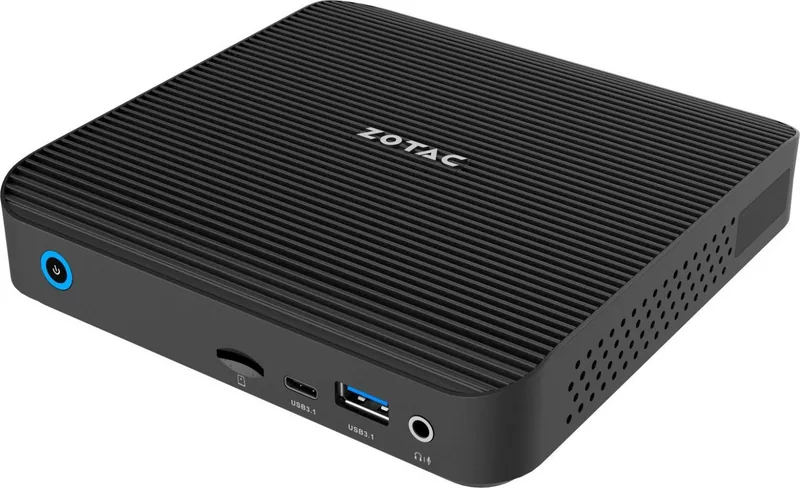
The Zotac ZBOX edge CI34x is a compact, energy-efficient mini PC designed for everyday computing, media playback, and light productivity tasks. Powered by an efficient Intel Alder Lake N-series processor and integrated Intel UHD graphics, it offers smooth 4K display output via HDMI 2.0 and DisplayPort video paths, and supports multiple displays via USB-C. The small footprint (147.2mm x 147.2mm x 32.1mm) makes it ideal for tight workspaces, home theaters, digital signage, or mounting behind monitors using the included VESA bracket.
Features and Design
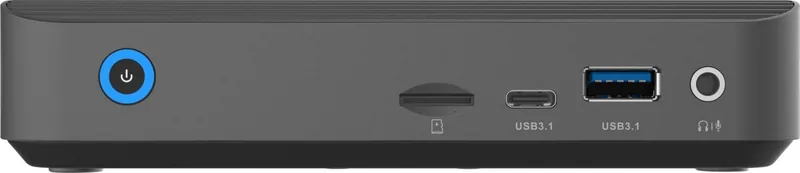
The CI34x supports a single DDR5 SO-DIMM (up to 16 GB, DDR5-4800), one M.2 PCIe 3.0 x4 / SATA slot for fast storage, and a micro SD card reader for quick expansion. Connectivity includes USB 3.1 Type-C, two USB 3.1 Type-A ports, dual Gigabit Ethernet, Wi-Fi 6, and Bluetooth 5.2 for modern wireless networking. Audio options include digital multi-channel over HDMI/DP and an analog combo jack for headsets. The system runs Windows 11 and ships with a 19V/40W power adapter.
Practical Setup and Use
Setting up the ZBOX edge CI34x is straightforward: remove the bottom cover to install memory or an M.2 SSD, attach the Wi‑Fi antenna, connect peripherals, and power it on. Ventilation guidance and safe operating temperatures (0–35°C) are emphasized to preserve longevity. VESA mounting is supported for a tidy, behind-monitor installation. Drivers and additional software should be downloaded from Zotac’s support site if the barebone model is used.
Performance and Use Cases
The Alder Lake N-series CPU and integrated GPU balance low power consumption with capable media playback, office apps, and light multitasking. Dual display outputs and USB-C display support make it suitable for productivity setups and digital signage. With WiFi 6 and Gigabit LAN, network performance is solid for streaming and remote work.
Notes
- Use the supplied power adapter to avoid damage; it may become warm during use.
- Ensure at least 10 cm clearance for ventilation and avoid blocking chassis openings.
- Replace batteries only with proper types and recycle used batteries per local regulations.
- For driver updates and OS installation on barebone units, visit Zotac’s official support portal.
Search for 67,732 Manuals online


Type-in Brand or Model