
Zotac ZBOX CI6x2 nano Manual
PDF manual · 57 Pages
English



Quick check
Incorrect answer, please try again.
Chat with your Zotac ZBOX CI6x2 nano manual using AI
Get instant AI answers from your Zotac ZBOX CI6x2 nano manual
Ask anything about the Zotac ZBOX CI6x2 nano. Answers come from this manual, with the pages they are based on.
Ask a Question
Do you recommend ZBOX CI6x2 nano?
Yes NoFrequently Asked Questions
Locate the SO-DIMM memory slots and insert the module at a 45-degree angle. Gently press down until it locks into place by the arms of the memory slot.
Is this answer helpful?
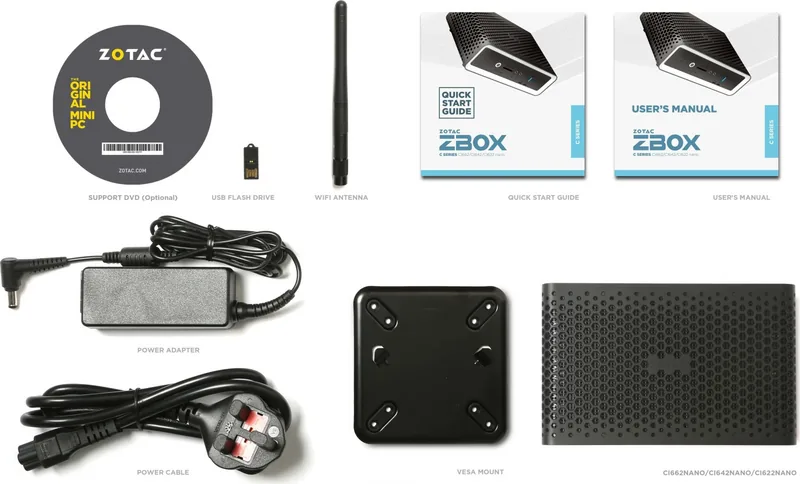
The package contains the ZBOX nano, VESA mount, AC adapter, power cord, warranty card, user manual, and antenna. Driver disc and USB drive are optional.
Is this answer helpful?
Yes, you can install a 2.5-inch SATA hard disk or SSD. Secure it in the bracket and slide it into the connector securely.
Is this answer helpful?
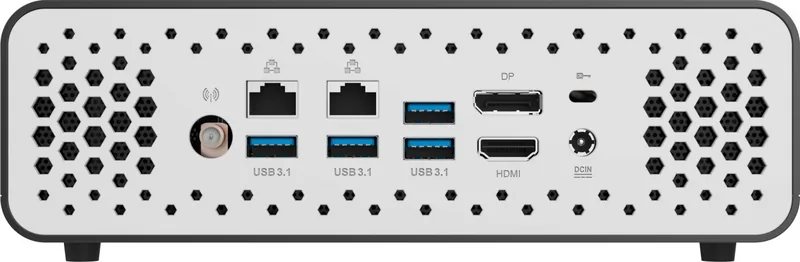
Yes, the rear panel includes DisplayPort and HDMI ports for connecting monitors to your system.
Is this answer helpful?
Use the LAN (RJ45) port located on the rear panel to connect via Ethernet cable for a stable connection.
Is this answer helpful?
Advantages and Disadvantages
Advantages

- Compact form factor with VESA mounting support for flexible placement.
- Easy internal upgrades for SO-DIMM memory and 2.5-inch SATA storage.
- Robust connectivity with USB 3.1 Type-C, HDMI, and DisplayPort outputs.
Disadvantages

- No internal Wi-Fi module requires external antenna connection.
- No internal hard drive included, storage must be added separately.
- External AC adapter adds a cord to the desk setup.
Product Specification
Type
Mini-PC
Chipset
System-on-Chip (SoC)
Socket
N/A
RAM
2x DDR4 SO-DIMM, dual PC4-21300S/DDR4-2666, max. 64GB (UDIMM)
Drive
1x SATA 6Gb/s
External bays
N/A
Internal bays
1x 2.5"
Rear ports
1x HDMI 2.0, 1x DisplayPort 1.2, 2x USB-C 3.1 (10Gb/s), 4x USB-A 3.1 (10Gb/s), 1x USB-A 3.0 (5Gb/s), 2x RJ-45 1Gb LAN, 2x 3.5mm jack, 1x barrel connector (power inlet)
Front/Side ports
1x SD Card
Expansion slots
N/A
Wireless
Wi-Fi 5 (WLAN 802.11a/b/g/n/ac), Bluetooth 5.0
Card reader
SD Card
Power supply
external, 1x barrel connector (65W/19V)
VESA mount
75x75/100x100 (included)
Dimensions (WxHxD)
8.03x2.68x5.08 in
Volume
1.8 L
CPU Cooler
included
Features
fanless, security lock (Kensington)
Manufacturer warranty
five years with warranty extension (when registering within 28 days after purchase)
USB labeling
Link
Product Description
Discover the Zotac ZBOX CI6x2 nano Manual Guide
A Compact Computing Powerhouse
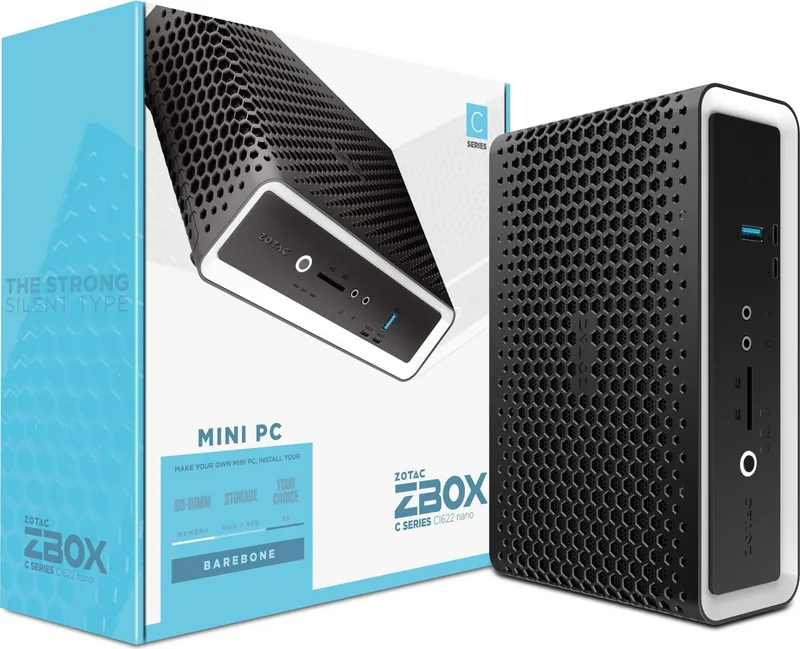
The Zotac ZBOX CI6x2 nano represents a leap in compact computing technology. This mini PC is designed for users who need serious performance without sacrificing valuable desk space. Whether for home entertainment systems or corporate business applications, this device adapts seamlessly. Referencing the Zotac ZBOX CI6x2 nano Manual ensures you get the absolute most out of your advanced new setup. It provides comprehensive instructions for every aspect of hardware integration and configuration.
Installation and Customization Procedures
One of the standout features is the ease of customization for users. You can upgrade internal memory modules by accessing the SO-DIMM slots inside the chassis. Insert the memory at a 45-degree angle and gently press it into place until it locks. Similarly, storage expansion is straightforward. Locate the hard disk bracket, remove the two screws, and secure a 2.5-inch SATA hard disk or SSD using the provided hardware. Reinstall the screws to lock it in securely within the unit.
Comprehensive Connectivity Options
Connectivity is robust with high-speed ports available immediately. The front panel includes USB 3.1 Type-C ports for fast data transfer, USB 3.0 ports for peripherals, and a card reader for SD cards. Audio jacks allow for headphone output. The rear panel features standard LAN ports for networking and connectors for Wi-Fi antennas. DisplayPort and HDMI outputs support high-resolution displays. The USB 3.1 interface guarantees high throughput for external storage devices.
Package Contents and Power Specifications
Every system comes with essential accessories needed for immediate operation. The package includes the ZBOX nano unit, a VESA mount for wall or monitor attachment, a robust AC adapter, and a power cord. A warranty card and detailed user documentation complete the set effectively. Optional driver discs and specific USB drives help with quick system initialization. Following the precise instructions ensures a smooth power-on experience with the DC19V input adapter.
Setting Up Your System Quickly
To begin the configuration, connect the included antenna for Wi-Fi signals and plug in the power adapter firmly. Turn on the system using the distinct front power button. The LED indicators show power status, WiFi connectivity, and drive activity clearly. This guide simplifies the complex process for international users. The build quality ensures durability for demanding daily tasks. Ensure all connections are secure before powering up.
Final Thoughts on Performance
In summary, the Zotac ZBOX CI6x2 nano is a versatile mini PC for many sectors. It balances performance and physical size effectively. Users appreciate the VESA mount option for clean desk setups. The variety of USB ports supports peripherals without needing extra hubs. Regular maintenance via the manual keeps the system running optimally for years.
Search for 67,732 Manuals online


Type-in Brand or Model