
Zebra ZXP Series 9 Manual
PDF manual · 140 Pages
English



Quick check
Incorrect answer, please try again.
Chat with your Zebra ZXP Series 9 manual using AI
Get instant AI answers from your Zebra ZXP Series 9 manual
Ask anything about the Zebra ZXP Series 9. Answers come from this manual, with the pages they are based on.
ZXP Series 9 Maintenance Schedule
Replace the X and Y cleaning rollers every 5,000 printed cards to ensure optimal print quality. New rollers are included with each ribbon.
Use cleaning cards for the side card path (X-rollers) and front card path (Y-rollers) after every 5,000 cards.
Clean the transfer station heater rollers using a specific cleaning card after every 20,000 printed cards.
For printers with laminators, clean the laminator card path using a laminator cleaning card after every 5,000 cards.
Clean the laminator oven/heat unit rollers using a sticky cleaning card after every 20,000 laminated cards.
Clean the printhead with a swab if irregularities in printing occur. Do not use sharp objects or abrasives.
Clean the magnetic stripe encoder head with a swab if encoding errors become frequent.
Ask a Question
Do you recommend ZXP Series 9?
Yes NoFrequently Asked Questions
The ZXP Series 9 uses reverse transfer printing technology. This method creates high-quality, photo-realistic images that cover the entire surface of the card, including edges, resulting in durable and professional-looking identification badges.
Is this answer helpful?
Yes, the ZXP Series 9 is available in a double-sided configuration. You can select settings to print color on the front and back, or use different ribbon combinations to achieve various design layouts on both sides of the card simultaneously.
Is this answer helpful?
Absolutely. The printer supports both contact and contactless smart cards. It includes dedicated encoding stations and software drivers to handle data writing securely and efficiently for access control and payment applications.
Is this answer helpful?
For optimal performance, cleaning rollers should be replaced every 5,000 cards. Heated rollers and the laminator path should be cleaned every 20,000 cards. Using the built-in cleaning routines on the Operator Control Panel ensures consistent print quality.
Is this answer helpful?
The printer is designed to work exclusively with genuine Zebra True Colours i Series ribbons, transfer films, and True Secure i Series laminates. Using non-genuine supplies may void the warranty and compromise print quality.
Is this answer helpful?
Advantages and Disadvantages
Advantages

- Produces high-resolution over-the-edge images using reverse transfer technology
- Supports double-sided printing with flexible ribbon combination options
- Includes optional single or double-sided lamination for enhanced security
- Compatible with magnetic stripes and various smart card types
- Features intuitive Operator Control Panel for easy navigation and maintenance
Disadvantages

- Requires specific genuine Zebra consumables which may increase operating costs
- Physical size requires significant desk space and proper ventilation clearance
- Initial setup and driver configuration can be time-consuming for new users
- Heated components require cooling periods before certain maintenance tasks
- Smart card encoding adds complexity to the printing workflow
Product Specification
Type
Card Printer
Technology
Thermal Transfer
Print Resolution
300 dpi
Paper Thickness
762-1016 µm
Printing Speed
190 cards/h (monochrome)
Memory
64 MB (RAM)
Connections
USB 2.0
Network
LAN
Display
Monochrome
Dimensions
18.74x13.15x20.43 in
Weight
27.56 lbs
Features
Magnetic Card Reader
Manufacturer Warranty
2 years
Product Description
Elevate Your Card Printing with the Zebra ZXP Series 9
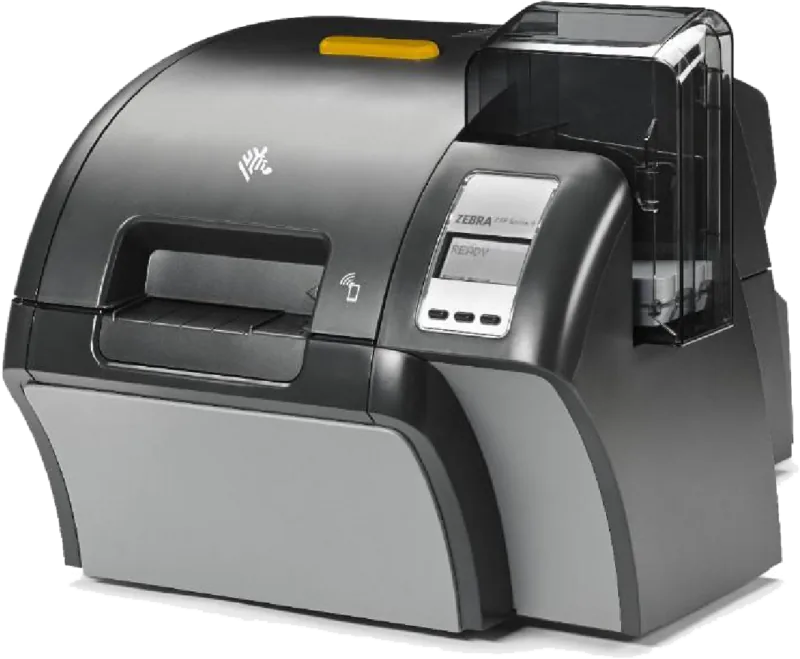
The Zebra ZXP Series 9 Card Printer stands as a pinnacle of identification card printing technology, designed for organizations that demand high-quality results and reliable performance. This advanced device utilizes reverse transfer printing technology to produce photo-quality images that extend over the edge of the card, ensuring a professional finish for every badge or credential produced.
Comprehensive Printing Capabilities
This printer excels in double-sided printing, allowing users to create full-color cards on both sides seamlessly. Whether you need to print color on the front and black text on the back, or full color on both sides, the ZXP Series 9 handles it with precision. The system supports various ribbon combinations, including YMCK for standard color printing and specialized ribbons like YMCKI for magnetic stripe cards and YMCUvK for invisible UV security features.
Integrated Lamination for Security
Security is paramount in modern ID programs, and the ZXP Series 9 addresses this with optional single- or double-sided laminators. These laminators apply protective film to the printed cards, enhancing durability and providing an additional layer of anti-counterfeiting protection. The machine can handle contact smart cards and contactless smart cards, offering versatile encoding options for access control and payment applications.
Ease of Use and Maintenance
Despite its robust capabilities, the ZXP Series 9 is user-friendly. The Operator Control Panel (OCP) provides clear guidance through menus for setup, maintenance, and troubleshooting. Regular cleaning routines are built into the system to maintain optimal performance, ensuring that rollers and printheads remain free of debris. The printer also features network connectivity via Ethernet and optional Wi-Fi, making it easy to integrate into existing IT infrastructures for shared use across multiple workstations.
Key Notes
- Requires genuine Zebra supplies for warranty compliance.
- Supports custom card specifications for unique dimensions.
- Includes comprehensive diagnostic tools for quick error resolution.
Search for 67,706 Manuals online


Type-in Brand or Model