
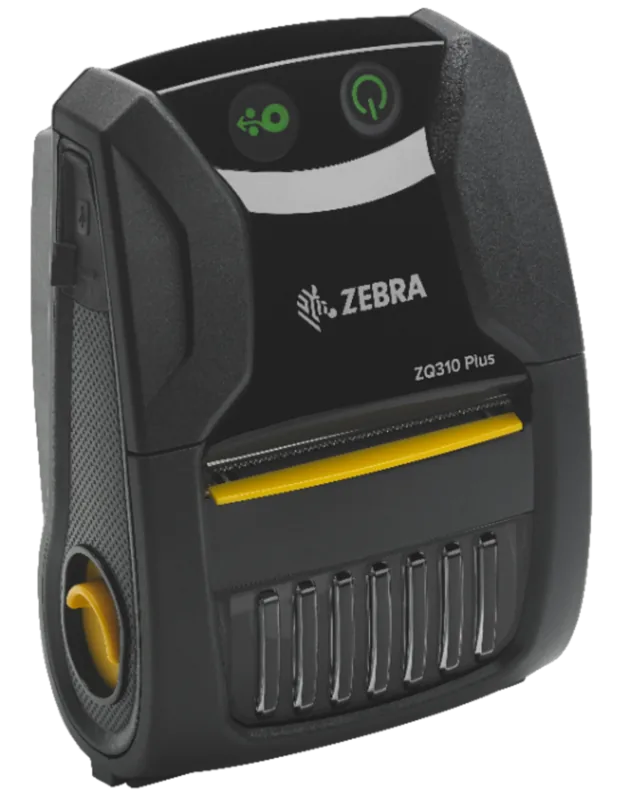
Zebra ZQ310 Manual
PDF manual · 82 Pages
English



Quick check
Incorrect answer, please try again.
Chat with your Zebra ZQ310 manual using AI
Get instant AI answers from your Zebra ZQ310 manual
Ask anything about the Zebra ZQ310. Answers come from this manual, with the pages they are based on.
ZQ310 Maintenance Schedule
Use a Zebra cleaning pen to swab the thin gray line on the printhead from center to outside edges. Allow it to cool before cleaning.
Rotate the platen roller and clean thoroughly with a fiber-free swab or lint-free cloth lightly moistened with medical-grade alcohol.
Clean only if printing issues occur using soap and water mixture followed by pure water rinse. This is an emergency procedure.
Use the adhesive side of media to clean the scraper. Do not apply liquids directly to the printer.
Clean thoroughly with 90% medical-grade alcohol and a cotton swab. Avoid sharp edges.
Wipe with a water-dampened cloth or 90% medical-grade alcohol wipe. Never insert pointed objects into the printer.
Gently brush out the printer and ensure sensor windows are free of dust. Turn off printer before cleaning.
Clean thoroughly with 90% medical-grade alcohol and a fiber-free swab. Ensure no liquid penetrates internal circuitry.
Ask a Question
Do you recommend ZQ310?
Yes NoFrequently Asked Questions
The ZQ310 has a standard maximum print width of 58 millimeters. However, by using optional media spacers, it can be configured to print up to 76 millimeters wide, accommodating larger labels and receipts.
Is this answer helpful?
Yes, the ZQ310 is Made for iPhone certified. It supports Apple MFi coprocessors, allowing secure and seamless Bluetooth connections with iPhones and iPads running iOS 5 or higher.
Is this answer helpful?
Turn off the printer and let the head cool. Use a cotton swab dipped in at least 90% medical alcohol or a dedicated Zebra cleaning pen to gently wipe the gray line on the print head from center to edge after every few rolls of media.
Is this answer helpful?
Yes, the ZQ310 can operate while connected to a power source via USB. However, note that charging the battery simultaneously while printing will extend the total time required to fully charge the battery.
Is this answer helpful?
The printer features an automatic shutdown mechanism. If the print head temperature reaches 70 degrees Celsius, printing pauses until the head cools down to 62 degrees Celsius, preventing data loss or hardware damage.
Is this answer helpful?
Advantages and Disadvantages
Advantages

- Intelligent PowerPrecision+ battery provides real-time health monitoring and extended runtime
- Seamless NFC pairing allows instant connection to Android and iOS devices
- Dual-radio option enables simultaneous Bluetooth and high-speed Wi-Fi connectivity
- Compact and lightweight design fits easily into pockets or attaches to belts
- Durable construction withstands harsh environments like warehouses and retail floors
Disadvantages

- Direct thermal printing means labels may fade over time if exposed to heat or sunlight
- Battery life decreases significantly in extremely cold temperatures below zero degrees
- Optional Wi-Fi module increases the overall cost compared to Bluetooth-only models
- Printhead requires regular cleaning to maintain optimal print quality and longevity
- Maximum print width is limited to 58mm or 76mm depending on media spacers used
Product Specification
Type
mobile receipt printer
Technology
Direct thermal
Print resolution
203 dpi
Roll diameter
1.18 inches
Print width
1.89 inches
Print speed
3.94 inches/s
Memory
128 MB (RAM), 256 MB (Flash)
Connections
USB 2.0
Network
Bluetooth 4.1, NFC, Wi-Fi Direct, AirPrint, Mopria
Display
N/A
Emulation
ZPL, CPCL
Dimensions
3.68x1.95x5.12 inches
Weight
13.05 oz
Manufacturer warranty
2 years
Product Description
The Zebra ZQ310: Your Ultimate Mobile Printing Companion
The Zebra ZQ310 represents a significant leap forward in portable printing technology, designed specifically for the dynamic needs of retail environments and field operations. This compact thermal printer delivers high-quality output directly from your pocket or belt, ensuring that receipts, labels, and barcodes are printed instantly wherever business happens. Whether you are managing inventory on a warehouse floor or processing transactions at a checkout counter, the ZQ310 provides the reliability and speed required to keep operations flowing smoothly.
Equipped with advanced connectivity options, the ZQ310 seamlessly integrates with your existing mobile devices. It supports Bluetooth 4.0 for stable wireless connections to smartphones and tablets, while the optional dual-radio version offers robust Wi-Fi capabilities alongside Bluetooth. The inclusion of Near Field Communication (NFC) allows for instant pairing by simply tapping an NFC-enabled device against the printer, making setup incredibly fast and intuitive. Furthermore, its Made for iPhone certification ensures perfect compatibility with Apple ecosystems, allowing users to print effortlessly from iOS devices.
Powering this device is the innovative PowerPrecision+ battery technology. This intelligent lithium-ion battery not only provides long-lasting runtime but also communicates real-time health data to the printer. Users can monitor battery status via LED indicators, ensuring they never get caught without power during a critical shift. The printer features a durable design capable of withstanding the rigors of daily use, complete with a standard belt clip and optional shoulder straps for comfortable carrying. With support for both direct thermal printing and various media types, including roll paper and die-cut labels, the ZQ310 adapts to a wide range of applications without compromising on print quality.
Maintenance is straightforward, with clear guidelines for cleaning the printhead and rollers to ensure consistent performance over time. The device includes comprehensive diagnostic tools, such as configuration reports and dump modes, which help IT staff troubleshoot issues quickly. By combining rugged durability, smart connectivity, and user-friendly management, the Zebra ZQ310 stands out as a versatile solution for modern mobile workforce demands.
Key Notes
- Supports CPCL and ZPL programming languages for flexible label design.
- Features an automatic head shutdown mechanism to prevent overheating damage.
- Compatible with a wide range of accessories including charging stations and vehicle adapters.
Search for 67,706 Manuals online


Type-in Brand or Model