
Zalman Z3 Iceberg Manual
PDF manual · 16 Pages
English



Quick check
Incorrect answer, please try again.
Chat with your Zalman Z3 Iceberg manual using AI
Get instant AI answers from your Zalman Z3 Iceberg manual
Ask anything about the Zalman Z3 Iceberg. Answers come from this manual, with the pages they are based on.
Ask a Question
Do you recommend Z3 Iceberg?
Yes NoFrequently Asked Questions
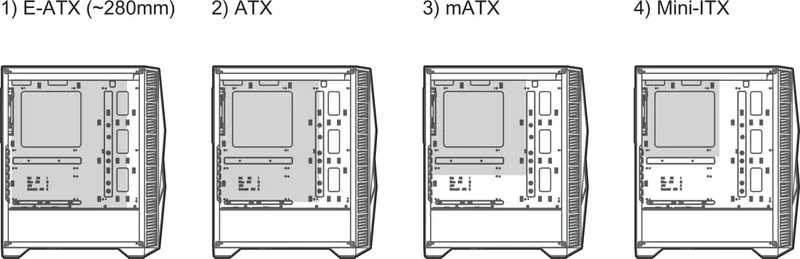
The case supports a wide range of form factors including E-ATX (up to 280mm), ATX, mATX, and Mini-ITX motherboards, providing flexibility for various build sizes.
Is this answer helpful?
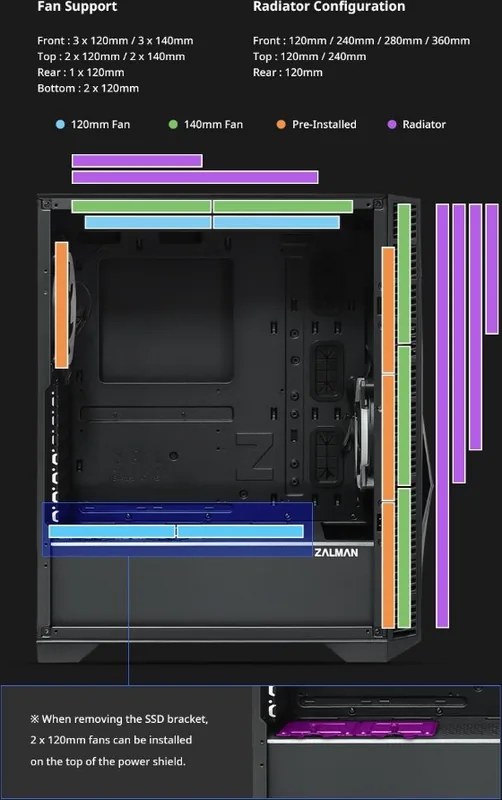
Yes, the Z3 Iceberg supports a 360mm radiator when mounted on the front panel, making it suitable for high-performance liquid cooling setups.
Is this answer helpful?
Yes, it includes three 120mm front fans with white LED effects, one addressable RGB front fan, and one rear 120mm fan with white LED effects.
Is this answer helpful?
You can control RGB settings using the dedicated LED button on the I/O panel to cycle through modes or sync with the motherboard using the included ARGB controller and software.
Is this answer helpful?
Yes, the product typically comes with a one-year warranty covering manufacturing defects, provided the user has followed installation guidelines and has proof of purchase.
Is this answer helpful?
The case supports graphics cards up to 315mm in length, accommodating most high-end gaming GPUs available on the market today.
Is this answer helpful?
Users should wear gloves during installation, avoid excessive force, ensure proper cable connections to prevent short circuits, and keep ventilation holes unblocked for optimal airflow.
Is this answer helpful?
Advantages and Disadvantages
Advantages

- Supports E-ATX motherboards and large GPUs up to 315mm
- Extensive liquid cooling radiator support up to 360mm at the front
- Includes addressable RGB fans and an ARGB controller for easy customization
- Toolless 3.5-inch drive bay for convenient storage expansion
- Multiple USB ports including USB 3.0 and USB 2.0 on the I/O panel
Disadvantages

- No built-in dust filters mentioned in the specifications
- Maximum PSU length limited to 160mm which may restrict larger power supplies
- Requires careful handling of ARGB headers to avoid voltage damage
- Tempered glass panels can be heavy and require careful removal
- Pre-installed fans have fixed speeds without PWM control in some configurations
Product Specification
Extern
N/A
Intern
2x 2.5"/3.5" (horizontal, drive rails), 4x 2.5"
Connectors
2x USB-A 3.0 (5Gb/s), 1x USB-A 2.0 (480Mb/s), 1x 3.5mm jack (Line-Out), 1x 3.5mm jack (Line-In)
PCI Slots
7
Fan (front)
1x 120mm, 1200rpm, 0.7mmH₂O, 64.22m³/h (37.79 CFM), 26.4dB(A) (RGB illuminated) or 3x 140mm (optional)
Fan (rear)
1x 120mm, 1200rpm, 0.7mmH₂O, 64.22m³/h (37.79 CFM), 26.4dB(A) (RGB illuminated)
Fan (left)
N/A
Fan (right)
N/A
Fan (top)
2x 140mm (optional)
Fan (bottom)
N/A
Fan (other)
2x 120mm (optional)
Radiator sizes
120/240/280/360mm front, 120/240mm top, 120mm rear
Motherboard
up to ATX (11 inches wide)
Supported Motherboards
Mini-ITX (6.7"x6.7")/µATX (9.6"x9.6")/ATX (12"x9.6")/E-ATX (12"x11")
Power Supply
ATX (max. 6.3 inches deep)
Power Supply Position
bottom
CPU Cooler
max. 6.4 inches height
Graphics Cards
max. 12.4 inches
Lighting
RGB Header 3-Pin ARGB (+5V/DATA/GND), integrated LED controller, integrated RGB LED lighting, illuminated fans
Dimensions (WxDxH)
8.3x18.9x16.1 inches
Volume
2.52 cu ft
Weight
14.11 lbs
Chassis Type
Mid-Tower
Front
closed, ventilation slots on sides
Top
partially closed, mostly fan grille, dust filter outside
Bottom
partially closed, fan grille at rear, dust filter
Left
closed, glass, ventilation slots front
Right
closed, ventilation slots front
Rear
partially closed, fan grille top right, PCI slots (7x horizontal)
Front I/O Position
Chassis side: top, Height: middle, Position: right
Features
Cable management, dust filters, glass window
Note on E-ATX
Motherboard and chassis manufacturers designate different dimensions as E-ATX. Motherboards with E-ATX/SSI EEB dimensions of 305x330mm or 12"x13" are not supported.
USB Spelling
Link
Product Description
Zalman Z3 Iceberg: The Ultimate ATX Mid-Tower Experience
The Zalman Z3 Iceberg stands out as a premium choice for PC enthusiasts seeking a blend of aesthetic appeal and functional performance. Designed as an ATX mid-tower case, this chassis offers a spacious interior that accommodates a wide range of motherboard sizes, from Mini-ITX to large E-ATX boards. Its construction utilizes high-quality materials including steel, plastic, and tempered glass, ensuring durability while maintaining a sleek, modern look. The case is engineered to support maximum graphics card lengths up to 315mm and CPU coolers up to 163mm, making it ideal for powerful gaming rigs and workstations.
One of the standout features of the Z3 Iceberg is its advanced cooling capabilities. It supports multiple fan configurations, including three front fans, two top fans, and one rear fan, all capable of handling 120mm or 140mm units. For liquid cooling enthusiasts, the case provides extensive radiator support on the front (up to 360mm), top (up to 240mm), and rear (120mm). The package includes several pre-installed fans with white LED effects and addressable RGB options, allowing users to customize their system's lighting immediately upon assembly. The included ARGB controller simplifies synchronization, enabling users to change colors and patterns directly via the I/O panel or through motherboard software using Razer Chroma compatibility.
Installation is made straightforward with thoughtful design elements such as toolless drive bays for 3.5-inch HDDs and ample space for SSDs. The case comes with a comprehensive set of accessories, including various screws, cable ties, rubber covers, and a glass cleaner. Safety precautions emphasize proper ventilation, avoiding direct sunlight, and careful handling during installation to prevent damage. Whether you are building your first PC or upgrading an existing setup, the Zalman Z3 Iceberg delivers reliability and style in one compact package.
Search for 67,706 Manuals online


Type-in Brand or Model