
Zalman CNPS9X OPTIMA Manual
PDF manual · 20 Pages
English



Quick check
Incorrect answer, please try again.
Chat with your Zalman CNPS9X OPTIMA manual using AI
Get instant AI answers from your Zalman CNPS9X OPTIMA manual
Ask anything about the Zalman CNPS9X OPTIMA. Answers come from this manual, with the pages they are based on.
Ask a Question
Do you recommend CNPS9X OPTIMA?
Yes NoFrequently Asked Questions
The cooler supports Intel LGA115X and LGA775 CPUs and AMD AM4, AM3+, AM3, as well as FM2+ and FM2 CPU and APU models. Match the mounting parts to your motherboard socket type before securing the heatsink.
Is this answer helpful?
It needs an unobstructed space of 72 mm (width) x 123 mm (length) x 156 mm (height) with the CPU as the central reference point. Confirm that nearby components like ODDs and the PSU do not protrude into this volume.
Is this answer helpful?
If your case has air guides mounted on the enclosure, the manual says to remove them before installing the cooler, because they can protrude into the cooler required space. Check your chassis layout to avoid installation interference.
Is this answer helpful?
The recommended orientation is to have air flow from the cooler toward the enclosure's rear exhaust fan so the hot air can be expelled out the back of the case. The exact recommended direction can vary slightly by motherboard model.
Is this answer helpful?
Connect the cooler's 4-pin connector to the motherboard's CPU fan header. Then enable PWM control mode in the motherboard BIOS settings. This helps the fan run using PWM control rather than fixed-speed operation.
Is this answer helpful?
Clean the CPU surface to remove particles or residue, then apply thermal grease evenly on the CPU and the base of the cooler. The manual also emphasizes safe handling, including wearing gloves during handling and avoiding contact with thermal grease.
Is this answer helpful?
The manual states that Zalman Tech Co., Ltd. is not responsible for damages caused by CPU overclocking, including damage to the CPU and system components. For warranty eligibility, use within supported conditions and follow installation precautions.
Is this answer helpful?
Advantages and Disadvantages
Advantages

- PWM-ready 4-pin fan connection for controlled cooling behavior on compatible motherboards
- Quiet operation with a listed max noise level of 26 dB(A)
- Supports multiple Intel and AMD CPU sockets, including LGA115X/775 and AM4/AM3+/AM3/FM2+/FM2
- Clear guidance on cooler orientation toward the case rear exhaust fan
- Manual-style installation steps including CPU cleaning and even thermal grease application
Disadvantages

- Requires a specific unobstructed clearance of 72 x 123 x 156 mm, so some cases may not fit
- May require removing case air guides before installation due to space interference
- Installation depends on correct BIOS settings, including enabling PWM control mode
- Warranty coverage excludes issues caused by improper installation or ignored precautions
- The manual states no responsibility for damages tied to CPU overclocking
Product Specification
Type
Tower cooler
Dimensions with fan
4.84x6.14x2.83in (WxHxD)
Fan
1x 4.72x4.72x0.98in, 600-1500rpm, 60.62 CFM, 60.62 CFM, 26dB(A), 0.06 inH2O
Weight with fan
1.31 lb
Connector
4-Pin PWM
AMD Socket
AM5, AM4, AM2/AM2+/AM3/AM3+, FM1/FM2/FM2+
Intel Socket
1700 (see note), 1150/1151/1155/1156/1200, 775
Intel Socket Note
Socket 1700 mounting kit may not yet be included in the scope of delivery
TDP classification
180W
Lighting
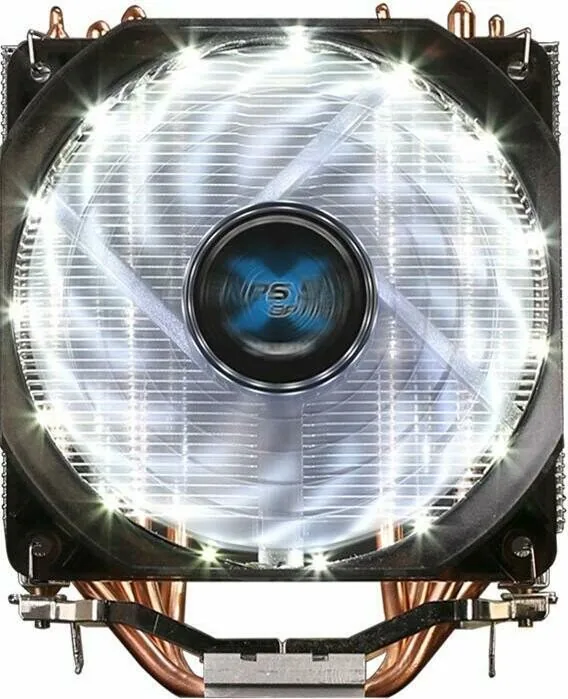
white
Special features
4 Heatpipes, Heatpipe-Direct-Touch
Manufacturer's warranty
1 year
Product Description
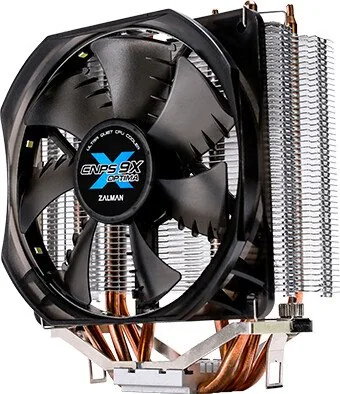
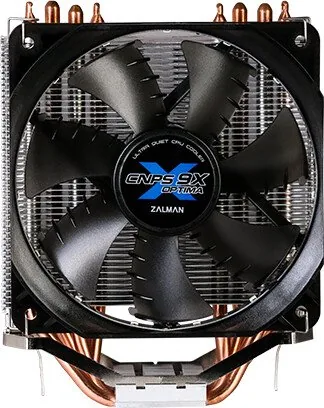
Zalman CNPS9X OPTIMA (Zalman CNPS9X OPTIMA Manual)
The Zalman CNPS9X OPTIMA is a compact CPU cooler designed to deliver quiet, steady airflow with an easy-to-follow setup process. Backed by a 4-pin PWM connection and smart fan control (including auto restart), it targets reliable cooling for Intel and AMD platforms covered by the included mounting approach. With its pure copper and aluminum construction, the heatsink helps transfer heat efficiently while keeping the system performance stable under everyday workloads.
Key results
- PWM control via a 4-pin CPU fan header supports smoother fan behavior and better temperature management than non-PWM setups.
- Quiet operation: up to 26 dB(A) maximum noise rating helps maintain a low-noise desktop experience.
- Fit matters: installation calls for an unobstructed clearance of 72 mm (W) x 123 mm (L) x 156 mm (H) around the CPU reference area.
- Airflow guidance is important: orient the cooler so air moves toward the case rear exhaust fan for best expulsion.
- Handling is user-driven: the manual emphasizes safe installation, proper thermal grease application, and careful component checks before mounting.
Cooling and build highlights
The cooler uses a 120 x 120 x 25 mm fan with a listed speed range of 600 to 1,500 +/- 10 percent RPM, controlled through PWM. It is designed around a 12 V DC system and supports Intel LGA115X/775 CPUs as well as AMD AM4/AM3+/AM3/FM2+/FM2 CPU and APU models. At about 594 g, it is substantial enough for effective heat dissipation without being overly bulky.
Space and orientation requirements
Before installing, verify the required unobstructed space with the CPU as the central reference point. Check that components like ODDs and the PSU do not intrude into the required volume. If your case has air guides installed on the enclosure, remove them first, since they can protrude into the cooler clearance area. For airflow performance, install the cooler so that air flows from the heatsink toward the enclosure rear exhaust fan.
Installation essentials
The manual highlights safe handling: avoid inserting objects or hands into the running fan, wear gloves during handling, and ensure the product is used and stored away from children. During mounting, clean the CPU surface, apply thermal grease evenly, align the appropriate Intel or AMD retention parts, secure the cooler using the provided clips and hardware, and connect the 4-pin fan to the motherboard CPU_FAN header. After installation, enable PWM control mode in the BIOS.
Notes
- Remove the cooler during system transportation to reduce the risk of damage.
- Keep installation aligned with the manual precautions to preserve warranty eligibility.
- The manual notes that damage related to CPU overclocking is not covered.
Search for 67,706 Manuals online


Type-in Brand or Model
arvilla58
7 months ago
For the price, how good is the cooling and is the fan really quiet even under full load?
Manual.ly
7 months ago
Yes. Customers report that the included fan stays very quiet, even when the system is under heavy load. Cooling performance is also described as strong for the price, helping the unit maintain good temperatures during demanding use. If you have a specific setup (case size, airflow, and ambient temperature), use the product specs to ensure compatibility with your build, as real-world noise and temperatures can also depend on installation and ventilation.