
Zalman CNPS7X LED Manual
PDF manual · 8 Pages
English



Quick check
Incorrect answer, please try again.
Chat with your Zalman CNPS7X LED manual using AI
Get instant AI answers from your Zalman CNPS7X LED manual
Ask anything about the Zalman CNPS7X LED. Answers come from this manual, with the pages they are based on.
Ask a Question
Do you recommend CNPS7X LED?
Yes NoVideo Manual
ТОП Вентиляторов с RGB Подсветкой
Frequently Asked Questions
The CNPS7X LED supports Intel sockets 1155, 1156, and 775, and AMD sockets FM2, FM1, AM3+, AM3, AM2+, and AM2, covering a wide range of mainstream processors.
Is this answer helpful?
Install the clip support onto the motherboard, clean the CPU surface, apply thermal grease, position the cooler, and secure the clip lever onto the mounting lugs. Use included washers, bolts, and nuts and follow the lever slot direction for Intel installations.
Is this answer helpful?
Fan Mate 2 is an inline fan speed controller included with the cooler. Connect it between the cooler fan and motherboard, mount it with the double-sided tape, and adjust the knob to control RPM for quieter or higher-performance cooling.
Is this answer helpful?
The cooler is compact, but tall RAM modules (over approximately 36 mm) can interfere with installation and may prevent dual/full-channel use. Measure your RAM height before installing to ensure clearance.
Is this answer helpful?
RPM varies by model and Fan Mate 2 settings, typically between about 1,150 and 2,400 RPM. Noise ranges from roughly 17 dBA at low speeds to around 32 dBA at maximum, depending on the model and load.
Is this answer helpful?
Wear gloves when handling, avoid contact with thermal grease on skin or eyes, keep the product away from children and pets, and remove the cooler during system transport to prevent damage.
Is this answer helpful?
Zalman disclaims responsibility for damages caused by overclocking. Follow your CPU and motherboard manufacturer guidelines; the cooler is suitable for typical use but not guaranteed for extreme overclocking.
Is this answer helpful?
Advantages and Disadvantages
Advantages

- Broad CPU socket compatibility (Intel 1155/1156/775 and AMD FM2/FM1/AM3+/AM3/AM2+/AM2).
- Compact dimensions minimize RAM and chassis clearance issues for many builds.
- Includes Fan Mate 2 for manual fan speed control and quieter operation.
- Wide RPM range (approx. 1,150–2,400 RPM) enabling balance between cooling and noise.
- Comes with full mounting hardware and thermal grease for out-of-box installation.
Disadvantages

- Noise can reach up to ~32 dBA at higher fan speeds on LED series models.
- May interfere with very tall RAM modules; verify clearance if modules exceed ~36 mm.
- Not intended for heavy extreme overclocking; Zalman disclaims overclocking-related damages.
- Requires manual Fan Mate 2 adjustment to avoid BIOS fan detection errors on some motherboards.
- Design updates or revised specifications may affect compatibility over time.
Product Specification
Type
Tower cooler
Dimensions with fan
5.31x5.00x3.54in (WxHxD)
Fan
1x 3.62x3.62x0.98in, 1250-1950rpm, 17-25dB(A)
Weight with fan
0.97 lb
Connector
3-Pin
AMD Socket
AM4, AM2/AM2+/AM3/AM3+, FM1/FM2/FM2+
Intel Socket
1150/1151/1155/1156/1200, 775
Features
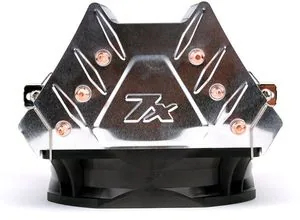
3 Heatpipes, Heatpipe-Direct-Touch
Product Description
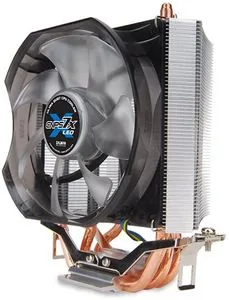
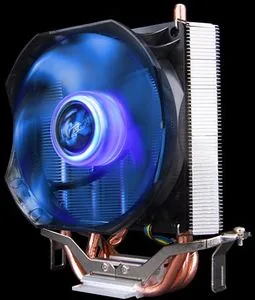
Zalman CNPS7X LED — High-performance, user-friendly CPU cooler
The Zalman CNPS7X LED is a compact, efficient CPU cooler designed for mainstream Intel and AMD sockets. With a low-profile heatsink and a bright LED-equipped fan, it balances cooling performance with quiet operation and easy installation. The cooler supports Intel sockets 1155/1156/775 and a wide range of AMD sockets (FM2/FM1/AM3+/AM3/AM2+/AM2), making it a versatile choice for upgrades, budget builds, and systems where clearance for RAM or chassis height is limited.
Featuring a fan that operates roughly between 1,150 and 2,400 RPM depending on the model, the CNPS7X LED provides effective heat dissipation while keeping noise levels in a reasonable range (typically 17–32 dBA). The package includes mounting hardware for both Intel and AMD platforms, thermal grease, and Zalman’s Fan Mate 2 controller: an inline speed regulator that lets users fine-tune fan RPM and reduce noise for everyday use or increase airflow during demanding loads.
Installation is straightforward: mount the clip support to the motherboard, apply thermal grease to the CPU and cooler base, and secure the clip lever onto the mounting lugs. The cooler’s compact dimensions help avoid interference with tall RAM modules, though users should check for clearance if memory modules exceed typical heights. The Fan Mate 2 can be attached inside the case with double-sided tape and connected between the cooler and motherboard for manual fan speed adjustment.
Build quality emphasizes safe handling and reliable operation. The cooler uses a ball-bearing fan for durability and includes washers, bolts, and nuts for a secure fit. Zalman provides precautions for safe installation — wearing gloves, avoiding contact with thermal grease, and removing the cooler during transport — and notes that product specifications may be updated to improve performance.
Overall, the Zalman CNPS7X LED is tailored for users who need a compact, easy-to-install cooler with adjustable fan control and broad socket compatibility. It’s suited for everyday desktop use, modest overclocking within safe limits, and systems where both noise and space are concerns.
Notes
- Check RAM height (especially if over ~36 mm) to avoid interference with the cooler.
- Use the Fan Mate 2 to prevent BIOS fan warnings by setting RPM higher or adjusting motherboard fan detection.
- Follow safety precautions: avoid skin/eye contact with thermal grease and remove the cooler during system transport.
Search for 67,706 Manuals online


Type-in Brand or Model
Dayana Kiehn
8 months ago
How quiet and efficient is this CPU cooler, and will it be difficult to install if my motherboard is already installed?
Manual.ly
8 months ago
Based on user feedback, the cooler is very efficient for its size: the Heatpipe-Directtouch design removes heat well and can significantly lower CPU temperatures compared to the stock cooler (in some cases by around 40C under load). It can also be made very quiet by using the included 7V adapter for the CPU fan (some users report it becoming similarly quiet to their previous system). Installation is easy if you mount it before installing the motherboard. If you are replacing it with the board already in place, the base clips and fastening can be fiddly and harder to reach with your fingers, so it may take some patience.