
Zalman ARX Series Manual
PDF manual · 24 Pages
English



Quick check
Incorrect answer, please try again.
Chat with your Zalman ARX Series manual using AI
Get instant AI answers from your Zalman ARX Series manual
Ask anything about the Zalman ARX Series. Answers come from this manual, with the pages they are based on.
Ask a Question
Do you recommend ARX Series?
Yes NoFrequently Asked Questions
The unit operates with a maximum efficiency of ninety-four percent under typical load conditions at 230VAC. Active Power Factor Correction ensures a power factor up to ninety-nine percent. This reduces heat output and lowers electricity costs during operation.
Is this answer helpful?
Specific power supply units in the ARX series qualify for a seven-year warranty. This distinguishes the brand from competitors offering standard three-year plans. Customers can check eligibility based on the purchase receipt.
Is this answer helpful?
Features include Over-Current Protection, Over-Voltage Protection, and Short-Circuit Protection. The unit also protects against Over-Temperature scenarios and Over-Power Protection. These safeguards ensure connected components remain secure during fluctuations.
Is this answer helpful?
The AC input range supports voltages from 100 to 240VAC. This flexibility allows operation in various global environments without manual voltage switching. Specific models may vary slightly based on region settings.
Is this answer helpful?
Higher models provide increased amperage on the positive twelve volt line. The top model offers one thousand two hundred watts with one hundred amps on the main rail. This ensures compatibility with modern high-performance graphics cards.
Is this answer helpful?
The physical dimensions remain consistent across the series at 180 millimeters depth by 150 millimeters width. Weight varies slightly with power output ranging from 2.9 kilograms to 3.1 kilograms. This design fits standard computer cases easily.
Is this answer helpful?
Opening the cover while the power cord is plugged into an outlet may cause electrocution. It is strictly prohibited. Always ensure the cord is unplugged before maintenance or installation to prevent damage.
Is this answer helpful?
Advantages and Disadvantages
Advantages

- High ninety-four percent efficiency rating reduces energy waste and heat
- Seven-year warranty coverage provides long-term reliability assurance
- Active Power Factor Correction reaches up to ninety-nine percent power factor
- Multiple protection circuits prevent component damage during electrical faults
- Fixed 180 millimeters depth fits standard computer cases easily
Disadvantages

- Non-modular cable design limits installation flexibility and customization
- Heavy build due to robust components may stress some mounting points
- Can generate heat under maximum load conditions in enclosed spaces
- Voltage regulation limited to plus or minus five percent tolerance
- Standard depth may not fit very small form factor cases strictly
Product Specification
Fan
5.31 inches
Cable Management
Fully Modular
80 PLUS Certificate
80 PLUS Platinum (115V, as per 80 PLUS certificate)
Dimensions (WxHxD)
5.91x3.39x7.09 inches
+3.3V
25A
+5V
22A
-12V
0.3A
+5Vsb
2.5A
12V Rail Count
1
PFC
Active
Form Factor
ATX PS/2
Specification
ATX 2.3
Features
ErP Lot 6
Color
Black
Product Description
Power Supply Excellence in Every Watt
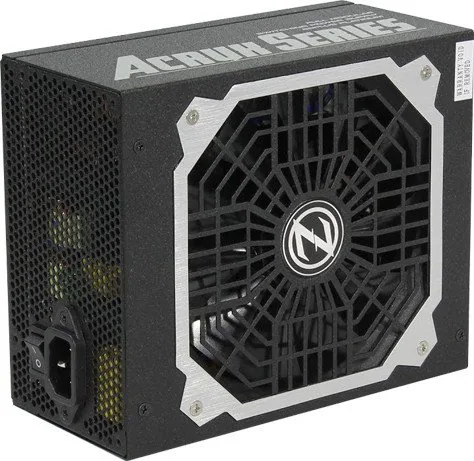
The Zalman 80 PLUS Platinum ZM-ARX series delivers exceptional power distribution for high-performance computing systems. Users seeking reliability and energy efficiency will find this unit highly effective. When consulting the Zalman 80 PLUS Platinum ZM-ARX ATX 2.3 Manual, enthusiasts discover a commitment to safety and performance standards. The unit operates with a maximum efficiency of ninety-four percent under typical load conditions at 230VAC. This level of efficiency reduces heat output and lowers electricity costs during extended gaming or work sessions. Active Power Factor Correction ensures a power factor up to ninety-nine percent, which minimizes energy waste during operation.
Comprehensive Safety Protocols
Safety is paramount for any electrical component housed within a computer chassis. The design incorporates robust protective circuits to prevent damage during irregular power states. Features include Over-Current Protection, Over-Voltage Protection, and Short-Circuit Protection. These safeguards ensure connected components remain secure even during internal fluctuations. Additionally, the product warns against opening the cover while connected to an outlet to prevent electrocution risks. Operating within specified temperature ranges of zero to forty degrees Celsius is recommended to maintain longevity. Exposure to liquids is strictly prohibited as it may cause malfunction. The unit also protects against Over-Temperature scenarios to prevent internal damage during thermal stress events.
Robust Warranty Coverage
Ownership provides peace of mind through a significant warranty period. Specific power supply units in the ARX series qualify for a seven-year warranty. This coverage distinguishes the brand from competitors offering standard three-year plans. Customers in the United States and Canada can reach support via dedicated toll-free lines. This support network ensures assistance is accessible when troubleshooting or claiming coverage is necessary. For other regions, email support is available through specific technical channels to address inquiries promptly.
Electrical Specifications Overview
Detailed electrical specifications are available for the seven hundred fifty, eight hundred fifty, one thousand, and one thousand two hundred watt models. Output voltage regulation maintains strict tolerance levels across all rails to ensure stability. Ripple and noise are kept within standard ranges at full load conditions to protect sensitive electronics. Certification numbers confirm compliance with regional safety standards for electronic appliances in multiple countries.
Versatile Power Options
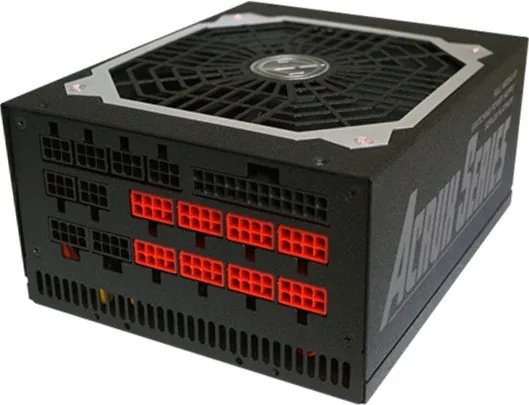
The series offers multiple wattage tiers to suit various system demands. Ratings start at seven hundred fifty watts and extend up to one thousand two hundred watts. Higher models provide increased amperage on the positive twelve volt line, crucial for modern graphics cards. For instance, the top model offers one thousand two hundred watts with one hundred amps on the main rail. Cable management is facilitated through included ties and organized connector layouts. SATA and peripheral connections ensure compatibility with storage drives and auxiliary devices. The cables feature specific lengths to accommodate different case sizes. Cable lengths vary from 550 millimeters to 700 millimeters depending on the connector type. Black connectors designate standard peripherals while red connectors identify high-power PCI-E connections. AC input range supports voltages from 100 to 240VAC depending on the specific region settings available.
Installation Guidelines
Proper installation protects both the user and the hardware. Connectors must be oriented correctly to avoid damage to the motherboard. Using gloves during installation prevents static discharge and physical injury. Ensure the main power connector P1 is not plugged in while the unit remains connected to the AC power source. Adhering to these procedures guarantees a stable power environment for your PC components. The physical dimensions remain consistent across the series at 180 millimeters depth by 150 millimeters width. Weight varies slightly with power output ranging from 2.9 kilograms to 3.1 kilograms. This design fits standard computer cases easily while delivering consistent voltage regulation.
Notes
Ensure all connectors are firmly seated before powering on the system. Check warranty eligibility based on the purchase receipt provided at the time of acquisition. Consult technical support if unexpected behavior occurs during operation.
Search for 67,706 Manuals online


Type-in Brand or Model