
Free Z-Edge Manuals – Read, Download & Print
1 Manuals
Manuals
Categories

Z-Edge Manuals
What Are Z-Edge Manuals?
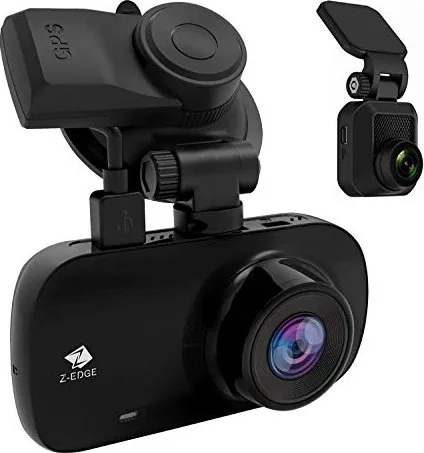
Z-Edge Manuals are the official, model-specific documentation that explains how to set up, use, and maintain Z-Edge products. Depending on the device you own, Z-Edge products may include items such as dash cameras, monitors, portable displays, DVR-related accessories, or other consumer electronics sold under the Z-Edge name. Manuals typically provide step-by-step instructions, safety guidance, feature explanations, and troubleshooting tips so you can get reliable performance from your device from day one.
When you search for Z-Edge Manuals, you are usually looking for one of these outcomes:
- Correct setup instructions for your exact model
- Guidance on buttons, menus, ports, and on-screen icons
- Help with common issues such as no power, no video, unclear images, or connectivity problems
- Instructions for formatting storage, updating settings, or resolving playback errors
- Safe care and maintenance practices
Because every Z-Edge model can differ in features and menu structure, the best results come from using the manual that matches your exact model number.
Why Z-Edge Manuals Matter
A good manual does more than tell you where the power button is. It reduces guesswork, helps you avoid incorrect installation steps, and ensures you configure the device correctly for your environment.
Better Setup, Faster Results
Many issues people experience after purchase come from skipped steps. Z-Edge Manuals help you:
- Select the right mounting method and positioning
- Choose correct cable connections and power sources
- Use the proper resolution, recording mode, or display settings
- Configure language, time, date, and region settings
Safer Use and Reliable Performance
Electronics require safe handling. Manuals commonly include warnings and precautions related to heat, moisture, ventilation, and power requirements. If your Z-Edge device involves a vehicle, a manual may also include car safety recommendations such as routing cables away from moving parts and following appropriate ignition or power guidelines.
Clear Feature Explanations
Z-Edge devices can include multiple modes and advanced features. Manuals explain what each feature does, how to enable it, and when it is most useful. Examples of features you might find across common device categories include:
- Recording modes, resolution options, and frame rates
- Playback controls and file management
- Menu navigation for system settings
- Sensitivity controls such as motion detection or sensor-based triggers
- Connectivity features when supported, such as Wi-Fi or mobile pairing
Troubleshooting That Matches Your Model
Generic advice often fails because the steps depend on the firmware version and the hardware layout. Z-Edge Manuals are designed to match the device you own, which means troubleshooting steps are usually more accurate.
How to Identify the Correct Z-Edge Manual
To avoid downloading the wrong document, verify your model information before you search. Common places to find the model number include:
- A label on the back or bottom of the device
- The packaging box
- The device settings menu, under About, System, or Information
- A sticker near ports or mounting hardware
Once you have the model number, use it as your search term for the most accurate match. If your device has multiple variants, the manual for one variant might still apply partially, but it may not cover the exact button layout, menu names, or included accessories.
Typical Sections Found in Z-Edge Manuals
While the exact layout varies by product category, most Z-Edge Manuals follow a consistent structure. Understanding these sections can help you find answers quickly.
1. Safety Information and General Precautions
This section usually includes warnings about:
- Operating temperature and humidity limits
- Proper power input requirements
- Safe installation and cable handling
- Cleaning instructions and materials to avoid
- Storage and battery guidance if relevant
Read this section first if you are installing the device in a new environment, especially in a vehicle or an area with exposure to heat or sunlight.
2. Package Contents and Components
Manuals often list what should be included in the box. This section helps you confirm that you have the correct accessories such as:
- Power cable, charging cable, or adapter
- Mounting bracket or adhesive plate
- Interface cables (USB, AV, HDMI, or similar)
- Remote control (if applicable)
- Storage recommendations (such as microSD cards) if the device records video
If something is missing, this section is also helpful when contacting support or reviewing retailer listings.
3. Device Overview and Controls
This part typically labels the device parts and explains the purpose of each control. You may see descriptions of:
- Power or mode buttons
- Menu or confirm buttons
- Directional navigation controls
- Ports for charging, data, HDMI output, or sensor connections
- Indicator lights and what they mean
4. Setup and Installation Instructions
This section provides step-by-step instructions. Depending on product type, it may include:
- Installing the device physically (mounting, orientation, and angle)
- Connecting power and relevant peripherals
- Turning the device on for the first time
- Selecting initial settings such as language and time
If your device uses storage for recording, the manual may also instruct you on formatting a card before first use.
5. Menu Navigation and Settings
Z-Edge Manuals generally explain how to access and use the on-screen menu system. This might include:
- How to enter Settings
- Common settings such as date/time, audio, display brightness, and recording preferences
- How to save changes
- How to revert to defaults
When you update a device, firmware changes can sometimes affect menu wording. If that happens, a newer manual version may be needed.
6. Operation and Daily Use
This section explains what to do during normal use. For example, if your Z-Edge device records, the manual can describe how to:
- Start and stop recording
- Understand file naming or time-stamped storage
- Protect files from being overwritten
- Use playback to review footage
If your device is display-focused, the operation section may describe how to:
- Switch inputs
- Adjust brightness, contrast, or resolution
- Use supported display modes
7. File Management, Playback, and Export
For devices that store media, manuals often include instructions for:
- Viewing recorded files
- Deleting or formatting storage
- Locking important footage
- Transferring files to a computer or mobile device
You may also find guidance on file formats and recommended playback tools.
8. Troubleshooting and Error Resolution
Troubleshooting sections usually list symptoms and fixes. Common categories include:
- No power or intermittent power
- No display or blank screen
- Poor image quality, blurriness, or low contrast
- Recording failures or missing files
- Storage errors, card not recognized, or write-protect issues
- Audio issues or silent playback
The manual may also advise on steps in a safe order, such as restarting the device, checking connections, confirming storage compatibility, and only then considering factory reset.
9. Maintenance and Care
For longevity, manuals often include maintenance guidance such as:
- Cleaning the lens or screen using appropriate methods
- Avoiding solvents or abrasive materials
- Protecting from dust and moisture
- Storing the device when not in use
For devices with airflow or vents, manuals may also mention keeping openings clear.
10. Specifications and Compatibility Notes
This section can include technical details like:
- Supported resolutions or recording modes
- Power requirements
- Storage capacity limitations
- Recommended memory card type and speed class (if applicable)
- Output formats and cable requirements
Compatibility notes help you avoid using accessories that do not meet the required standards.
Best Practices for Using Your Z-Edge Device with the Manual
Using a manual effectively means treating it like a reference tool rather than a one-time read.
Follow the Setup Steps in Order
If the manual says to configure time and date before enabling recording, do it in that order. Some devices rely on correct timestamps for organizing recordings.
Use the Recommended Accessories
Manuals often specify recommended power sources, cables, and storage types. Using unsupported accessories can cause:
- Instability
- Lower quality performance
- Overheating risks
- Data corruption or recording gaps
Configure Settings for Your Environment
Menu options can be tuned to match your needs. For example, if you are using a device in a vehicle, consider:
- Adjusting exposure or brightness for lighting conditions
- Ensuring the mounting angle captures the intended area
- Verifying night performance settings if supported
For home or office use, settings might focus more on display clarity, color, or input selection.
Re-check Settings After Firmware or Hardware Changes
If you update settings, replace a storage card, or change a connection type, return to the manual to confirm that settings remain correct.
Common Questions Z-Edge Manuals Typically Answer
People usually look for manuals when they want answers to practical questions such as:
- How do I connect power and turn the device on safely?
- What do the indicator lights mean?
- How do I change date and time?
- How do I format storage correctly?
- Why is the device not recording, even when power is on?
- Where can I find my recordings or media files?
- How do I delete, lock, or protect important files?
- How do I reset the device if settings become incorrect?
- Which memory cards or storage capacities are supported?
The manual provides model-specific steps, which is why using the correct Z-Edge Manuals version matters.
How to Get Help Using Z-Edge Support Resources
If the manual does not solve your issue, it helps to combine the manual with other support methods:
- Confirm your model number and hardware revision
- Note the exact error message or symptom
- Follow the manual troubleshooting steps in order
- If safe, capture a screenshot of menu settings for reference
When contacting support, the manual sections on diagnostics or system information can help you provide accurate details.
Conclusion
Z-Edge Manuals are essential guides that help you install, configure, operate, and troubleshoot your Z-Edge product correctly. By using the correct manual for your model number, you can improve setup accuracy, enhance safety, understand features, and resolve issues more quickly with steps designed for your specific device. Whether you are setting up for the first time or solving a problem, Z-Edge Manuals give you a reliable path to better performance and long-term satisfaction.
Search for 67,706 Manuals online


Type-in Brand or Model