
XYZprinting da Vinci Color Manual
PDF manual · 20 Pages
English


Quick check
Incorrect answer, please try again.
Chat with your XYZprinting da Vinci Color manual using AI
Get instant AI answers from your XYZprinting da Vinci Color manual
Ask anything about the XYZprinting da Vinci Color. Answers come from this manual, with the pages they are based on.
da Vinci Color Maintenance Schedule
After long-term use, enable the Clean Nozzle function every 60 hours to clear filament residuals. Unload filament before cleaning the feeding path.
The replaceable PC film on the rubber magnet should be replaced when it becomes dirty or broken to ensure proper adhesion.
To prevent drying, clean the nozzle with alcohol, seal the cartridge with its protective cover, and store at room temperature.
Ask a Question
Do you recommend da Vinci Color?
Yes NoFrequently Asked Questions
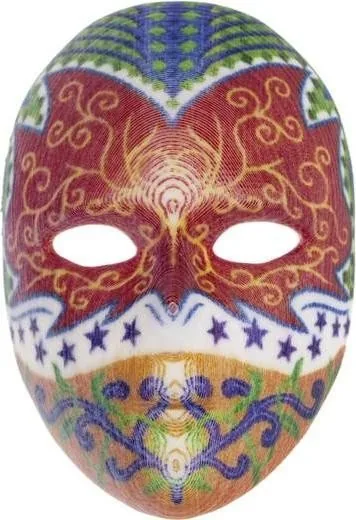
It combines fused filament fabrication for the 3D structure with CMYK inkjet printing for surface color. This lets compatible models be produced with color applied during the printing process.
Is this answer helpful?
Full-color printing supports objects up to 185 x 185 x 150 mm. Single-color printing without inkjet color supports up to 200 x 200 x 150 mm.
Is this answer helpful?
The printer supports 1.75 mm 3D Color-inkjet PLA, PLA, Tough PLA, and PETG filament. Full-color results require the compatible color-inkjet PLA material and CMYK ink cartridges.
Is this answer helpful?
Yes. Prepared 3CP projects can be imported from a USB drive and printed from the touchscreen. This supports offline operation after the project has been prepared.
Is this answer helpful?
The printer uses separate black, cyan, magenta, and yellow ink cartridges. Test printing, color calibration, and ink calibration help correct alignment or quality issues when needed.
Is this answer helpful?
Yes. It can connect to Wi-Fi when the wireless dongle is installed. XYZmaker software can then be used to confirm the connection, monitor the printer, prepare models, and start prints.
Is this answer helpful?
Advantages and Disadvantages
Advantages

- Combines FFF construction with CMYK inkjet coloring for directly printed full-color models.
- Offers automatic filament feeding and automatic print-bed calibration for a simpler workflow.
- Supports USB, USB cable, Wi-Fi, and offline printing from imported 3CP projects.
- Includes a 5-inch color touchscreen with maintenance, calibration, and material controls.
Disadvantages

- Full-color build volume is smaller than the single-color build volume.
- The 32 kg printer requires a sturdy location and two people for safe moving.
- Color printing depends on compatible ink cartridges, calibration, and regular ink checks.
- The print bed is not heated, which may limit material and adhesion options.
Product Specification
Process
Fused Filament Fabrication (FFF)
Configuration
1x moving print head (front/back, left/right), 1x moving print bed (up/down)
Construction
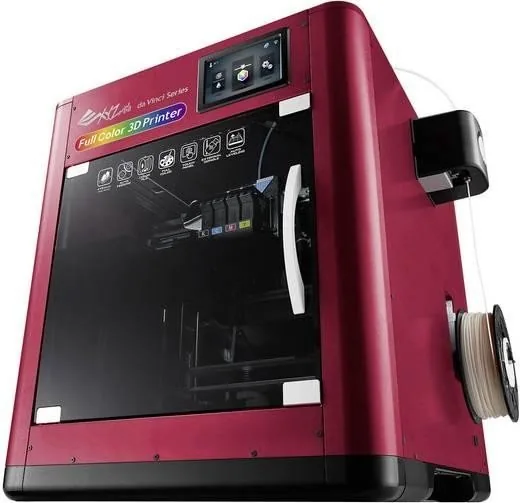
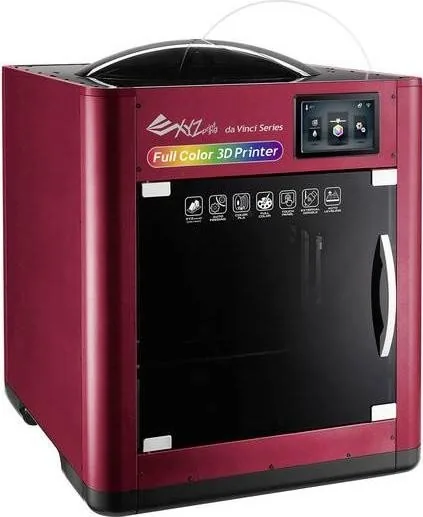
Assembled model, enclosed print chamber (with viewing window and front door), all-metal frame, onboard controls, integrated filament holder
Recommended materials
0.07 in filament, closed system (NFC-encoded), Color Inkjet PLA, PLA, PETG, Carbon
Build volume
7.87 x 5.91 x 7.87 in (W x H x D)
Print head configuration
1x print head (1x nozzle with mono feed, 0.02 in, brass, replaceable), 1x direct extruder (with automatic filament loading)
Layer height
0.004-0.016 in
X accuracy
0.49 mil
Y accuracy
0.49 mil
Z accuracy
0.16 mil
Speeds
1.18-4.72 in/s printing (4.72 in/s maximum recommended), 7.09 in/s rapid travel without printing
Print bed
Rectangular, metal, removable (magnetic attachment), automatic print bed leveling
Interfaces
USB-A 2.0 (host), USB-B 2.0, Wi-Fi (802.11b/g/n)
Additional features
Inkjet print head (CMYK, installed simultaneously)
Display
5 in diagonal, color, touchscreen
Controls
Touchscreen, optionally via computer
Power supply
100-240 V, 240 W
Operating environment
59-90 F, 30-60% RH
Dimensions
23.62 x 25.20 x 22.87 in (W x H x D)
Weight
71 lb (empty)
Color
Red (housing), black (frame), black (print bed)
Package contents
1x printer, 1x 1.32 lb PLA filament (Color Inkjet PLA), tool set, cleaning set, adhesive film for print bed, USB-A 2.0 Wi-Fi adapter
Special features
Filament sensor, full-color 3D printing
Manufacturer warranty
One year
Product Description
XYZprinting da Vinci Color Manual: Full-Color 3D Printing Made Practical
The XYZprinting da Vinci Color combines fused filament fabrication with CMYK inkjet technology to create detailed 3D models with color applied directly to their surfaces. This hybrid approach makes the printer a strong option for makers, educators, designers, and small teams that want to produce presentation-ready prototypes without relying on manual painting after printing.
Designed for Colorful, Detailed Models
Using 3D Color-inkjet PLA, the machine can build full-color objects up to 185 x 185 x 150 mm. For projects that do not need inkjet color, it supports single-color builds up to 200 x 200 x 150 mm. A 0.4 mm print head and layer heights from 0.1 to 0.4 mm provide flexibility between finer surface detail and faster production.
The XYZprinting da Vinci Color Manual highlights a practical workflow built around automatic filament feeding, separate CMYK ink cartridges, and automatic print-bed calibration. The removable EZ rubber magnet print surface supports easier part removal after the platform has cooled, while the replaceable PC film helps maintain a usable printing surface over time.
Straightforward Controls and Connectivity
A 5-inch color touchscreen provides direct access to material loading, ink replacement, calibration, print controls, settings, and printer statistics. Users can import prepared 3CP projects from a USB drive for computer-free printing, or connect through USB and wireless networking. Wi-Fi operation requires the supplied wireless dongle and can be managed through XYZmaker software.
XYZmaker supports common 3D formats including AMF, PLY, OBJ, and STL. OBJ models are particularly useful for color work, allowing color-capable designs to be prepared for output. The printer also supports offline printing, which can be helpful in classrooms, studios, or workspaces where a dedicated computer is not always available.
Setup, Care, and Safe Operation
This is a substantial desktop system, measuring 600 x 581 x 640 mm and weighing 32 kg. It should be placed on a level, sturdy surface and moved by two people. Good ventilation is recommended during printing, and the enclosed moving and heated components should not be touched while active.
Routine care includes checking filament flow, cleaning residue from the print module, maintaining the nozzle, and running color or ink calibration when output alignment needs adjustment. The touchscreen also offers Z-offset adjustment, jog controls, nozzle cleaning, and door-lock settings. These features help users keep prints consistent while handling common maintenance tasks with confidence.
Notes
- Keep the original packaging for protected transport and service returns.
- Allow the print bed and print head to cool before removing parts or performing maintenance.
- Use compatible 1.75 mm filament and the specified CMYK ink cartridge system for reliable results.
Search for 67,706 Manuals online


Type-in Brand or Model