
Xilence XM012 Mini Manual
PDF manual · 1 Pages
English


Quick check
Incorrect answer, please try again.
Chat with your Xilence XM012 Mini manual using AI
Get instant AI answers from your Xilence XM012 Mini manual
Ask anything about the Xilence XM012 Mini. Answers come from this manual, with the pages they are based on.
Ask a Question
Do you recommend XM012 Mini?
Yes NoFrequently Asked Questions
It is a universal notebook adaptor made to power compatible laptops with the correct tip and voltage setting. It is meant for practical everyday charging and as a flexible replacement or backup solution.
Is this answer helpful?
Check your notebook’s input voltage and connector size, then select the matching tip from the included set. The adaptor should only be used with the tip that fits your notebook correctly.
Is this answer helpful?
Matching the output voltage to the notebook’s required input helps protect the device and supports stable charging. Using the wrong setting can cause poor performance or damage.
Is this answer helpful?
No. It should only be used with devices that fit its power rating and connector requirements. It is intended for notebooks and similar compatible equipment, not high-power devices.
Is this answer helpful?
Attach the correct tip first, then connect the AC cable, and finally connect the adaptor to the notebook. The manual warns not to plug into the wall socket before preparing the tip connection.
Is this answer helpful?
Keep the adaptor away from rain and wet areas, do not open the unit, and keep it away from children. Always use the correct tip and avoid overloading the adaptor.
Is this answer helpful?
Do not throw it into unsorted household waste. It should be taken to a special collection point or recycling center that accepts waste electrical and electronic equipment.
Is this answer helpful?
Advantages and Disadvantages
Advantages

- Universal design supports multiple notebook models with the right tip and voltage match.
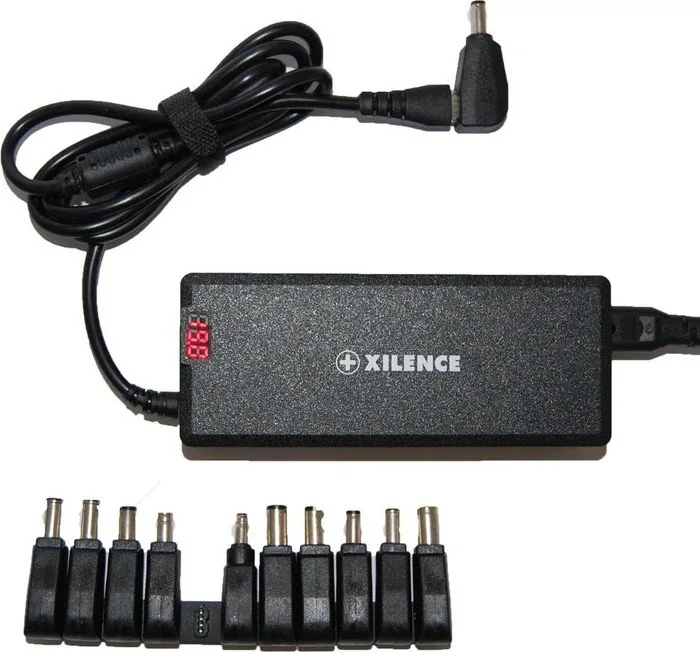
- Includes AC and DC cables plus tips, so it is ready for practical everyday use.
- Voltage display helps users confirm the setup before connecting to a notebook.
- Compact 120W mini format is convenient for travel, backup use, or limited desk space.
Disadvantages

- Requires careful tip selection, so setup can be confusing for first-time users.
- Not suitable for devices that need more power than the adaptor can provide.
- Must be kept dry and handled safely, which limits use in some environments.
- Incorrect connection order may cause problems if the instructions are not followed closely.
Product Specification
Type
Third-party
Compatibility
11 adapter plugs (ASUS, HP, Sony, Dell, Acer, Lenovo, Toshiba, Fujitsu, Samsung)
Power
120W
Input Voltage
100-240V
Output Voltage
15-24V
Dimensions
5.59x2.28x1.26 in
Weight
0.82 lb
Product Description
Xilence XM012 120W Mini: Compact Power for Everyday Notebook Use
The Xilence XM012 120W Mini is designed as a practical universal notebook adaptor for users who need a flexible and portable charging solution. Instead of relying on a single fixed connector, it comes with multiple DC tips and a clear setup process, making it easier to match different notebook models with the right voltage and plug size. For people who travel often, work in different spaces, or simply need a reliable spare adapter, this compact 120W unit aims to keep things simple.
Built for compatibility
One of the strongest advantages of the Xilence XM012 120W Mini is its universal approach. The adaptor is intended to work with notebooks that require different input voltages, as long as the correct tip and output match are selected. The included tips help reduce guesswork, while the voltage display adds a useful layer of confirmation before connecting the notebook. That makes the manual instructions especially important, because the right setup is what ensures safe and stable use.
Easy to understand, but attention matters
The manual emphasizes a careful step-by-step process: first check the original adapter’s output voltage, then choose the proper tip, and only after that connect the AC cable and notebook. This sequence is more than a formality. It protects the device and helps prevent avoidable mistakes. The adaptor is not meant for equipment that needs more power than the stated rating, so matching the notebook’s requirements remains essential.
A practical choice for daily use
With AC input cable, DC cable, and several tips included in the package, the Xilence XM012 120W Mini gives users a ready-to-use solution out of the box. Its compact format makes it a convenient option for a desk, a carry bag, or a backup charger kept at the office. The design focuses on functionality rather than complexity, which is ideal for users who want a straightforward universal adaptor.
Notes
- Use only the correct tip for your notebook.
- Do not connect the AC cable before the tip is attached.
- Keep the adaptor away from water and children.
- Do not use it with devices that exceed its power rating.
- Dispose of old electronic equipment through proper recycling channels.
Search for 67,706 Manuals online


Type-in Brand or Model
mmraz42
7 months ago
Is the build quality good for the price, or does it feel cheap?
Manual.ly
7 months ago
Based on customer feedback, the product offers good build quality (