
Xilence PCIe Riser Cable with Bracket Manual
PDF manual · 2 Pages
English



Quick check
Incorrect answer, please try again.
Chat with your Xilence PCIe Riser Cable with Bracket manual using AI
Get instant AI answers from your Xilence PCIe Riser Cable with Bracket manual
Ask anything about the Xilence PCIe Riser Cable with Bracket. Answers come from this manual, with the pages they are based on.
Ask a Question
Do you recommend PCIe Riser Cable with Bracket?
Yes NoFrequently Asked Questions
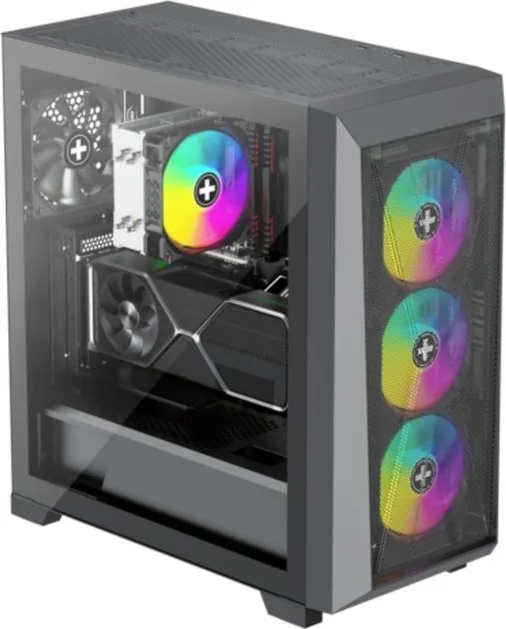
No. The Xilence riser card and bracket are specifically designed for the Xilence X Case (X912.ARGB). Other cases may require modifications or third-party brackets; verify dimensions and mounting points before purchase.
Is this answer helpful?
Yes. The cable is specified for PCIe 4.0, designed to maintain signal integrity for modern GPUs. Proper installation and minimal bending improve performance and reduce signal loss.
Is this answer helpful?
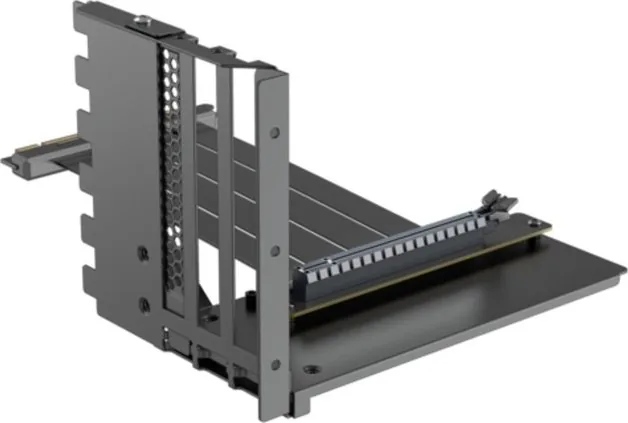
The kit includes an L-shaped bracket, a PCIe riser cable, a small screwdriver, mounting screws in types A, B, and C, and a pre-installed protective pad. These parts cover bracket assembly and mounting for the intended Xilence chassis.
Is this answer helpful?
Potentially. Vertical mounting can change airflow patterns around the GPU. Ensure your case has adequate intake and exhaust airflow; monitor temperatures after installation and adjust fan curves if necessary.
Is this answer helpful?
Installation is moderately straightforward: assemble the bracket, attach the riser cable, remove PCI slot covers, mount the bracket, and connect the GPU. Basic tools and comfort with PC assembly are recommended.
Is this answer helpful?
Yes. The kit contains a pre-installed pad to cushion components and reduce vibration, and the included screws and bracket provide stable mechanical support to prevent stress on the GPU connector.
Is this answer helpful?
Dispose of electronic accessories and packaging according to local regulations. Use designated e-waste recycling centers or municipal collection points; check local guidelines or sites like your municipality’s waste management resources for drop-off locations.
Is this answer helpful?
Advantages and Disadvantages
Advantages

- PCIe 4.0 compatible riser preserves high-bandwidth GPU performance.
- Included bracket and hardware tailored for Xilence X912.ARGB case for an easy fit.
- Complete kit with screwdriver and multiple screw types simplifies installation.
- Matte black finish offers a clean, professional appearance inside the build.
- Pre-installed padding protects components and reduces vibration.
Disadvantages

- Designed specifically for Xilence X912.ARGB; may not fit other cases without modification.
- Vertical mounting can change GPU cooling dynamics—requires airflow consideration.
- Bracket assembly and cable routing require moderate DIY skill for secure installation.
- Extra length and routing of riser cable can complicate compact builds.
- Limited to a single bracket orientation provided; fewer aesthetic variants.
Product Specification
Quantity
1x
Specification
PCIe 4.0
Connection
PCIe x16 PCIe x16
Form
wired angled
Cable connection
Ribbon cable fixed
Additional power supply
N/A
Power cable included
N/A
Special features
case-specific (Xilent X X912.ARGB), incl. slot bracket, incl. graphics card holder
Product Description
Xilence Riser Card incl. PCI slot bracket for Xilence - PCIe 4.0, black Manual
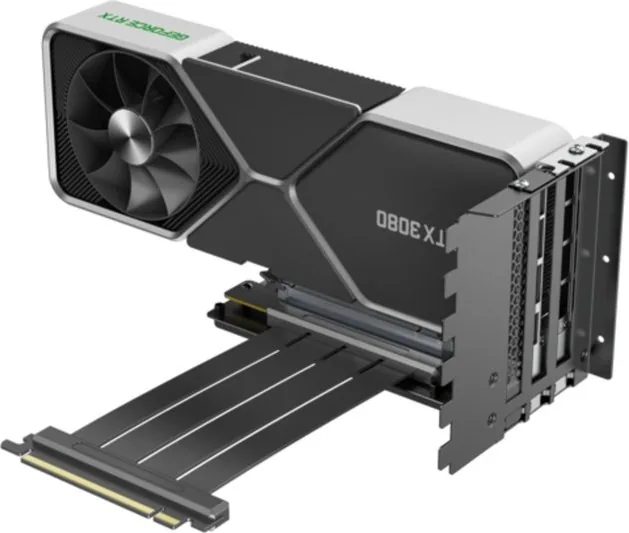
Discover the Xilence PCIe 4.0 Riser Card with an included PCI slot bracket — a tailored solution for the Xilence X Case (X912.ARGB). This black riser set is designed to relocate and mount your graphics card vertically with a sturdy bracket, helping you showcase your GPU while maintaining signal integrity and compatibility with PCIe 4.0 bandwidth.
Product overview
The package delivers a complete mounting kit: an L-shaped bracket, a PCIe 4.0 riser cable, mounting screws in multiple sizes, a small screwdriver, and pre-installed padding to protect components. The bracket and riser are engineered for the Xilence X912.ARGB chassis, ensuring a clean fit and simplified installation that avoids improvising adapters or third-party mounts.
Key features and benefits
The riser cable supports PCIe 4.0 speeds to preserve high-bandwidth connections for modern GPUs. The included bracket converts standard PCI slots into a vertical GPU mount, delivering improved aesthetics and airflow options in compatible cases. Multiple screw sizes and a dedicated screwdriver streamline assembly, and protective pads reduce vibration and contact damage.
Installation at a glance
Assembly is straightforward: build the L-shaped bracket, attach the riser cable, remove the case’s existing PCI slot covers, mount the bracket to the case, then connect your GPU to the riser. Clear component labeling and included fasteners help minimize installation time. The kit is optimized for compatibility with the Xilence X912.ARGB; other cases may require modifications.
Durability and design
Finished in matte black, the bracket and cable present a discreet, professional look. Fasteners and the screwdriver are included to ensure the mechanical stability of the mounted GPU. The riser cable’s shielding and construction aim to maintain signal fidelity at PCIe 4.0 data rates while the bracket provides robust mechanical support for heavier graphics cards.
Notes
- This riser set is specifically designed for the Xilence X Case (X912.ARGB); verify fitment before purchase for other chassis.
- Keep screws organized by type (A, B, C) during installation to avoid confusion.
- Dispose of electronic accessories according to local recycling rules.
Search for 67,706 Manuals online


Type-in Brand or Model