
Worx WX255 Manual
PDF manual · 144 Pages
English



Quick check
Incorrect answer, please try again.
Chat with your Worx WX255 manual using AI
Get instant AI answers from your Worx WX255 manual
Ask anything about the Worx WX255. Answers come from this manual, with the pages they are based on.
WX255 Maintenance Schedule
Never use water or chemical cleaners. Wipe the tool clean with a dry cloth to maintain it.
Ensure ventilation slots remain free of dust and debris to prevent overheating.
Wipe the charging terminals with a clean dry cloth if they become dirty.
Ask a Question
Do you recommend WX255?
Yes NoFrequently Asked Questions
The Worx WX255 Cordless Screwdriver has a maximum torque of 3 Newton meters (3N.m), which is suitable for general assembly and light drilling tasks but not for heavy-duty construction work.
Is this answer helpful?
It takes approximately 5 hours to fully charge the 1.5Ah Li-Ion battery using the included charger. A green indicator light signals when the charging process is complete.
Is this answer helpful?
The tool is primarily designed for indoor use. While it can be used outdoors, it must be protected from rain and moisture to prevent electrical hazards and damage to the internal components.
Is this answer helpful?
The standard delivery includes five 25mm screwdriver bits, one 25mm pilot hole drill bit, a cartridge, a holster, a charger, and a screw holder. Some accessories shown in manuals may not be included.
Is this answer helpful?
No, you must wait until the chuck has completely stopped before changing the forward or reverse rotation direction to avoid damaging the motor or mechanism.
Is this answer helpful?
No, the Worx WX255 does not require any additional lubrication or user serviceable parts. Simply keep the ventilation slots clean and wipe the exterior with a dry cloth.
Is this answer helpful?
Advantages and Disadvantages
Advantages

- Lightweight design at 0.5 kg reduces user fatigue during prolonged use.
- Includes 1.5Ah Li-Ion battery providing adequate power for most household tasks.
- Soft grip handle enhances comfort and control while operating the tool.
Disadvantages

- Maximum torque of 3N.m may be insufficient for heavy-duty industrial applications.
- Charging time of 5 hours is relatively long compared to some modern fast-chargers.
- No-load speed of 230/min limits efficiency for high-speed drilling requirements.
Product Specification
Type
Driver
Battery
1x Battery (4V, 1.5Ah, Li-Ion)
No-load speed
230 rpm
Torque
2.65 lb-ft
Tool holder
1/4" Bit holder
Features
Right/Left rotation, battery indicator, LED work light, soft grip, bit storage
Weight
1.1 lbs
Package contents
Charger, 1x integrated battery, 6-piece accessory set, screw holder
Product Description
Worx WX255 Cordless Screwdriver Review
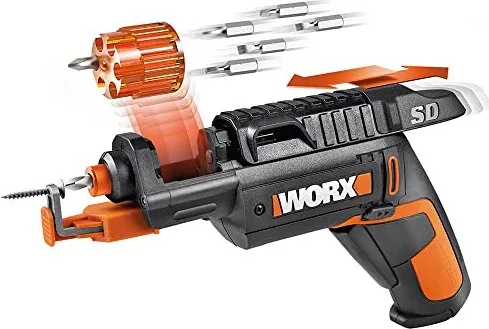
The Worx WX255 Cordless Screwdriver is a versatile and compact power tool designed for both DIY enthusiasts and professional users who need reliable performance in tight spaces. This battery-powered device features a lightweight design weighing only 0.5 kg, making it easy to handle during extended tasks without causing fatigue. The unit comes with a 1.5Ah Li-Ion battery that delivers a maximum torque of 3N.m, sufficient for driving screws into wood, metal, and plastic, as well as drilling pilot holes.
One of the standout features of the WX255 is its soft grip handle, which ensures comfort and control while working. The tool includes a forward and reverse rotation control, allowing users to easily switch between tightening and loosening operations. An integrated LED light illuminates the work area, enhancing visibility in dimly lit environments. The screwdriver also boasts an automatic spindle lock, which facilitates quick bit changes even when the battery is low or depleted.
The package includes essential accessories such as five 25mm screwdriver bits, one 25mm pilot hole drill bit, a cartridge, a holster, a charger, and a screw holder. The charger supports a wide voltage range of 100-240V, ensuring compatibility across different regions. It takes approximately five hours to fully charge the battery, indicated by a green light upon completion. Safety is a priority, with warnings regarding vibration exposure and electrical hazards clearly outlined in the manual. Users are advised to wear protective gear and maintain proper posture to minimize risks.
Maintaining the Worx WX255 is straightforward as it requires no lubrication. Cleaning should be done with a dry cloth, avoiding water or chemical cleaners. The tool is designed for indoor use and should be stored in a dry place away from children. Regular maintenance of the battery and charger ensures optimal performance and longevity. Whether you are assembling furniture or performing minor repairs, this cordless screwdriver offers the power and convenience needed for efficient task completion.
Search for 67,706 Manuals online


Type-in Brand or Model