
Worx WX102.9 Manual
PDF manual · 16 Pages
English



Quick check
Incorrect answer, please try again.
Chat with your Worx WX102.9 manual using AI
Get instant AI answers from your Worx WX102.9 manual
Ask anything about the Worx WX102.9. Answers come from this manual, with the pages they are based on.
WX102.9 Maintenance Schedule
Wipe clean with a dry cloth. Never use water or chemical cleaners.
Keep the motor ventilation slots clean to ensure proper operation.
Keep all working controls free of dust for safe handling.
Ask a Question
Do you recommend WX102.9?
Yes NoFrequently Asked Questions
Use Worx 20V PowerShare batteries (e.g., WA3550, WA3551, WA3553) and compatible Worx chargers (such as WA3869, WA3880). Using non-recommended batteries or chargers can damage the battery or tool and may void safety coverage.
Is this answer helpful?
The clutch may be set too low; increase the torque setting toward higher positions (1 low to 18 high). Also check battery charge, correct bit selection, and ensure you are not overloading the tool with excessive pressure or unsuitable fasteners.
Is this answer helpful?
The tool and battery include protection circuits that cut power under overload, overheating, or low-voltage conditions. If protection triggers, release the trigger, allow the tool and battery to cool, reduce load, and recharge the battery if needed before resuming.
Is this answer helpful?
Minimal maintenance: wipe clean with a dry cloth, keep vents and controls free of dust, avoid water or chemical cleaners, and do not attempt internal repairs. For battery service or internal faults, contact authorized service centers.
Is this answer helpful?
Maximum drilling capacities are approximately 40 mm in wood and 13 mm in steel. The drill is intended for driving screws and drilling in wood, metal, and plastic—ideal for household DIY, furniture assembly, and light construction.
Is this answer helpful?
Yes. Declared sound pressure is around 83 dB(A) and vibration values apply for metal drilling. Wear eye and hearing protection, maintain sharp accessories, use anti-vibration accessories if available, and plan breaks to reduce exposure.
Is this answer helpful?
Store batteries dry within recommended temperatures (0–45°C storage; 0–40°C charging). Avoid shorting terminals, keep them clean and dry, do not expose to extreme heat or liquids, and recycle batteries per local regulations.
Is this answer helpful?
Advantages and Disadvantages
Advantages

- Lightweight 1.1 kg bare tool for comfortable handling during extended tasks.
- Up to 60 Nm torque and 18+1 clutch positions for precise screwdriving and drilling.
- Keyless 13 mm chuck for fast, tool-free bit changes.
- LED work light, soft-grip handle, belt hook and bit clip for improved usability.
- Built-in overload and thermal protection to safeguard tool and battery.
Disadvantages

- Sold as a solo unit; battery and charger must be purchased separately.
- Not intended for heavy industrial applications; best for light-to-medium tasks.
- Declared noise (~83 dB(A)) requires hearing protection for prolonged use.
- Battery performance degrades in extreme temperatures and heavy workloads.
- No user-serviceable internal parts; repairs need authorized service.
Product Specification
Type
Drill driver
Battery
20V, Li-ion
No-load speed
0-400/0-2000 rpm
Drilling capacity
Steel 0.51 in, Wood 1.57 in
Torque
531.04 lb-in, 19 stages (18+1)
Chuck capacity
0.04-0.51 in keyless chuck
Features
Forward/reverse rotation, Speed control, Multi-gear, Torque preselection, LED work light, Soft grip, Brushless motor, Belt clip
Weight
2.42 lb (without battery)
Scope of delivery
without charger and battery, incl. screwdriver bit
Product Description
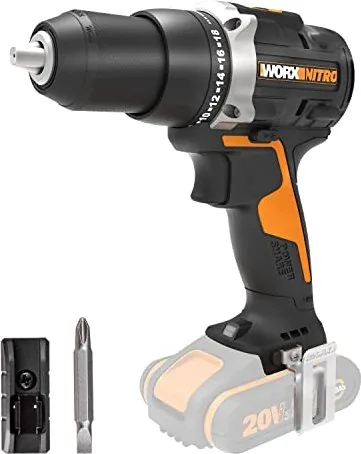
Worx WX102.9 Nitro 20V PowerShare Cordless Drill Driver solo Manual
The Worx WX102.9 Nitro 20V PowerShare cordless drill driver is a compact, versatile tool designed for everyday DIY and light professional tasks. Powered by a 20V (nominal 18V) lithium-ion system, this solo unit accepts PowerShare batteries and delivers up to 60 Nm of torque. It combines a keyless 13 mm chuck, 18+1 clutch settings, two-speed gearbox, and a lightweight 1.1 kg bare-tool weight for balanced handling during drilling and screwdriving in wood, metal, and plastic.
Ergonomically built with a soft-grip handle, the WX102.9 features forward/reverse control, an LED work light for low-light conditions, a belt hook and bit clip for convenience, and an easy battery-release button. The package emphasizes safety and maintenance: use recommended chargers and batteries, avoid exposing the tool or battery to moisture, and follow torque/clutch settings to prevent overdriving or stalling. The tool and battery include thermal and overload protection that will cut power under stress, low voltage, or overheating to protect components and extend battery life.
Performance-wise, the drill offers a no-load speed range suitable for common household tasks and small construction jobs. With a maximum drilling capacity of 40 mm in wood and 13 mm in steel, it covers most routine applications. Noise and vibration data are provided to help users estimate exposure: sound pressure around 83 dB(A) and declared vibration values for metal drilling—users should wear hearing and eye protection and follow recommended work/rest schedules to limit exposure.
Maintenance is minimal: keep vents and controls free of dust, wipe the tool with a dry cloth, and do not attempt internal repairs. Battery care guidance stresses correct charging temperatures (0–40°C recommended), storing batteries dry, avoiding short circuits, and recycling batteries properly. For troubleshooting, the manual covers common issues such as drill not starting, premature stoppage during screwdriving (adjust clutch), and reduced battery runtime (conditioning cycles and proper charging recommended).
Notes:
- Use only compatible Worx 20V batteries and chargers to avoid damage or safety risks.
- Allow the chuck to stop before changing rotation direction to prevent gearbox damage.
- Observe torque settings (1 to 18) to match screw sizes and materials.
- Recharge and condition batteries per the manufacturer’s recommendations for best lifetime performance.
Pros and Cons
Pros:
- Lightweight (1.1 kg bare tool) for comfortable extended use.
- 60 Nm max torque with 18+1 clutch for controlled screwdriving.
- Keyless 13 mm chuck for quick bit changes.
- LED work light and soft-grip handle enhance usability in tight spaces.
- Integrated overload/thermal protection extends tool and battery life.
Cons:
- Sold as a solo unit; battery and charger are not included.
- Not intended for heavy industrial use; limited to light-to-medium tasks.
- Noise level (~83 dB(A)) requires hearing protection during extended use.
- Battery performance affected by extreme temperatures and heavy loads.
- No user-serviceable internal parts; repairs require authorized service.
Most Important Results
- Versatile torque control: 18+1 clutch positions up to 60 Nm for accurate screwdriving and drilling (fits 13 mm chuck).
- Compact power: 20V PowerShare compatibility provides a balance of runtime and weight for DIY and light professional jobs.
- Safety features: thermal and overload cut-out protect tool and battery from overheating and overcurrent.
- Practical ergonomics: soft-grip handle, LED light, belt hook, and bit clip improve on-site convenience and control.
- Maintenance guidance: minimal upkeep—keep vents clean, follow battery charging/storage limits, and recycle batteries properly.
FAQ
-
Question: What batteries and chargers are compatible with the WX102.9 Nitro? Answer: Use Worx 20V PowerShare batteries (recommended models include WA3550/WA3551/WA3553) and compatible Worx chargers (e.g., WA3869, WA3880). Using non-recommended batteries or chargers can damage the battery or tool and void safety assurances.
-
Question: How do I prevent the drill from stopping before a screw is fully tightened? Answer: Adjust the torque by increasing the clutch setting toward higher numbers; position 1 is lowest torque and 18 the highest. Also ensure the battery is charged and the bit and fastener are appropriate for the material.
-
Question: What maintenance does the drill require? Answer: Wipe the tool clean with a dry cloth, keep ventilation slots and controls free of dust, do not use water or chemical cleaners, and avoid internal repairs—service should be done by authorized providers.
-
Question: How does the tool protect against overload and overheating? Answer: The tool and battery include protection systems that cut power when overloaded, overheated, or when battery voltage is too low. If tripped, release the trigger, let components cool, and recharge or reduce load before restarting.
-
Question: What are the drilling capacities and typical applications? Answer: Maximum drilling capacity is about 40 mm in wood and 13 mm in steel. The drill is intended for drilling and screwdriving in wood, metal, and plastic—suitable for home improvement, furniture assembly, and light construction tasks.
-
Question: Are there noise and vibration considerations? Answer: Yes—sound pressure is around 83 dB(A) and vibration values are declared for metal drilling. Use hearing and eye protection, maintain the tool, and plan work/rest periods to minimize exposure.
-
Question: How should I store and care for the battery? Answer: Store batteries in a dry place within recommended temperature ranges (0–45°C for storage, 0–40°C for charging), avoid shorting terminals, keep them clean and dry, and recycle used batteries per local regulations.
Search for 67,706 Manuals online


Type-in Brand or Model