

Western Digital My Cloud EX2 Ultra Manual
PDF manual · 129 Pages
English



Quick check
Incorrect answer, please try again.
Chat with your Western Digital My Cloud EX2 Ultra manual using AI
Get instant AI answers from your Western Digital My Cloud EX2 Ultra manual
Ask anything about the Western Digital My Cloud EX2 Ultra. Answers come from this manual, with the pages they are based on.
Ask a Question
Do you recommend My Cloud EX2 Ultra?
Yes NoFrequently Asked Questions
The device supports Windows 10, 8, 8.1, 7, Vista, and XP. For Mac OS X, it supports El Capitan (10.11), Yosemite (10.10), Mavericks (10.9), Mountain Lion (10.8), and Lion (10.7). Compatibility may vary depending on hardware configuration.
Is this answer helpful?
You can perform USB backups, remote backups to another My Cloud device, internal backups within the same unit, or cloud backups using services like ElephantDrive and Amazon S3. Each method is managed through the dashboard's Backups section.
Is this answer helpful?
Yes, you can use the My Cloud mobile app for iOS and Android to access, view, and stream files stored on your private cloud. You must first enable cloud access on the device and configure user accounts for remote access.
Is this answer helpful?
Warning: Changing the RAID mode will delete all data and user settings currently stored on the device. It is recommended to save your configuration file before making any changes to the RAID settings.
Is this answer helpful?
Yes, the device has two USB 3.0 ports on the back. You can connect compatible external hard drives to expand storage capacity or use them as targets for USB backups. Supported formats include FAT, NTFS, HFS+, and Linux Ext2/3/4.
Is this answer helpful?
Advantages and Disadvantages
Advantages

- High-performance two-bay NAS suitable for home and small office use
- Supports multiple RAID modes including RAID 0, 1, JBOD, and spanning
- Integrated DLNA and iTunes servers for easy media streaming
- Mobile app support for iOS and Android allows remote file access
- Two USB 3.0 ports enable storage expansion and direct backups
Disadvantages

- Changing RAID mode deletes all existing data and user settings
- Requires broadband internet connection for initial setup and remote access
- Video streaming performance over WAN may be limited by upload speeds
- Administrator account cannot be deleted, requiring careful security management
- Some advanced features like encryption are not available in certain regions
Product Description
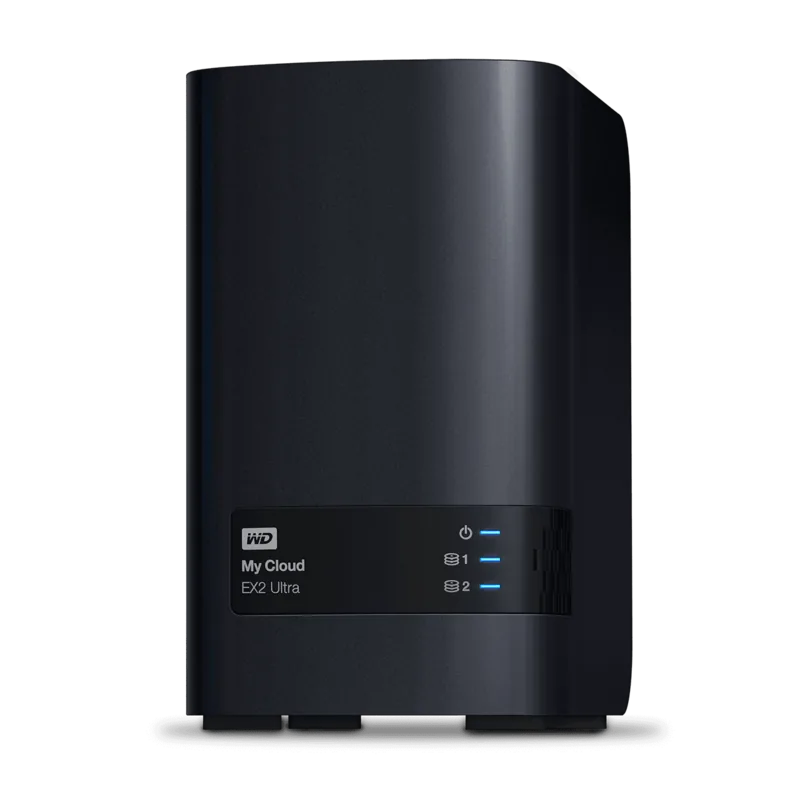
Western Digital WD My Cloud EX2 Ultra NAS
The Western Digital WD My Cloud EX2 Ultra is a high-performance, two-bay Network Attached Storage (NAS) device designed for home and small office environments. It serves as a private cloud storage solution, allowing users to keep all their content in one safe place on their local network rather than relying on remote public servers. This setup eliminates monthly fees and ensures that data location remains transparent and under user control.
Key Features and Capabilities
This device offers robust data protection through multiple backup options, including RAID 1, USB, cloud, or LAN/WAN backups. Users can choose between a diskless enclosure to install their own drives or a populated system featuring WD Red hard drives optimized for 24x7 operation. The EX2 Ultra supports various drive management modes such as RAID 0, RAID 1, JBOD, and spanning, providing flexibility in balancing performance and redundancy.
Media streaming is a central function of the My Cloud EX2 Ultra. It features integrated DLNA/UPnP media servers and a built-in iTunes server, enabling seamless streaming of videos, photos, and music to connected TVs, gaming consoles, and other compatible devices. Additionally, the device supports mobile access via iOS and Android apps, allowing users to view files, stream media, and sync data from anywhere with an internet connection.
Management and Expansion
A powerful web-based dashboard simplifies system administration, offering tools for managing users, groups, and shares. Administrators can set quotas, assign permissions, and monitor device health, including CPU, RAM, and network activity. The system includes two USB 3.0 ports for expanding storage capacity by attaching external hard drives directly to the NAS.
For advanced users, the EX2 Ultra provides iSCSI target support, volume virtualization, and a suite of customizable apps such as Transmission, Joomla!, and phpBB. Energy-saving features like disk spin-down and scheduled power on/off help reduce operational costs. With its combination of secure private cloud storage, extensive media capabilities, and flexible management options, the WD My Cloud EX2 Ultra stands out as a comprehensive solution for personal and small business data needs.
Search for 67,706 Manuals online


Type-in Brand or Model