
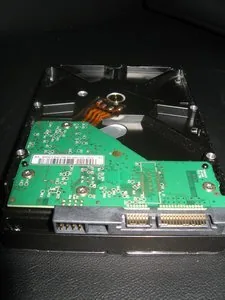
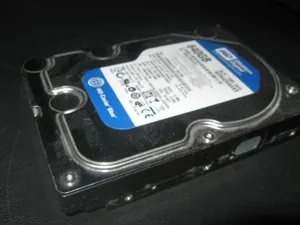
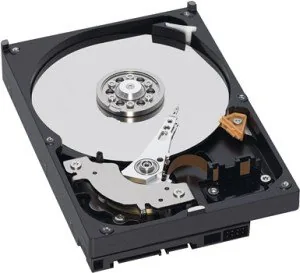
Western Digital Caviar Blue AAKS Manual
PDF manual · 59 Pages
English



Quick check
Incorrect answer, please try again.
Chat with your Western Digital Caviar Blue AAKS manual using AI
Get instant AI answers from your Western Digital Caviar Blue AAKS manual
Ask anything about the Western Digital Caviar Blue AAKS. Answers come from this manual, with the pages they are based on.
Ask a Question
Do you recommend Caviar Blue AAKS?
Yes NoFrequently Asked Questions
Models in the series support SATA 3 Gb/s (AAKS) and SATA 6 Gb/s (AAKX). Verify the specific model suffix to confirm whether the drive uses SATA Gen1/Gen2 (3 Gb/s) or SATA Gen2/Gen3-capable signaling per the manual.
Is this answer helpful?
NoTouch parks the recording heads off the disk surface during spin-up, spin-down, and when powered off, preventing head-to-media contact. This reduces head and media wear, improves non-operational shock tolerance, and enhances long-term reliability.
Is this answer helpful?
The drive supports S.M.A.R.T. (with SCT extensions), Data Lifeguard diagnostics, self-test routines (quick, extended, conveyance, selective), automatic defect retirement, and ATA error logging to detect, log, and remediate media issues proactively.
Is this answer helpful?
Yes—SATA supports hot-plug, but reliable operation depends on the enclosure/backplane design to control inrush current (precharge resistors or hot-plug controllers) and ensure staged connector mating per SATA specifications.
Is this answer helpful?
Operating ambient temperature is 10°C to 60°C with base casting temperature limits; non-operating range is −40°C to 70°C. Humidity up to 95% non-condensing is supported within specified wet-bulb limits and thermal gradients detailed in the manual.
Is this answer helpful?
CacheFlow dynamically partitions and adapts the drive buffer for read and write caching, detecting sequential or random patterns and using predictive reads and segmented caching to increase cache hit rates and reduce media accesses.
Is this answer helpful?
The ATA Security Mode feature supports user and master passwords, High and Maximum security levels, and secure erase commands. Master password and security erase behavior depend on the configured security level; Maximum mode may require secure erase to regain access.
Is this answer helpful?
Advantages and Disadvantages
Advantages

- Reliable 7200 RPM performance with 16 MB cache for responsive desktop use.
- IntelliSeek and NoTouch technologies reduce power, noise, wear, and vibration.
- Comprehensive reliability features: S.M.A.R.T., Data Lifeguard, self-tests, and defect management.
- Support for SATA features: NCQ, staggered spin-up, hot-plug (with proper backplane design).
- Thermal design and FDB bearings improve durability, acoustics, and shock tolerance.
Disadvantages

- Limited 16 MB cache may lag behind modern high-cache drives for heavy workloads.
- Performance and interface vary by model (3 Gb/s vs 6 Gb/s); pick carefully for needs.
- Not SSD-class speeds—mechanical limitations affect random I/O compared to flash storage.
- Hot-plug dependability requires compatible backplane and proper inrush-current control.
- Power-up spin cycles and frequent spin-up/spin-down reduce lifespan if mismanaged.
Product Specification
Form Factor
3.5" (Width)
Interface
SATA 3Gb/s
Rotational Speed
7200 RPM
Cache
16MB
Recording Method
Conventional Magnetic Recording (CMR)
Product Description
Western Digital WD Caviar Blue AAKS HDD Manual
The Western Digital WD Caviar Blue AAKS HDD Manual outlines a reliable 3.5-inch SATA hard drive family designed for desktop and entry-level server usage. These WD Caviar Blue drives deliver 7200 RPM performance, low acoustics, and robust feature sets—balancing capacity, speed, and long-term dependability. With capacities up to 500 GB in the XL500S family, models include SATA 3 Gb/s (AAKS) and SATA 6 Gb/s (AAKX) interfaces, 16 MB cache, and technologies aimed at improving performance, reducing wear, and protecting data.
WD integrates Perpendicular Magnetic Recording (PMR) for increased areal density and Femto slider heads for faster, more accurate track seeking. IntelliSeek optimizes seek speeds to lower noise, vibration, and power consumption, while NoTouch Ramp Load parks heads off the platter to reduce wear and improve shock tolerance. CacheFlow caching algorithms adapt to workloads to improve read/write efficiency and responsiveness.
Reliability features receive emphasis: Data Lifeguard utilities, S.M.A.R.T. monitoring with SCT extensions, extensive self-test options (quick, extended, conveyance, selective), and automatic defect retirement help detect and remediate developing media issues. Thermal management, fluid dynamic bearings (FDB), ducted airflow, and environmental filtration are included to maintain stable operation and extend component life.
For system integrators, the manual details mechanical dimensions, mounting, connector pinouts, power and current requirements, shock and vibration ratings, and operating temperature/humidity ranges. It describes SATA features such as Native Command Queuing (NCQ), staggered spin-up, hot-plug considerations, and activity signaling (SATA power pin 11). Security Mode supports user and master passwords and multiple security levels, including secure erase behaviors.
The drive supports extensive ATA command sets (including ATA-8), S.M.A.R.T. attributes and logs, SCT commands (Write Same, Read/Write Long, Temperature Reporting), and 48-bit LBA for large-capacity addressing. Performance specs include nominal 7200 RPM, ~4.2 ms average latency, sustained transfer figures per model, and 16 MB buffer. Power management modes (idle, standby, sleep) and recommendations for host-driven spin management are provided to balance performance and longevity.
Overall, the WD Caviar Blue AAKS HDD offering combines mainstream performance with protective features and diagnostics suitable for desktops, workstations, and modest server tasks. Integrators and enthusiasts will find detailed technical and installation guidance to ensure correct deployment and reliable operation.
Notes
- Models vary by interface speed (3 Gb/s vs 6 Gb/s) and capacity; consult model number spec for exact features.
- S.M.A.R.T. and Data Lifeguard tools enhance proactive monitoring and recovery.
- Hot-plug reliability depends on enclosure/backplane design and inrush current handling.
Search for 67,706 Manuals online


Type-in Brand or Model