
Weller WXR 3030 Manual
PDF manual · 139 Pages
English



Quick check
Incorrect answer, please try again.
Chat with your Weller WXR 3030 manual using AI
Get instant AI answers from your Weller WXR 3030 manual
Ask anything about the Weller WXR 3030. Answers come from this manual, with the pages they are based on.
WXR 3030 Maintenance Schedule
Regularly check the vacuum filter for contamination and replace it if necessary. Operating without a filter can damage the vacuum pump.
Clean the operator panel with a suitable cleaning cloth if it is dirty or contaminated.
Ask a Question
Do you recommend WXR 3030?
Yes NoFrequently Asked Questions
The station operates within a Celsius range of 100 to 450 degrees, extendable up to 550 degrees depending on the tool used. In Fahrenheit, this translates to 200 to 850 degrees, with a potential maximum of 999 degrees.
Is this answer helpful?
Yes, the station features a USB port that allows users to perform firmware updates automatically by inserting a memory stick. The process begins when the station is powered on after inserting the stick.
Is this answer helpful?
You can activate a password lock function via the parameter menu. Once enabled, only fixed temperature keys remain operational until the three-digit code is entered to unlock all other settings.
Is this answer helpful?
Operating without a filter can cause irreparable damage to the vacuum pump. The system warns users to check for a main filter before starting any desoldering work to prevent catastrophic failure.
Is this answer helpful?
Yes, the COM 1 interface can be configured to accept footswitch inputs for activating air flow, vacuum, or PickUp functions, allowing for hands-free operation during critical tasks.
Is this answer helpful?
Absolutely. The WXR 3030 is built with an anti-static housing to ensure safe handling of sensitive electronic components and to meet ESD (Electrostatic Discharge) safety standards.
Is this answer helpful?
Advantages and Disadvantages
Advantages

- Highly accurate digital temperature control with real-time feedback
- Multi-channel support allows simultaneous management of various tools
- Comprehensive safety features including overload cut-out and auto-shutoff
- USB connectivity enables easy firmware updates and monitoring
- Ergonomic design reduces operator fatigue during extended use
Disadvantages

- Requires specific original Weller tools for optimal sensor recognition
- Filter maintenance must be performed regularly to avoid pump failure
- Initial setup may require reading extensive manual for full parameter configuration
Product Specification
Power
420W (120V)
Temperature
212-842°F
Weight
14.77 lbs
Package Contents
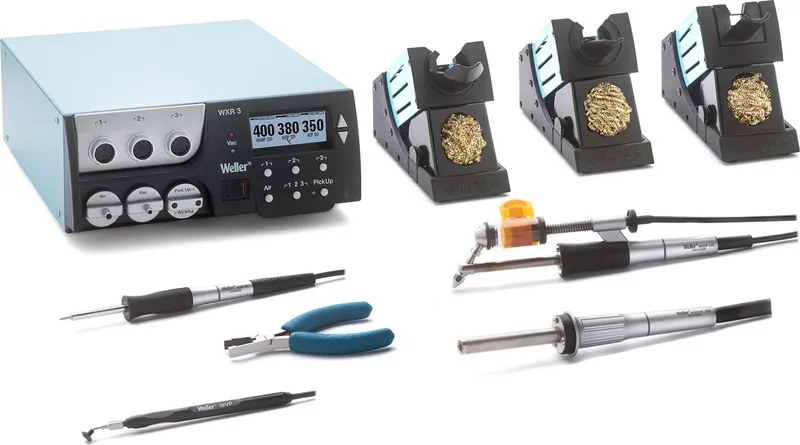
Soldering iron WXP65, Desoldering pump WXDP 120, Hot air gun WXHAP 200, 3x soldering iron stands, Vacuum pipette, Desoldering tweezers
Product Description
Master Precision with the Weller WXR 3030 Reworkstation
The Weller WXR 3030 Reworkstation Digital Soldering Station Set stands as a pinnacle of reliability for electronics professionals who demand absolute precision. This digital powerhouse is designed to handle the most complex rework tasks with ease, offering a seamless blend of advanced technology and robust build quality. Whether you are repairing circuit boards or assembling delicate components, this station ensures that every joint is perfect.
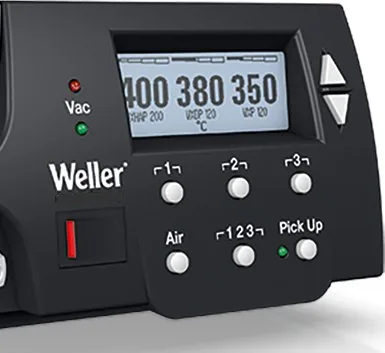
At the heart of the WXR 3030 is its intelligent temperature control system. It features a high-resolution display that clearly shows actual versus nominal temperatures, allowing operators to maintain strict thermal profiles. The station supports multiple channels, enabling users to manage different tools simultaneously without compromising performance. Its digital interface simplifies operation, making it accessible even for those new to professional rework stations while providing deep customization options for veterans.
Safety is paramount in the design of this unit. The Weller WXR 3030 includes comprehensive safety features such as overload protection and automatic shut-off timers to prevent accidental burns or fire hazards. The ergonomic design minimizes user fatigue during long sessions, and the anti-static housing protects sensitive electronic components from electrostatic discharge. With its USB connectivity, updating firmware or monitoring parameters is straightforward, ensuring the device remains at the forefront of soldering technology.
The integration of vacuum desoldering and hot air capabilities makes this station a true all-in-one solution. Users can switch between soldering, desoldering, and component removal tasks quickly. The included filters and nozzles are easy to replace, maintaining peak efficiency over time. For workshops where consistency is key, the WXR 3030 delivers repeatable results day after day.
Key Notes
- The station requires a stable power supply matching the voltage specifications on the nameplate.
- Regular filter changes are essential to protect the vacuum pump from damage.
- Always use original Weller replacement parts to maintain warranty and performance standards.
Search for 67,732 Manuals online


Type-in Brand or Model