
Weller WXP 200 Manual
PDF manual · 21 Pages
English



Quick check
Incorrect answer, please try again.
Ask a Question
Do you recommend WXP 200?
Yes NoFrequently Asked Questions
It provides guidance for safe and intended operation of the WXP 200 soldering iron. The material emphasizes correct handling of hot parts, proper placement in the original holder, and following the relevant Weller power supply or station instructions used with the iron.
Is this answer helpful?
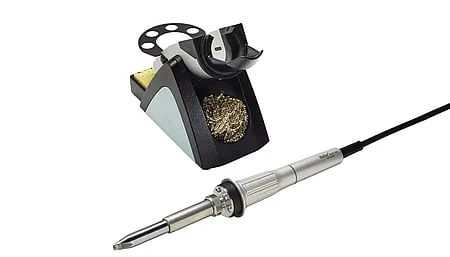
The documentation shows an option where the WXP 200 is bundled with a stand designated as WDH 31. A set configuration like this is meant to help keep your workspace organized and support consistent workflow between soldering tasks.
Is this answer helpful?
The provided instructions reference temperature display in both Celsius and Fahrenheit (C and F). That means you can align the temperature setting and monitoring with your preferred unit system when operating your Weller setup.
Is this answer helpful?
Key steps highlighted include placing the hot tool in its original holder, keeping all flammable items away, not working on live parts, and using suitable protective clothing. The material also stresses adequate ventilation, since soldering and rework can generate fumes.
Is this answer helpful?
The guidance indicates that the manufacturer does not accept responsibility for uses that deviate from the described purpose or for unauthorized modifications. Stick to soldering and desoldering of the intended components and conditions described for the WXP 200 family.
Is this answer helpful?
Yes. The material advises reading and following the operating manual for the specific Weller WXA or WXR power supply units that supply your soldering setup. Using the correct station instructions helps ensure safe operation and proper integration with the iron.
Is this answer helpful?
Advantages and Disadvantages
Advantages

- Manual-based guidance supports correct, intended use for better soldering consistency.
- WXP 200 fits into the Weller WXP ecosystem with tip-related compatibility across models.
- Set configuration includes a dedicated stand option (WDH 31) to improve bench organization.
- Operational cues (like START/STOP and OFF, with C/F indications) help streamline workflow.
Disadvantages

- Safety requirements are strict, including proper holder use and keeping away from flammables.
- Use is restricted to specified conditions and purposes, limiting improvisation outside instructions.
- Live-part work is discouraged, requiring careful control of your working environment.
- Fume handling and ventilation are emphasized, which may require additional workspace setup.
Product Specification
Power
200W (24V)
Temperature
212-842°F
Soldering tip width
0.05 in
Heating time
19s
Scope of delivery
Soldering tip
Product Description
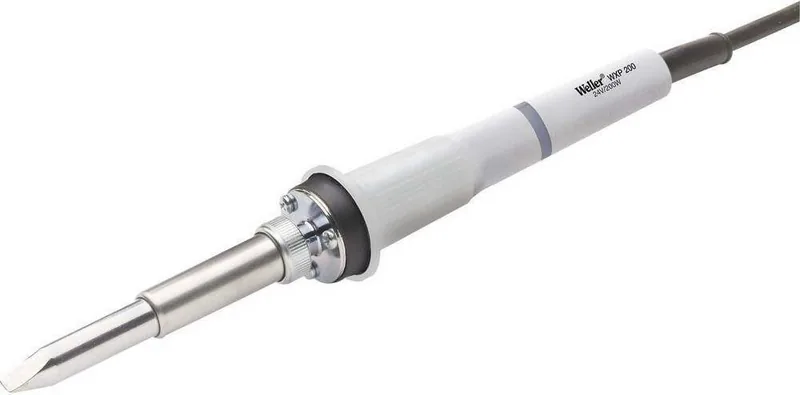
Weller WXP 200 Soldering Iron
If you want precise soldering for electronics work, the Weller WXP 200 Soldering Iron Manual is a valuable companion. The WXP 200 belongs to Weller's widely used WXP tip platform and is built for reliable soldering and efficient rework when you are working on surface-mount assemblies.
In practical terms, the WXP 200 experience is centered on dependable operation and predictable workflow. The system is designed around temperature control and quick start/stop handling, so you can move from setup to fine soldering without unnecessary friction. The manual-oriented guidance emphasizes that successful results depend on using the equipment exactly as intended, including safe handling around hot working parts.
Another highlight is compatibility with Weller soldering accessories and toolheads. In the documentation context, the WXP line appears alongside multiple WXP variants and setup options, including “set” configurations paired with a dedicated soldering stand (shown for the WXP 200 as bundled with WDH 31). This helps keep your work area organized and ensures the iron is returned to its holder properly between tasks.
For daily use, pay attention to temperature unit indications (C or F) and the clear operating states described in the material (including OFF handling). The overall approach supports consistent work habits, which matters when you are soldering delicate leads and pads.
Key results
- Designed for routine soldering and desoldering of surface-mount components with stable, temperature-controlled operation.
- Set-ready workflow, including a dedicated stand option (WDH 31) to improve bench organization.
- Clear operational cues like START/STOP and OFF handling to support consistent handling during work.
- The manual focus on correct use and safety helps reduce risk when working with hot equipment.
Safety and usage notes
- Always place the hot iron in its original holder and keep flammables away from the hot soldering area.
- Do not operate on live parts, and follow the relevant Weller station power-supply instructions used with your setup.
- Use suitable protective gear and ensure adequate ventilation, especially when working with fumes.
- Use only the intended purpose described for the WXP 200 family, and avoid unauthorized modifications.
Search for 67,732 Manuals online


Type-in Brand or Model