Manual.ly Logo

Voltcraft WPB-10000 Manual

0.0 · 0 Ratings

PDF manual · 2 Pages

English

M: QW-35-FL
page

/ 2

Loading...
682ca4043649ea8791d1a031669f5287e639 page 2
Wired Charging
IN
OUT
CHARGING
Never connect the product to a USB port on your computer as this
may cause damage. Use a suitable USB power adaptor as a source of
power.
Do not recharge the power bank and recharge / power an external
source at the same time. This may overload / overheat the power
source.
a) Charge power bank
Using the included cable, connect one end to the micro USB port (6), and the other
end to a suitable 5 V 2 A power supply.
The USB-C
TM
output (7) can also be used to charge the power bank
(cable not included).
b) Charge mobile devices
• Insert a cable into the USB-C
TM
output, or USB-A output (8).
• Connect the other end of the cable to your mobile device charging input.
• Press the power button (3) to begin charging.
Wireless Charging
The single row of suction cups should be pointing towards the top of the mobile phone as
shown. Charging will begin upon successful contact.
Align the wireless charging points to maximize charging efficiency.
Troubleshooting
Problem Cause Solution
Wireless charging
has stopped
The charger is too hot and over heat
protection has shut the charger off.
Remove mobile device from the charger and allow
to cool down.
Wired charging has
stopped
Overload protection has been
triggered.
Disconnect the device that is causing the overload.
See “Technical Data” for max. outputs.
Cannot wireless
charge device
Wireles charging platform is not lined
up with the device charging area.
Adjust the position of the charger.
Suction cups do
not stick
Phone or suction cups are dirty.
The phone case material is porous
or uneven.
Wipe your phone and the suctions cups clean.
Use without the phone case.
Care and cleaning
• Disconnect any attached devices and turn the power off. Disconnect the product from
the power supply and allow to cool down before each cleaning.
• Do not use any aggressive cleaning agents, rubbing alcohol or other chemical solutions
as they can cause damage to the housing and malfunctioning.
• This product does not contain any components that require maintenance. Never attempt
to open or disassemble it.
• Clean the product with a dry, fibre-free cloth.
Declaration of Conformity (DOC)
Conrad Electronic SE, Klaus-Conrad-Straße 1, D-92240 Hirschau hereby declares that this product conforms to the
2014/53/EU directive.
Click on the following link to read the full text of the EU declaration of conformity: www.conrad.com/downloads
Select a language by clicking on a flag symbol and enter the product order number in the search box. You can
then download the EU declaration of conformity in PDF format.
Disposal
Electronic devices are recyclable waste and must not be disposed of in the household waste. At the end of its
service life, dispose of the product in accordance with applicable regulatory guidelines.
You thus fulfill your statutory obligations and contribute to the protection of the environment.
Technical data
Battery .............................................................LiPo 10000 mAh 37 Wh
Input voltage / current ...................................... Micro USB: 5 V/DC 2 A, 9 V/DC 2 A
USB-C
TM
: 5 V/DC 2.5 A, 9 V/DC 2 A
Output voltage / current / power ...................... USB-A, Type-C
TM
: 5 V/DC 3 A, 9 V/DC 2 A, 12 V/DC 1.5 A max. 18 W
Wireless: 5 V/DC 1 A, 9 V/DC 1.12 A
Charging time (empty to full) ........................... 5 hours (Micro-USB 5 V / 2 A)
4.5 hours (USB-C™ 5 V / 2.5 A)
3 hours (USB-C™ 9 V / 2 A)
Wireless charging ............................................Qi compatible devices
Transmission distance .....................................≤ 6 mm
Frequency range .............................................110 - 205 kHz
Material ............................................................ABS
Charging efficiency .......................................... Wired: ≥ 85 %, Wireless: ≥ 65 %
Protection ........................................................short circuit, over-charge, overload, over-heat
Operating conditions ........................................-10 to +45 °C, 20 – 75 % RH (non-condensing)
Storage conditions ...........................................-20 to +75 °C, 20 – 75 % RH (non-condensing)
Cable length ....................................................approx. 30 mm (Micro USB to USB-A)
Dimensions (L x W x H) ...................................101 x 67.5 x 22 mm
Weight .............................................................220 g
Operating Instructions
WPB-10000 Wireless Charging Power Bank
Item No. 2203056
Intended use
This product is a Qi-Certified wireless fast charger that also
provides wired charging via USB-C
TM
and USB-A outputs. It
has raised wireless coils to assist charging through thicker
phone cases and is equipped with suction cups for attaching
over the mobile device charging area. Built in safety features
include short circuit, over-charge, and overload protection.
Integrated LED indicators show the battery and power status.
It is intended for indoor use only. Do not use it outdoors.
Contact with moisture, e.g. in bathrooms, must be avoided
under all circumstances.
For safety and approval purposes, you must not rebuild and/
or modify this product. If you use the product for purposes
other than those described above, the product may be
damaged. In addition, improper use can result in short
circuits, fires, electric shocks or other hazards. Read the
instructions carefully and store them in a safe place. Make
this product available to third parties only together with its
operating instructions.
This product complies with the statutory national and
European requirements. All company names and product
names are trademarks of their respective owners. All rights
reserved.
Delivery content
• Main unit
• Micro USB to USB-A cable
• Operating instructions
Explanation of symbols
The symbol with the exclamation mark in
the triangle is used to indicate important
information in these operating instructions.
Always read this information carefully.
The arrow symbol indicates special information
and advice on operation.
The Qi symbol indicates this is a
Qi-Certified device.
For indoor use.
Safety instructions
Read the operating instructions carefully
and especially observe the safety
information. If you do not follow the safety
instructions and information on proper
handling in this manual, we assume no
liability for any resulting personal injury
or damage to property. Such cases will
invalidate the warranty/guarantee.
a) General information
• The product is not a toy. Keep it out of the reach of children
and pets.
• Do not leave packaging material lying around carelessly.
This may become dangerous playing material for children.
• Protect the product from extreme temperatures, direct
sunlight, strong jolts, high humidity, moisture, flammable
gases, steam and solvents.
• Do not place the product under any mechanical stress.
• If it is no longer possible to operate the product safely, take
it out of operation and protect it from any accidental use.
Safe operation can no longer be guaranteed if the product:
- is visibly damaged,
- is no longer working properly,
- has been stored for extended periods in poor ambient
conditions or
- has been subjected to any serious transport-related
stresses.
• Please handle the product carefully. Jolts, impacts or a fall
even from a low height can damage the product.
• Also observe the safety and operating instructions of any
other products which are connected to the product.
• Consult an expert when in doubt about the operation,
safety or connection of the product.
• Maintenance, modifications and repairs must only be
completed by a technician or an authorised repair centre.
• If you have questions which remain unanswered by these
operating instructions, contact our technical support
service or other technical personnel.
b) LiPo battery
• The rechargeable battery is permanently built into the
product and cannot be replaced.
• Never damage the rechargeable battery. Damaging
the casing of the rechargeable battery might cause
an explosion or a fire! Unlike conventional batteries/
rechargeable batteries (e.g. AA or AAA type), the casing
of the LiPo rechargeable battery does not consist of a thin
sheet but rather a sensitive plastic film only.
• Never short-circuit the contacts of the rechargeable battery.
Do not throw the battery or the product into fire. There is a
danger of fire and explosion!
• Charge the rechargeable battery regularly, even if you do
are not using the product. Due to the rechargeable battery
technology being used, you do not need to discharge the
rechargeable battery first.
• Never charge the rechargeable battery of the product
unattended.
• When charging, place the product on a surface that is not
heat-sensitive. It is normal that a certain amount of heat is
generated during charging.
c) Charger
• Risk of fire. Do not place any objects between the charging
device and the wireless charging platform (5).
• Do not use the charger outdoors or near heated surfaces.
• If you have a pacemaker or other implanted device, consult
your doctor or the manufacturer of the implanted device
before using the charger.
• Risk of fire. When charging do not leave the charger or
charging device covered with fabric or any other flammable
material.
• Risk of fire. Do not place any metal objects or metallic
labels on the charger.
• Do not place credit (magnetic) cards, magnetic recording
devices or other sensitive electronic devices too close
to the charger! There may be loss of data or damage to
sensitive instruments.
• Never use the product immediately after it has been brought
from a cold room into a warm one. The condensation
generated could destroy the product. Allow the product to
reach room temperature before connecting it and putting it
to use. This may take several hours.
• Never leave the product unattended during use.
• Make sure the specifications of any connected device
conform to the product specifications listed in the technical
data section.
• Do not short-circuit the USB ports (6), (7), and (8).
Operating Elements
4
5
6 7 8
1 2
3
1 Wireless charging indicator
Green: Charging
Red: Standby
Red/Green alternating: Charging abnormal
2 Battery level indicator
1x LED 2x LED 3x LED 4x LED
0-24 % 25-49 % 50-74 % 75-100 %
3 Power button
1x press: Check battery status / power on
Press and hold 5 sec: Power off
4 Suction cups
5 Wireless charging platform
6 Micro USB input
7 USB-C
TM
input / output
8 USB-A output
This is a publication by Conrad Electronic SE, Klaus-Conrad-Str. 1, D-92240 Hirschau (www.conrad.com). All rights
including translation reserved. Reproduction by any method, e.g. photocopy, microlming, or the capture in electronic data
processing systems require the prior written approval by the editor. Reprinting, also in part, is prohibited. This publication
represents the technical status at the time of printing.
Copyright 2020 by Conrad Electronic SE. *2203056_v1_0320_02_dh_m_en

Chat with your Voltcraft WPB-10000 manual using AI

Get instant AI answers from your Voltcraft WPB-10000 manual

Ask anything about the Voltcraft WPB-10000. Answers come from this manual, with the pages they are based on.

WPB-10000 Maintenance Schedule

As needed
Clean the product with a dry, fibre-free cloth

Disconnect all devices and let the product cool down. Do not use aggressive cleaning agents or alcohol.

As needed
Wipe suction cups and phone surface clean

If suction cups do not stick, clean both the cups and the phone/case to remove dirt or residues.

Regularly
Recharge the battery even when not in use

Charge the LiPo battery regularly during periods of non-use to maintain its condition; no prior discharge is required.

M: qwen/qwen3.8-flash

Ask a Question

0/1000

Do you recommend WPB-10000?

Yes No

Frequently Asked Questions

A

No, you should not recharge the power bank while simultaneously charging an external device. Doing so can cause the power bank to become overloaded or overheat, potentially damaging the unit.

Is this answer helpful?

A

No, the LiPo battery is permanently built into the product and cannot be replaced by the user. Attempting to open or disassemble the device is dangerous and voids the warranty.

Is this answer helpful?

A

The transmission distance for wireless charging is less than or equal to 6 mm. For best results, align the phone directly with the suction cups on the charging platform.

Is this answer helpful?

A

No, this product is intended for indoor use only. Exposure to moisture, rain, or extreme outdoor conditions can damage the device and create safety hazards.

Is this answer helpful?

A

Charging time varies by input source. It takes approximately 5 hours using a Micro-USB 5V/2A adapter, 4.5 hours with USB-C 5V/2.5A, and about 3 hours with USB-C 9V/2A.

Is this answer helpful?

M: QW-35-FL

Advantages and Disadvantages

Advantages

  • Qi-certified wireless fast charging with suction cup holder
  • High 10000 mAh capacity for extended usage
  • Multiple output options including USB-C and USB-A
  • Built-in safety protections against overheating and shorts
  • LED indicators show precise battery levels
VS

Disadvantages

  • Non-replaceable internal LiPo battery
  • Indoor use only, not weatherproof
  • Requires specific positioning for optimal wireless charging
  • Cannot charge power bank while powering another device
  • Charging efficiency is lower for wireless compared to wired
M: QW-35-FL

Product Specification

Battery Type

Lithium-Polymer

Capacity

10000mAh

Output

1x USB-A (Female), 1x USB-C (Female, shared), 1x wireless (Qi), max. 18W

Input

1x USB Micro-B (Female), 1x USB-C (Female, shared), max. 18W

Charging Time

3h

Features

Charge indicator (4x LED)

Color

Black

Dimensions

3.98x2.66x0.87in

Weight

7.76oz

Volume

9.15cu in

M: QW-35-FL

Product Description

Voltcraft WPB-10000 Induction Power Bank black - Read, Download & Print Free

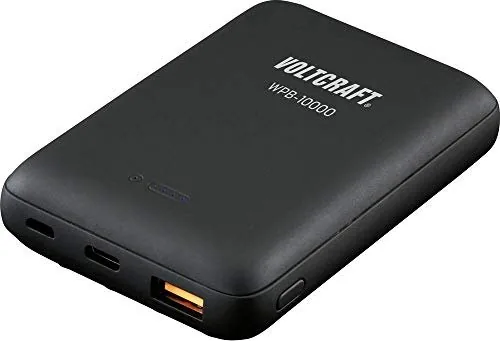
The Voltcraft WPB-10000 is a versatile power solution designed for modern mobile needs. This black induction power bank combines high-capacity storage with the convenience of wireless charging. It features a robust 10000 mAh LiPo battery that ensures your devices stay powered throughout the day. The device supports both wired and wireless charging methods, making it compatible with a wide range of smartphones and tablets.

One of the standout features is its Qi-certified wireless charging capability. The unit includes raised wireless coils that allow charging even through thicker phone cases. Suction cups are integrated into the design to securely hold your mobile device in place on the charging platform, ensuring optimal alignment for efficient energy transfer. For faster or more direct connections, the power bank offers USB-C and USB-A outputs capable of delivering up to 18 watts of power.

Safety is paramount in the design of this product. It includes multiple protection mechanisms against short circuits, overcharging, overload, and overheating. Users are advised to use only suitable USB power adapters rather than computer ports to prevent potential damage. The device also features LED indicators that clearly display the remaining battery level and charging status. Whether you need to charge via cable or wirelessly, the Voltcraft WPB-10000 provides a reliable and safe way to keep your electronics running.

M: QW-35-FL

© Copyright 2026 Manual.ly