
Voltcraft WBP-80 Manual
PDF manual · 97 Pages
English



Quick check
Incorrect answer, please try again.
Chat with your Voltcraft WBP-80 manual using AI
Get instant AI answers from your Voltcraft WBP-80 manual
Ask anything about the Voltcraft WBP-80. Answers come from this manual, with the pages they are based on.
WBP-80 Maintenance Schedule
Always disconnect the USB cable from the power supply before performing any cleaning work.
Clean the product using a dry, fiber-free cloth. Do not use aggressive cleaning agents, alcohol, or chemical solvents.
Ask a Question
Do you recommend WBP-80?
Yes NoFrequently Asked Questions
The WBP-80 measures from -10 °C up to 400 °C with a resolution of 0.1 °C and an accuracy of ±3.5 °C or 3.5%.
Is this answer helpful?
Set the camera's emissivity to match the target material (range 0.01–0.99, default 0.95) and perform a sensor calibration when ambient conditions change. Use the emissivity table for common materials as a reference.
Is this answer helpful?
Images are saved as BMP (320x240) on a microSD card up to 32 GB (not compatible with SDHC/SDXC). New cards should be formatted on first use and the device may require a restart to recognize the card.
Is this answer helpful?
The camera uses an internal non-replaceable Li-Po battery (3.7 V, 1300 mAh) charged via micro-USB at 5 V DC. Charge on a heat-resistant surface, never leave charging unattended, and avoid damaging the battery.
Is this answer helpful?
Selectable palettes include iron red, rainbow and greyscale. The device offers center-point temperature readout, dynamic high/low tracking, a right-side temperature bar, adjustable brightness and a fast thermal contrast mode.
Is this answer helpful?
Yes — the package includes software (CD-ROM) for file management and image analysis. Connect the camera to a Windows PC via the supplied USB cable; supported OS is Windows XP or newer.
Is this answer helpful?
Avoid moisture and extreme conditions, protect the camera from shocks, do not modify the device, handle the Li-Po battery carefully (do not short, puncture or incinerate) and follow local disposal regulations for electronic waste.
Is this answer helpful?
Advantages and Disadvantages
Advantages

- Wide temperature range (-10 °C to 400 °C) suitable for many inspection tasks.
- Compact, lightweight pocket form factor with tripod mount for portability and hands-free use.
- Adjustable emissivity (0.01–0.99) plus calibration improves measurement reliability.
- Onboard storage (microSD up to 32 GB) and included software for image management and analysis.
- User-friendly controls, selectable palettes and HI/LO alarms for quick diagnostics.
Disadvantages

- Limited IR sensor resolution (80x60) and modest effective image resolution (320x240 BMP).
- Low frame rate (≤9 Hz) not ideal for rapid-moving targets or smooth thermal video.
- Built-in, non-replaceable Li-Po battery may reduce long-term serviceability.
- Not compatible with SDHC/SDXC cards; max microSD capacity limited to 32 GB.
- Accuracy ±3.5 °C (or 3.5%) may be insufficient for high-precision temperature measurement.
Product Specification
Camera
80x60 (max. sensor resolution), 320x240 (max. display resolution)
Special features
SD Card, USB
Power supply
Battery operated
Dimensions
2.99x2.99x0.94in (WxHxD)
Weight
0.25 lb
Product Description
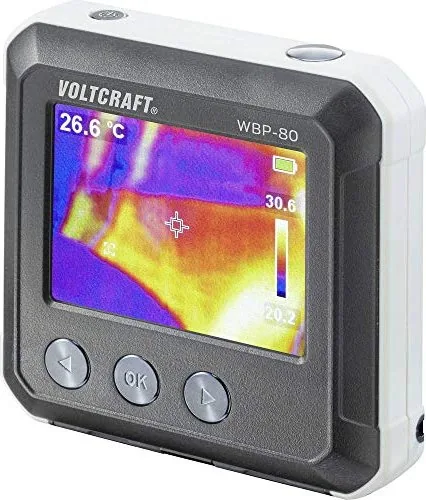
Voltcraft WBP-80 Wärmebildkamera Manual: Pocket Thermal Camera Overview
The Voltcraft WBP-80 pocket thermal camera is a compact, user-focused infrared imager designed for fast, on-the-go thermal inspections. With an 80x60 bolometer sensor and a 320x240 pixel output image format, it visualizes temperature differences in real time on a 48 x 36 mm LCD. The device measures a wide temperature range from -10 °C to 400 °C, offering a measurement resolution of 0.1 °C and accuracy of ±3.5 °C or 3.5%. Its low NETD (≤150 mK) and 1 mrad IFOV enable useful detection of hotspots, energy losses, HVAC faults, pipe blockages and structural defects where thermal imaging reveals hidden anomalies.
The camera is pocket-sized and lightweight (approx. 113 g), making it convenient for electricians, HVAC technicians, building inspectors and DIY users. It includes a built-in Li-Po battery (3.7 V, 1300 mAh) rechargeable via micro-USB, an LED charge indicator, tripod mount, and a microSD slot supporting up to 32 GB for image storage. Images are saved as BMP files (320 x 240) and can be reviewed on-device or transferred to a PC using the included USB cable and bundled software. The system runs with a ≤9 Hz frame rate suitable for handheld inspections.
Controls are straightforward: an OK/menu button, left/right navigation for quick functions such as temperature calibration and fast thermal contrast, and a dedicated photo/save/cancel workflow. The camera offers selectable palettes (iron red, rainbow, greyscale), center-point and dynamic high/low temperature tracking, adjustable emissivity (0.01–0.99, default 0.95), auto power-off settings, brightness control and HI/LO alarms for threshold alerts. Sensor calibration and emissivity adjustment help improve measurement reliability depending on surface properties.
Safety and care are emphasized: avoid moisture, extreme conditions and mechanical impact; do not attempt modifications; charge on heat-resistant surfaces and never short or damage the internal Li-Po battery. Clean with a dry, lint-free cloth and avoid solvents. End-of-life disposal should follow local electronic-waste regulations.
Notes:
- Emissivity matters: metrology depends on matching emissivity to the measured surface; a table of common material emissivities helps get accurate readings.
- Avoid storing more than ~5000 images on the card to prevent slowdowns.
- Format new microSD cards before first use; the device supports non-SDHC/SDXC microSD cards up to 32 GB.
Quick summary
- Compact thermal imaging for maintenance, inspection and troubleshooting.
- Measures -10 °C to 400 °C; resolution 0.1 °C; accuracy ±3.5 °C or 3.5%.
- 80x60 IR sensor, 320x240 image output, BMP storage, microSD support.
- Adjustable emissivity, color palettes, HI/LO alarms, rechargeable Li-Po battery.
Practical tip
Always set emissivity appropriate to the surface (e.g., human skin ~0.98, aluminum low) and perform sensor calibration when ambient conditions change to maintain measurement accuracy.
Search for 67,706 Manuals online


Type-in Brand or Model