
Voltcraft WB-80 Manual
PDF manual · 80 Pages
English



Quick check
Incorrect answer, please try again.
Chat with your Voltcraft WB-80 manual using AI
Get instant AI answers from your Voltcraft WB-80 manual
Ask anything about the Voltcraft WB-80. Answers come from this manual, with the pages they are based on.
Ask a Question
Do you recommend WB-80?
Yes NoFrequently Asked Questions
The camera has a maximum measuring range of +600 degrees Celsius. This makes it suitable for detecting high heat sources in industrial or electrical applications within its specified indoor environment.
Is this answer helpful?
No, the Voltcraft WB-80 is designed exclusively for indoor use. Exposure to rain, humidity, or extreme weather conditions can damage the device and void the warranty.
Is this answer helpful?
The device features an internal memory capable of storing more than 100 thermal images. These are saved in BMP format and can be viewed directly on the camera or transferred via USB.
Is this answer helpful?
Yes, the emissivity is fully adjustable between 0.01 and 1.00. This feature allows users to calibrate the device for different materials like metal, wood, or plastic to ensure accurate temperature readings.
Is this answer helpful?
The Voltcraft WB-80 operates using three AAA alkaline batteries. These are included in the package. Users should remove them if the device will not be used for extended periods to prevent leakage.
Is this answer helpful?
Yes, the device includes a High Alarm and Low Alarm function. Users can set specific temperature thresholds, and the camera will alert them if the measured temperature exceeds or falls below these limits.
Is this answer helpful?
Advantages and Disadvantages
Advantages

- Wide temperature range from -20 to +600 degrees Celsius
- Adjustable emissivity for accurate material measurements
- Internal storage for over 100 thermal images
- IP54 rating provides resistance to dust and water splashes
- USB connectivity for easy data transfer to computers
Disadvantages

- Low resolution 32x32 pixel sensor may lack fine detail
- Frame rate under 9 Hz can cause lag in moving targets
- Limited to indoor use only due to moisture sensitivity
- Powered by disposable AAA batteries requiring frequent replacement
- Accuracy decreases significantly on low emissivity shiny surfaces
Product Specification
Camera
32x32 (max. sensor resolution), 33 degrees (horizontal field of view), 33 degrees (vertical field of view)
Features
USB
Dimensions
3.31x6.89x2.28 inches (WxHxD)
Weight
7.48 oz
Product Description
Discover the Voltcraft WB-80 Thermal Imaging Camera
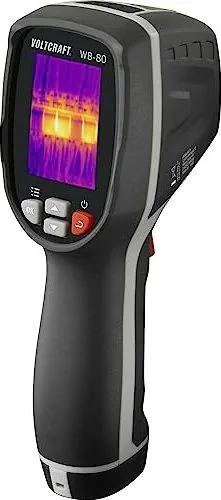
The Voltcraft WB-80 Thermal Imaging Camera is a compact and efficient tool designed for indoor temperature analysis. This device features a 32x32 pixel infrared sensor that captures thermal images with a frequency of less than 9 Hz. It offers a wide measuring range from -20 degrees Celsius to +600 degrees Celsius, making it suitable for various diagnostic tasks in electronics, building inspections, and HVAC maintenance.
Equipped with a 2-inch TFT LCD display with a resolution of 240x320 pixels, users can clearly view thermal patterns. The camera includes an internal memory capable of storing over 100 images in BMP format. A USB interface allows for easy transfer of these images to a computer for further analysis. The device runs on three AAA alkaline batteries and boasts an IP54 rating for protection against dust and water splashes.
Key Features and Capabilities
One of the standout features of this thermal imager is its adjustable emissivity setting, which ranges from 0.01 to 1.00. This adjustment ensures accurate readings across different materials, from organic surfaces to metals. The camera also supports automatic hot and cold spot tracking, helping users quickly identify problem areas. Users can customize color tables, set alarms for specific temperature thresholds, and adjust the fusion distance between visible and infrared light for better image clarity.
Operational Notes
This device is intended for indoor use only. Exposure to moisture or outdoor elements should be avoided to prevent damage. The camera automatically shuts off after ten minutes of inactivity to conserve battery life. When cleaning the lens or body, use a soft, dry cloth and avoid harsh chemicals. Always ensure the correct polarity when inserting batteries to avoid leakage issues.
Important Reminders
- Keep the device away from children as it is not a toy.
- Do not attempt to modify the internal components.
- Dispose of batteries according to local environmental regulations.
- Calibration should be performed by professionals if accuracy seems compromised.
Search for 67,706 Manuals online


Type-in Brand or Model