
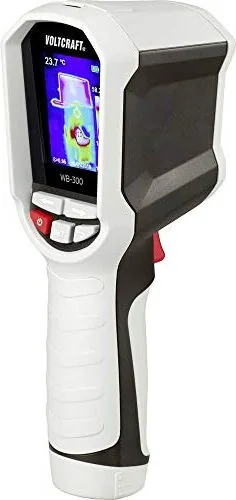
Voltcraft WB-300 Manual
PDF manual · 92 Pages
English



Quick check
Incorrect answer, please try again.
Chat with your Voltcraft WB-300 manual using AI
Get instant AI answers from your Voltcraft WB-300 manual
Ask anything about the Voltcraft WB-300. Answers come from this manual, with the pages they are based on.
WB-300 Maintenance Schedule
Calibrate the thermal imaging camera once a year to ensure long-term accuracy.
Regularly inspect the device for technical safety issues such as casing damage or deformation.
Wipe the casing and display with a clean, lint-free, antistatic, slightly damp cloth. Allow to dry completely before use.
Remove loose particles with compressed air, then wipe with a fine brush and soft lint-free cloth moistened with water or lens cleaner.
Free maintenance reminders
Timed to your purchase date. Always free, unsubscribe anytime.
Ask a Question
Do you recommend WB-300?
Yes NoFrequently Asked Questions
The maximum measurable temperature is 400 degrees Celsius.
Is this answer helpful?
No, the camera cannot measure through transparent surfaces and will only read the glass temperature.
Is this answer helpful?
Go to system settings in the menu and select Language, then choose English or German.
Is this answer helpful?
It supports microSD cards up to 32 GB in FAT32 format.
Is this answer helpful?
It is splash-resistant with an IP54 rating but not fully waterproof for submersion.
Is this answer helpful?
No, only specific rechargeable Lithium Ion batteries are permitted for operation.
Is this answer helpful?
The battery typically lasts approximately three hours during normal usage.
Is this answer helpful?
Advantages and Disadvantages
Advantages

- Wide temperature range from -10 to +400 C for diverse applications.
- Durable IP54 rating protects against dust and water spray.
- Adjustable false color palettes enhance thermal contrast visibility.
- Built-in microSD slot allows convenient image storage and transfer.
- Rechargeable Li-Ion battery offers up to 3 hours of runtime.
Disadvantages

- Not ATEX certified so it cannot be used in explosive areas.
- Fixed focus limits measurement to objects at least 25 cm away.
- Cannot measure temperatures through transparent materials like glass.
- Manual requires careful reading to configure emissivity correctly.
- Battery access requires unscrewing a compartment cover.
Product Specification
Camera
160x120 (max. Sensor Resolution), 240x320 (max. Display Resolution), 50 deg (Horizontal View Angle), 38 deg (Vertical View Angle)
Features
microSD Card, USB
Power
Battery (Li-Ion)
Dimensions
3.15 x 8.31 x 2.80 in (WxHxD)
Weight
0.80 lb
Product Description
Advanced Thermal Vision for Professionals
In the field of diagnostics, seeing the unseen is crucial for ensuring safety and efficiency. The Voltcraft WB-300 Thermal Imaging Camera offers a robust solution for identifying heat signatures and temperature anomalies effectively. This device empowers users to perform non-contact infrared temperature measurement across a broad industrial and residential range. Operating from minus ten to plus four hundred degrees Celsius, it captures data that standard contact thermometers simply miss. The core sensor utilizes a modern bolometer matrix with a specific resolution of 160 by 120 pixels. This high pixel count ensures that 19200 individual temperature points are measured and processed simultaneously. The results are displayed instantly on a color TFT screen, rendering heat distribution in vivid false colors for clear interpretation.
Intuitive Operation and Settings
Managing the device is designed for ease of use by both beginners and experts. A graphical interface simplifies menu navigation through dedicated function buttons located below the display. Users can customize the view by selecting from multiple color palettes such as Iron, Rainbow, or Grey scales. These options enhance contrast depending on the ambient lighting or specific application needs. The system supports adjustable crosshairs to highlight minimum or maximum temperatures within the captured frame. Additionally, the emissivity level can be set manually to ensure accuracy on different material surfaces like shiny metal or matte plastic. This flexibility makes the tool suitable for electrical work, building insulation inspections, or automotive engine diagnostics.
Power and Storage Capabilities
Portability is key for mobile field technicians who travel daily. The camera runs on a single removable rechargeable lithium ion battery type 18650. Charging is handled via a micro USB port using standard five volt direct current sources from a computer or adapter. Once fully charged, the unit provides approximately three hours of continuous operation during measurement tasks. Captured thermal images can be saved directly to a removable microSD card for later analysis. The package includes a 32 GB card, allowing for extensive data logging. Files are saved in bitmap format, which is compatible with standard graphics software for further processing and reporting. Refer to the Voltcraft WB-300 Thermal Imaging Camera Manual for detailed setup and connectivity instructions.
Durability and Safety Considerations
Rugged construction protects the investment during daily transport and rough handling. The housing meets the IP54 standard, offering protection against dust and water splashes from any direction. It is engineered to survive accidental drops from heights up to two meters without sustaining critical damage. However, strict safety warnings apply regarding hazardous environments. The unit is not ATEX protected, so it must not be used in potentially explosive atmospheres containing gases. Regular maintenance involves cleaning the lens with soft fibers and avoiding harsh chemicals or abrasives. Proper care ensures the longevity and precision of the infrared detector over many years of active use.
Search for 67,706 Manuals online


Type-in Brand or Model