
Voltcraft WB-200 Manual
PDF manual · 92 Pages
English


Quick check
Incorrect answer, please try again.
Chat with your Voltcraft WB-200 manual using AI
Get instant AI answers from your Voltcraft WB-200 manual
Ask anything about the Voltcraft WB-200. Answers come from this manual, with the pages they are based on.
WB-200 Maintenance Schedule
To ensure accuracy over a long period, the thermal imaging camera should be calibrated at least once a year.
Regularly check the device for technical safety, such as damage to the casing or deformation.
Use a clean, lint-free, antistatic, slightly damp cloth. Do not use abrasive detergents, petrol, alcohol, or sharp tools.
Remove loose particles with compressed air, wipe residue with a fine brush, and clean surface with a soft lint-free cloth moistened with water or lens cleaner.
Free maintenance reminders
Timed to your purchase date. Always free, unsubscribe anytime.
Ask a Question
Do you recommend WB-200?
Yes NoFrequently Asked Questions
The device measures temperatures between minus ten and plus four-hundred degrees Celsius using its infrared sensor.
Is this answer helpful?
Yes, images are saved in bitmap format on a microSD card for later viewing.
Is this answer helpful?
The lithium-ion cell provides approximately five hours of operation on a single charge.
Is this answer helpful?
It is not fully waterproof but has an IP54 rating protecting against dust and water jets.
Is this answer helpful?
No, the sensor measures the glass surface temperature rather than objects behind it.
Is this answer helpful?
Check the battery status first and recharge it using the provided micro USB cable.
Is this answer helpful?
Use a soft lens cloth and compressed air to remove debris without damage.
Is this answer helpful?
Advantages and Disadvantages
Advantages

- Non-contact infrared temperature measurement from -10 to +400 degrees Celsius
- IP54 protection against dust and splash water for durability
- 80 x 60 pixel bolometer resolution captures 4800 heat points
- Reusable microSD card storage allows offline data analysis
- Three selectable color palettes optimize contrast for different tasks
Disadvantages

- Low pixel resolution may lack detail in small objects compared to high end models
- Cannot measure temperature through glass as it reflects surface heat instead
- Not ATEX certified so it is unsafe for explosive environments or zones
- Battery must be removed during long storage to prevent corrosion damage
- Device heats up during charging so requires non-flammable surfaces
Product Specification
Camera
80x60 (max. sensor resolution), 240x320 (max. display resolution), 50 deg (horizontal field of view), 38 deg (vertical field of view)
Features
microSD card, USB
Power Supply
Battery powered (Li-Ion)
Dimensions
3.07x8.39x2.83 inches (WxHxD)
Weight
0.86 lbs
Product Description
Mastering Heat with the Voltcraft WB-200
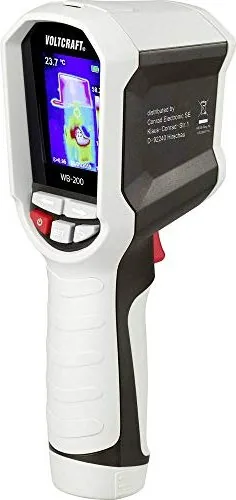
When tackling complex home inspections or electrical troubleshooting, visualizing temperature differences can save significant hours of diagnosis. The Voltcraft WB-200 Thermal Camera delivers precise infrared insights without physically touching your equipment. This device features an 80 by 60 pixel bolometer matrix resolution that visualizes heat distribution effectively across surfaces. Users can monitor a broad thermal spectrum ranging from minus ten to plus four-hundred degrees Celsius. Whether checking insulation gaps, finding overheating circuits, or tracking HVAC performance, the false-color display highlights anomalies clearly on the TFT screen.
Operation relies on a removable lithium-ion cell providing approximately five hours of continuous work per charge. Charging happens easily through a micro-USB connection found under the rubber cover on the top side. Data capture allows you to save thermal shots to a removable microSD card for later analysis on a standard computer. The interface includes three distinct color palettes tailored for different contrast needs such as Iron, Rainbow, or Grey. Safety is prioritized with an IP54 rating protecting against dust and water jets. It also withstands accidental drops from heights up to two meters without damage.
Proper setup and operation are best understood by referring to the official Voltcraft WB-200 Thermal Camera Manual to maximize lifespan and accuracy. Emissivity settings allow adjustment for various materials ensuring readings remain reliable even on metals. Metallic surfaces might reflect external heat, so applying matte tape helps refine measurement precision. Glass blocks infrared waves, so you measure the surface temperature of the pane instead of what is behind it. The camera auto-calibrates the sensor every few seconds to maintain measurement precision during use. An automatic power-off function preserves battery life when the device remains idle for a set time. Cleaning requires a soft lens cloth and non-abrasive wipes only. Remember to remove the battery during long storage periods to prevent potential corrosion issues inside the casing.
This tool suits both seasoned professionals and hobbyists looking for reliable diagnostic data. Its rugged design ensures durability in field conditions where tools take a significant beating. Tracking minimum and maximum temperature points helps identify hot spots instantly within the image frame. The compact handle fits comfortably in one hand during extended use sessions. Calibration should occur annually to maintain certified performance standards. An external USB power source must provide sufficient current for safe charging. This instrument represents excellent value for those needing visual thermal data access quickly. Troubleshooting begins by checking the battery status if the unit fails to power on or display data. Condensation can occur when moving from cold to warm environments, so allow acclimation time. Disposal must follow local regulations for electronic waste and lithium batteries separately.
Search for 67,706 Manuals online


Type-in Brand or Model