
Voltcraft VC33 Manual
PDF manual · 60 Pages
English



Quick check
Incorrect answer, please try again.
Chat with your Voltcraft VC33 manual using AI
Get instant AI answers from your Voltcraft VC33 manual
Ask anything about the Voltcraft VC33. Answers come from this manual, with the pages they are based on.
VC33 Maintenance Schedule
Replace the batteries at least once a year to prevent damage from leaking.
Inspect test leads before use. Replace if insulation is damaged or second layer becomes visible.
Examine the multimeter for signs of damage before taking measurements.
Disconnect test leads and clean with a dry, fibre-free cloth. Do not use aggressive cleaners or immerse in water.
Free maintenance reminders
Timed to your purchase date. Always free, unsubscribe anytime.
Ask a Question
Do you recommend VC33?
Yes NoFrequently Asked Questions
Press and hold the SMART button until the display shows dashes. This activates the automatic detection feature for suitable measurement modes.
Is this answer helpful?
This multimeter is rated for measurements up to six hundred volts in both direct and alternating current categories under CAT III standards.
Is this answer helpful?
No, always disconnect power before measuring resistance. Doing otherwise can damage the multimeter and create safety hazards.
Is this answer helpful?
Hold the power button and the NCV button together until you hear three beep sounds to disable automatic shutdown.
Is this answer helpful?
No, the warning states NCV is unreliable. Always verify results using a two-pole measurement for safety assurance.
Is this answer helpful?
The device operates on a single AAA size 1.5 volt battery. Replace annually to prevent leakage damage.
Is this answer helpful?
Yes, it measures up to sixty millifarads with automated range selection though manual mode is required for this function.
Is this answer helpful?
Advantages and Disadvantages
Advantages

- Automatic range selection simplifies operation for most tests.
- SMART Mode identifies settings automatically when connected.
- Included flashlight aids visibility in dark environments.
- Meets CAT III 600V safety standards effectively.
- True RMS ensures accuracy on distorted waveforms.
Disadvantages

- Capacitance and diode modes require manual selection.
- Single AAA battery life may vary with usage.
- Auto-off must be disabled via button combination.
- No built-in data logging capability for records.
- Battery compartment requires screwdriver access.
Product Specification
Measurement Units
mV, V, Ohm, mF, deg C, Hz
Measuring Range
max. 600 V
Display
Yes
Features
Battery status indicator, LED work light, auto-off after 10 min
Power Supply
Battery operated (AAA battery)
Dimensions
2.99 x 5.83 x 0.75 in (WxHxD)
Weight
0.34 lbs
Package Contents
Case, test leads
Product Description
Voltcraft VC33 Digital Multimeter Analysis
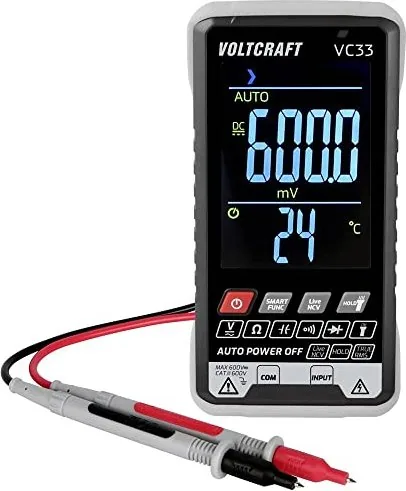
Electrical professionals and serious hobbyists alike require reliable instruments to diagnose complex circuits with absolute confidence. The Voltcraft VC33 Digital Multimeter offers a robust solution for measuring various electrical parameters with notable precision and clarity. This versatile device supports comprehensive measurements across direct current, alternating current, resistance, and capacitance ranges. It makes it an excellent choice for diagnosing issues in household appliances or industrial equipment. Users frequently appreciate the automatic range selection function which simplifies daily operation without needing constant manual adjustments.
Key Features and Capabilities Overview
One standout capability includes the advanced SMART Mode function integrated into the system. This unique feature allows the unit to identify appropriate settings automatically when connecting probes to a power source. It covers DC voltage, AC voltage, resistance, and continuity checks extremely efficiently for most common scenarios. Additionally, the tool features a dedicated Non-Contact Voltage detection system for safely checking live wires without physical contact risk. An integrated white LED flashlight illuminates dark workspaces effectively when overhead lighting fails completely.
Safety Protocols and Usage Guidelines
Maintaining personal safety remains paramount when working with electricity exceeding thirty-three volts regularly. This specific instrument meets CAT III standards up to six hundred volts against earth potential effectively. Users must ensure all test leads are thoroughly inspected before every single job to prevent accidental injury or equipment damage. Always disconnect power sources completely before measuring resistance or capacitance components to protect internal sensors. Battery replacement requires accessing the rear compartment using a standard Phillips screwdriver type tool only.
Conclusion and Final Recommendations
Overall, this digital multimeter delivers exceptional value for the price paid while maintaining high standards for user safety protocols globally. It includes essential accessories like quality test leads and a durable protective soft carrying case upon purchase. Consumers should consider keeping fresh batteries nearby to ensure uninterrupted functionality during critical repair tasks or diagnostic sessions. The convenient auto-off feature helps preserve energy over time yet can be temporarily suspended if continuous monitoring of unstable circuits is strictly required by project demands.
Product Care Notes
The LCD display presents five thousand nine hundred ninety-nine counts for high readability even in low light conditions. True RMS technology ensures accurate readings even when waveforms are distorted by modern electronic loads found in homes today. Environmental conditions matter too, so keep units between minus ten degrees and plus fifty degrees Celsius during operation. Storage humidity should remain below eighty percent to avoid internal condensation problems damaging sensitive electronics. Clean surfaces gently using dry cloths avoiding harsh chemicals that degrade plastic housing over extended periods.
Search for 67,706 Manuals online


Type-in Brand or Model