Manual.ly Logo

Voltcraft UC-3ACX002 Manual

0.0 · 0 Ratings

PDF manual · 6 Pages

English

M: QW-35-FL
page

/ 6

Loading...
7c3979f25c7683fcf90d49411e55b07f7e1f page 3
3
Operating Instructions
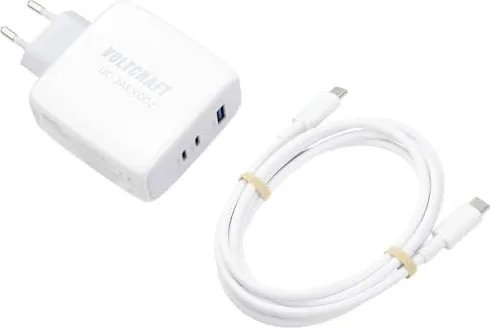
UC-3ACX002 USB Charger (100 W)
Item no: 2582114
1 Intended use
The product is a USB charger. The following charging ports are available:
■
2x USB-C
TM
(supports power delivery fast charge)
■
1x USB-A (supports super quick charge)
The product is intended for indoor use only. Do not use it outdoors.
Contact with moisture must be avoided under all circumstances.
If you use the product for purposes other than those described, the product may be damaged.
Improper use can result in short circuits, fires, electric shocks or other hazards.
The product complies with the statutory national and European requirements.
For safety and approval purposes, you must not rebuild and/or modify the product.
Read the operating instructions carefully and store them in a safe place. Make this product available to
third parties only together with the operating instructions.
All company names and product names are trademarks of their respective owners. All rights reserved.
2 Delivery contents
■
Product
■
USB-C
TM
to USB-C
TM
charging cable (2 m)
■
Operating instructions
3 Latest product information
Download the latest product information at www.conrad.com/downloads or scan the QR code shown. Fol-
low the instructions on the website.
4 Description of symbols
The symbol warns of hazards that can
lead to personal injury.
The symbol warns of dangerous voltage
that can lead to personal injury by elec-
tric shock.
Protection class 2 (double or reinforced
insulation, protective insulation).
This product must only be used in dry,
enclosed indoor areas. It must not be-
come damp or wet, as this may cause a
fatal electric shock!
5 Safety instructions
Read the operating instructions carefully and especially observe the safety informa-
tion. If you do not follow the safety instructions and information on proper handling,
we assume no liability for any resulting personal injury or damage to property. Such
cases will invalidate the warranty/guarantee.
5.1 General
■
The product is not a toy. Keep it out of the reach of children and pets.
■
Do not leave packaging material lying around carelessly. This may become dangerous playing mater-
ial for children.
■
If you have questions which remain unanswered by this information product, contact our technical
support service or other technical personnel.
■
Maintenance, modifications and repairs must only be completed by a technician or an authorised re-
pair centre.
5.2 Handling
■
Handle the product carefully. Jolts, impacts or a fall even from a low height can damage the product.
5.3 Operating environment
■
Do not place the product under any mechanical stress.
■
Protect the appliance from extreme temperatures, strong jolts, flammable gases, steam and solvents.
■
Protect the product from high humidity and moisture.
■
Protect the product from direct sunlight.
■
Do not switch the product on after it has been taken from a cold to a warm environment. The con-
densation that forms might destroy the product. Allow the product to reach room temperature before
you use it.
5.4 Operation
■
Consult an expert when in doubt about the operation, safety or connection of the product.
■
If it is no longer possible to operate the product safely, take it out of operation and protect it from any
accidental use. DO NOT attempt to repair the product yourself. Safe operation can no longer be guar-
anteed if the product:
– is visibly damaged,
– is no longer working properly,
– has been stored for extended periods in poor ambient conditions or
– has been subjected to any serious transport-related stresses.
5.5 Connected devices
■
Also observe the safety and operating instructions of any other devices which are connected to the
product.
6 Cleaning and care
Important:
– Do not use aggressive cleaning agents, rubbing alcohol or other chemical solutions. They damage
the housing and can cause the product to malfunction.
– Do not immerse the product in water.
1. Disconnect the product from the power supply.
2. Clean the product with a dry, fibre-free cloth.
7 Disposal
This symbol must appear on any electrical and electronic equipment placed on the EU mar-
ket. This symbol indicates that this device should not be disposed of as unsorted municipal
waste at the end of its service life.
Owners of WEEE (Waste from Electrical and Electronic Equipment) shall dispose of it separ-
ately from unsorted municipal waste. Spent batteries and accumulators, which are not en-
closed by the WEEE, as well as lamps that can be removed from the WEEE in a non-de-
structive manner, must be removed by end users from the WEEE in a non-destructive man-
ner before it is handed over to a collection point.
Distributors of electrical and electronic equipment are legally obliged to provide free take-back of waste.
Conrad provides the following return options free of charge (more details on our website):
■
in our Conrad offices
■
at the Conrad collection points
■
at the collection points of public waste management authorities or the collection points set up by man-
ufacturers or distributors within the meaning of the ElektroG
End users are responsible for deleting personal data from the WEEE to be disposed of.
It should be noted that different obligations about the return or recycling of WEEE may apply in countries
outside of Germany.
8 Technical data
8.1 Data according to EU regulation 2019/1782
Manufacturer Conrad Electronic SE, Klaus-Conrad-Str. 1, D-92240 Hirschau
Commercial registration number HRB 3896
Model identifier UC-3ACX002
Input voltage 100 - 240 V/AC
Input AC frequency 50 / 60 Hz
Output voltage
USB-C
TM
1:
5.0 V/DC, max. 3.0 A, max. 15.0 W
9.0 V/DC, max. 3.0 A, max. 27.0 W
12.0 V/DC, max. 3.0 A, max. 36.0 W
15.0 V/DC, max. 3.0 A, max. 45.0 W
20.0 V/DC, max. 5.0 A, max. 100 W
USB-C
TM
2:
5.0 V/DC, max. 3.0 A, max. 15.0 W
9.0 V/DC, max. 3.0 A, max. 27.0 W
12.0 V/DC, max. 3.0 A, max. 36.0 W
15.0 V/DC, max. 3.0 A, max. 45.0 W
20.0 V/DC, max. 5.0 A, max. 100 W
USB-A:
5.0 V/DC, max. 3.0 A, max. 15.0 W
5.0 V/DC, max. 4.5 A, max. 22.5 W
9.0 V/DC, max. 2.0 A, max. 18.0 W
12.0 V/DC, max. 1.5 A, max. 18.0 W
Output USB-C
TM
1 + USB-A:
max. 65.0 W + max. 22.5 W
Output USB-C
TM
2 + USB-A:
max. 65.0 W + max. 22.5 W
Output USB-C
TM
1 + USB-C
TM
2:
max. 65.0 W + max. 30.0 W
Output USB-C
TM
1 + USB-C
TM
2 + USB-A:
max. 45.0 W + max. 30.0 W + max. 22.5 W
Output current
Output power
Average active efficiency 85.0 %
Efficiency at low load (10 %) 71.0 %
No-load power consumption 0.28 W
8.2 Environment
Operating temperature .......................... 0 to +35 °C
Operating humidity ................................ 10 - 90 % RH (non-condensing)
Storage temperature .............................. -20 to +70 °C
Storage humidity .................................... 10 - 90 % RH (non-condensing)
8.3 Others
Dimensions (L x W x H) (approx.) ......... 106.3 x 68.6 x 33.8 mm
Weight (approx.) .................................... 220 g
This is a publication by Conrad Electronic SE, Klaus-Conrad-Str. 1, D-92240 Hirschau (www.conrad.com).
All rights including translation reserved. Reproduction by any method (e.g. photocopying, microfilming or the capture in
electronic data processing systems) requires prior written approval from the editor. Reprinting, also in part, is prohibited.
This publication reflects the technical status at the time of printing.
Copyright by Conrad Electronic SE.
*2582114_V2_0722_dh_mh_en 9007199846123787-2 I2/O2 en

Chat with your Voltcraft UC-3ACX002 manual using AI

Get instant AI answers from your Voltcraft UC-3ACX002 manual

Ask anything about the Voltcraft UC-3ACX002. Answers come from this manual, with the pages they are based on.

Ask a Question

0/1000

Do you recommend UC-3ACX002?

Yes No

Frequently Asked Questions

A

The charger provides a maximum output of 100 watts through the USB-C ports. This high capacity supports fast charging for high-demand devices like laptops and tablets efficiently.

Is this answer helpful?

A

No, the product is intended for indoor use only. Contact with moisture or rain should be avoided at all costs to prevent serious electric shock hazards.

Is this answer helpful?

A

Disconnect the power first. Then use a dry, fiber-free cloth to wipe the surface. Do not use water, alcohol, or aggressive cleaning agents that could damage the housing.

Is this answer helpful?

A

If the unit is visibly damaged or malfunctioning, stop using it immediately. Do not attempt to repair it yourself. Contact a professional technician for assistance.

Is this answer helpful?

A

Yes, the USB-C ports support Power Delivery fast charging protocols. Users can expect rapid charging speeds compatible with devices that support this standard.

Is this answer helpful?

M: QW-35-FL

Advantages and Disadvantages

Advantages

  • High power output of up to 100 Watts supports fast charging for laptops and tablets.
  • Features multiple ports including two USB-C and one USB-A for versatile connectivity.
  • Compact and lightweight design allows for easy transport and office integration.
  • Complies with European safety standards and offers protection class II insulation.
  • Good efficiency rating ensures minimal energy waste during active charging operation.
VS

Disadvantages

  • Indoor use only limits versatility compared to weather-resistant outdoor models.
  • Exposure to moisture is strictly forbidden due to electric shock risks.
  • Users cannot modify the internal components without voiding safety approvals.
M: QW-35-FL

Product Specification

Output

1x USB-A (Port, 18W), 2x USB-C (Port, 100W), max. 100W

Input

AC Plug

Features

incl. USB-C Cable, USB-PD 3.0

Color

white

Dimensions

4.19 x 2.70 x 1.33 in

Weight

6.17 oz

Volume

15.04 cu in

M: QW-35-FL

Product Description

Exploring the Voltcraft UC-3ACX002 USB Charger 100W White Manual Guide

When looking for a powerful charging solution, the Voltcraft UC-3ACX002 USB Charger 100W White stands out as a robust option for modern devices. This device offers multiple ports to handle simultaneous charging needs efficiently. The product supports fast charging protocols including Power Delivery on USB-C ports and super quick charge on the USB-A port. It is designed for indoor use only, ensuring safety and optimal performance within dry environments. The manual provided with the unit contains critical information regarding setup and operation to guarantee user safety.

Charging Capabilities and Efficiency

The charger delivers a maximum output of 100 watts via the USB-C ports. This high power capability makes it suitable for laptops, tablets, and smartphones that require substantial energy input. The USB-A port provides additional flexibility for legacy devices that rely on older charging standards. Combined output options allow users to connect up to three devices simultaneously without significant power loss. Efficiency is maintained with an average active efficiency of 85 percent during operation. This ensures that energy is not wasted significantly during the charging process. The input voltage ranges from 100 to 240 volts, making it versatile for travel across different regions with compatible power outlets.

Safety and Maintenance Instructions

Safety is a priority with this electrical device. It carries protection class II ratings, indicating enhanced insulation against electric shock hazards. Users must avoid contact with moisture to prevent hazardous situations like short circuits. The manual advises keeping the unit away from children and pets as it resembles electronic equipment. Cleaning should be done with a dry, fiber-free cloth without using liquids or alcohol. If damage occurs, immediate disconnection from power is required. Do not attempt self repair as this voids safety guarantees and valid warranties. Proper disposal follows WEEE regulations to protect the environment from electronic waste.

Dimensions and Physical Attributes

The compact design measures approximately 106 by 68 by 33 millimeters. It weighs around 220 grams, making it portable for office or home setups. Storage temperatures range from minus 20 to 70 degrees Celsius without damage. Operating conditions require temperatures between 0 and 35 degrees Celsius for best results. Users should allow the device to reach room temperature after cold transport to prevent condensation damage inside components. Following the Voltcraft UC-3ACX002 USB Charger 100W White Manual guidelines ensures longevity and safe operation for years of reliable use.

Important Notes for Users

  • Do not leave the product out in the rain.
  • Consult technical support for unresolved queries.
  • Dispose of according to local electronic waste laws.
  • Ensure the power supply voltage matches local standards.
M: QW-35-FL

© Copyright 2026 Manual.ly