
Voltcraft SEM8500 Manual
PDF manual · 4 Pages
English


Quick check
Incorrect answer, please try again.
Chat with your Voltcraft SEM8500 manual using AI
Get instant AI answers from your Voltcraft SEM8500 manual
Ask anything about the Voltcraft SEM8500. Answers come from this manual, with the pages they are based on.
Ask a Question
Do you recommend SEM8500?
Yes NoFrequently Asked Questions
Download the Tuya Smart app on your phone. Plug the device into power, then follow the in-app instructions to pair it with your Wi-Fi router. The mechanical switch must be turned on first for pairing mode.
Is this answer helpful?
No, this product is designed strictly for dry indoor environments. Using it outside exposes it to rain and humidity which causes fatal electric shock risks and device damage.
Is this answer helpful?
The integrated overcurrent protection system activates. It automatically shuts down the socket with the highest power consumption to prevent overheating or fire.
Is this answer helpful?
Yes, there is a reset button. You can perform a soft reset via the switch or a hard reset using a thin tool to press the button until the light flashes fast.
Is this answer helpful?
Yes, the USB port provides 5V DC at 2.1 amps, suitable for charging smartphones and tablets via standard USB cables.
Is this answer helpful?
Use a soft dry cloth or a vacuum cleaner to remove dust. Do not use chemical sprays or abrasive cleaners as they can damage the plastic surface finish.
Is this answer helpful?
Advantages and Disadvantages
Advantages

- Advanced Wi-Fi connectivity enables remote monitoring via the Tuya Smart app.
- High load capacity of 3680W supports powerful appliances safely.
- Integrated USB-A port charges mobile devices without extra adapters.
- Overcurrent protection prevents fire hazards from electrical faults.
Disadvantages

- Strictly limited to indoor use prohibiting outdoor applications.
- Dependence on Wi-Fi network for full smart features control.
- Standby power consumption contributes slightly to background usage.
- Fixed cable length may limit placement flexibility in large rooms.
Product Specification
Type
Sensor, Actuator
Standard
Wi-Fi (802.11a/b/g/n)
Functions
Switchable Outlet (on/off), Power Measurement, Charging Function (1x USB-A)
Topology
Star
Dimensions
10.28x4.65x2.01 in
Features
Controllable via App (iOS, Android)
Product Description
Enhancing Home Energy Management with Intelligent Power Solutions
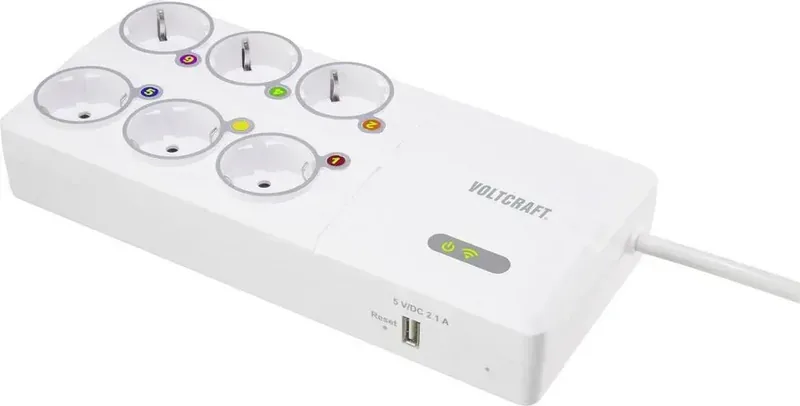
Modern households face increasing pressure to monitor electricity costs effectively while maintaining comfort and convenience. The Voltcraft SEM8500 Wi-Fi Energy Cost Meter 6-socket 3680W 1x USB-A Smart Power Strip Manual offers a comprehensive pathway to achieve these goals. This sophisticated device integrates seamlessly into existing electrical infrastructure, providing six distinct outlets capable of handling substantial loads up to 3680 watts. Each socket works individually under cloud supervision, allowing granular control over connected appliances. A dedicated USB-A port also supplies 5 volts DC at 2.1 amps for mobile devices, eliminating the need for separate chargers on your workspace.
Central to its functionality is wireless connectivity via the Tuya Smart platform. Users download the application to link the unit to their local network. Once paired, real-time data streams reflect active power consumption rates. The measuring module calculates usage with high precision, aiding in identifying inefficient electronics. This insight empowers homeowners to adjust habits and reduce monthly bills significantly. The mechanical switch overrides app controls, enabling global power cycling for safety or maintenance purposes. Detailed technical specifications confirm compliance with European safety directives for consumer electronics.
Operational safety protocols are rigorous and clearly defined within the documentation. The unit must reside in dry indoor areas exclusively. Exposure to moisture leads to severe electrical hazards including potential shocks. Condensation forms when moving from cold to warm environments, necessitating a waiting period before plugging in. Thunderstorms require immediate unplug due to surge risks. Internal components heat during operation, so sensitive surfaces must be protected. Overcurrent protection automatically isolates faulty circuits to prevent fire. Maintaining accessibility of the main socket ensures emergency shut-off capability at all times.
Maintenance procedures remain simple and non-intrusive. Dust accumulation can be managed using a soft brush or vacuum cleaner without disassembly. Chemical cleaners risk damaging the protective casing. Should connectivity fail, a hard reset restores default settings by pressing the recessed button. A soft reset restarts the system while keeping configurations intact. These steps recover functionality after crashes or network changes. Packaging materials should be recycled properly according to local WEEE regulations. End users are responsible for removing personal data before disposal. Following these guidelines ensures longevity and optimal performance for years of reliable service in any smart home environment.
Important Notes
- Always wait for room temperature adaptation after transport.
- Do not cover the unit during operation to prevent overheating.
- Disconnect power immediately if liquid spills occur.
Search for 67,706 Manuals online


Type-in Brand or Model