
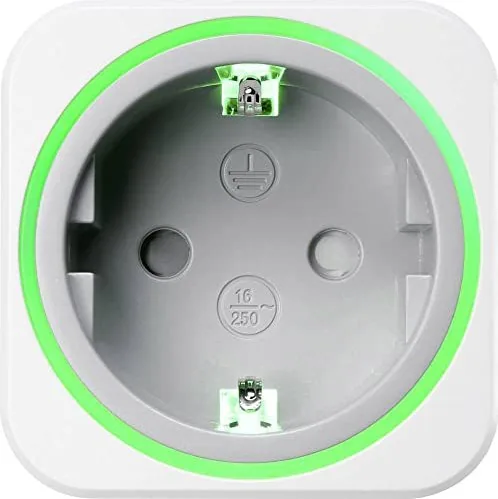
Voltcraft SEM6000SE Manual
PDF manual · 29 Pages
English


Quick check
Incorrect answer, please try again.
Chat with your Voltcraft SEM6000SE manual using AI
Get instant AI answers from your Voltcraft SEM6000SE manual
Ask anything about the Voltcraft SEM6000SE. Answers come from this manual, with the pages they are based on.
Ask a Question
Do you recommend SEM6000SE?
Yes No
Julia Schmidt
5 months ago
Is the Bluetooth connection secure enough to prevent unauthorized access or reprogramming by others?

SolarFan99
5 months ago
Can I monitor peak power usage and set a custom cost per kWh in the app?

Manual.ly
5 months ago
The device accurately measures energy consumption and allows you to set cost parameters. However, current firmware only displays cumulative hourly usage; it does not show peak values yet. Regarding costs, the default is set to 2.00 EUR, but please note this refers to the total daily calculation rather than per kWh unless configured specifically in your region settings.
Anna Weber
7 months ago
Is the Bluetooth connection secure enough for home use, or can anyone reprogram my device?
SitAut24
6 months ago
Does the app reliably save the electricity price and stay connected via Bluetooth?
Manual.ly
6 months ago
The meter works via Bluetooth without account registration. If the app display freezes or the tariff setting is not retained, please update both the app and the meter firmware, then reconnect the device. Current firmware also supports a PIN to prevent unauthorized access. If the issue persists, contact support with your phone model and app version.
Judd Abernathy
4 months ago
Can I secure the Bluetooth connection, turn off the LED ring, and rely on the app to save my electricity price settings?
Manual.ly
4 months ago
The meter supports Bluetooth operation without mandatory account registration. Current firmware versions offer a PIN option to help prevent unauthorized access. The LED ring can be disabled, including through night mode. If the app does not retain your cost-per-kWh setting or the connection becomes unresponsive, please update both the app and device firmware, then reconnect the meter. Consumption data is typically displayed in hourly totals; peak-value reporting may be limited.
Patrick Gray
3 months ago
Can I turn off the LED ring, and does the meter work without creating an account?
Manual.ly
3 months ago
Yes. The LED ring can be disabled, including for night use. The energy meter is set up via Bluetooth and does not require account registration. Keep the firmware updated and set a PIN where available to help prevent unauthorized access.
Carson Wisozk
6 months ago
Is the Bluetooth connection secure, and can I turn off the LED light at night?
Manual.ly
6 months ago
The device supports a PIN to help prevent unauthorized Bluetooth access when using the latest firmware. Please update the device and set a PIN in the app after pairing. The LED display can also be disabled or switched to night mode to avoid disturbing light in dark rooms.
Lonzo Hagenes
3 months ago
Is the Bluetooth connection protected, and can I turn off the LED light at night?
Manual.ly
3 months ago
The meter works via Bluetooth without requiring account registration. Please install the latest firmware and set a PIN to help prevent unauthorized access. The LED lighting can also be disabled or switched to night mode so it does not disturb you in dark rooms.
Leanna Langosh
5 months ago
Can the Bluetooth connection be secured, and can I turn off the LED ring at night?
Manual.ly
5 months ago
Yes. With the latest firmware, you can set a PIN to prevent unauthorized Bluetooth access. The LED ring can also be disabled using the night mode or LED settings in the app, so it will not disturb you in dark rooms.
et45
5 months ago
Is the Bluetooth connection secure, and can I turn off the LED light at night?
Manual.ly
5 months ago
The meter works via Bluetooth without requiring account registration. For privacy, keep the device within your control and use the PIN protection available in the latest firmware to prevent unauthorized access. The LED lighting can also be disabled using the app's night mode or LED settings.
Rodger Champlin
4 months ago
Is the Bluetooth connection secure, and can I turn off the LED ring or protect the meter from unauthorized access?
Manual.ly
4 months ago
The meter works via Bluetooth without mandatory account registration. Please install the latest firmware and enable the available PIN protection to prevent unauthorized access. The LED ring can be disabled, including for night use. Keep the app and firmware updated for the best connection stability and security.
Frequently Asked Questions
It measures the live power consumption of a connected device and records energy use in kWh. The app can also calculate estimated operating costs from the electricity tariff configured by the user.
Is this answer helpful?
Yes. The app can add and manage up to 10 compatible meters from one interface. Each meter can be assigned a name and icon to make connected appliances easier to identify.
Is this answer helpful?
Yes. You can create timers and up to 12 schedule rules for automatic switching. Rules can run on selected weekdays or on a specific date, and a random switching feature is also available.
Is this answer helpful?
In reminder mode, the status light flashes red and a connected smartphone can receive a notification. With overload shutoff enabled, the meter disconnects power to the connected appliance until the protection function is reset.
Is this answer helpful?
Yes. The app can export energy consumption or cost records in CSV format. These files can be saved, shared, or opened in compatible spreadsheet software for further review.
Is this answer helpful?
The default password is 0000. Leaving it unchanged may allow another nearby user to add and control the meter. A new password can contain up to four digits.
Is this answer helpful?
Advantages and Disadvantages
Advantages

- Tracks real-time power draw, energy use in kWh, and estimated electricity costs.
- Supports day and night tariffs for more accurate cost calculations.
- Offers Bluetooth switching, timers, recurring schedules, and random switching.
- Exports consumption and cost records as CSV files for backup or analysis.
- Includes overload alerts and optional overload shutoff for connected loads.
Disadvantages

- Real-time readings and app control require an active Bluetooth connection.
- Only one user can control a meter at a time while it is connected.
- Deleting a meter from the app removes its settings and recorded data.
- The default password is 0000 and should be changed for better access control.
- Timers and schedules are unsuitable for appliances that must not operate unattended.
Product Specification
Type
Sensor, actuator
Standard
Bluetooth
Function
Smart plug (on/off), power measurement function
Dimensions
2.15 x 2.15 x 2.81 in
Features
LED lighting, app-controlled
Product Description
Voltcraft SEM6000SE Energy Cost Meter, 3680W, Type F, Smart Socket Manual
The Voltcraft SEM6000SE Energy Cost Meter, 3680W, Type F, Smart Socket Manual introduces a practical way to understand and manage the electricity use of connected household devices. This Bluetooth-enabled smart socket combines live power monitoring, energy statistics, cost tracking, and scheduled switching in one compact solution. It is designed for users who want clearer insight into appliance consumption without changing their existing equipment.
Monitor energy use and running costs
Once a device is plugged into the meter, the companion app can display its current power draw in real time. It also records energy consumption in kWh and calculates costs using the electricity tariff entered by the user. Daily, monthly, and yearly views help reveal how usage changes over time, making the meter useful for checking appliances, entertainment equipment, lighting, and other suitable connected loads.
The app supports separate day and night electricity tariffs. This feature can provide more accurate cost estimates where electricity suppliers charge different rates at different times. Consumption and cost records can also be exported in CSV format, allowing users to store data, share it, or review it in spreadsheet software.
Bluetooth control for connected devices
Bluetooth connectivity enables local control from a compatible Android or iOS mobile device. The Voltcraft SEM6000SE can be switched on or off through the app, while real-time data requires an active Bluetooth connection. Up to 10 meters can be added to one app, giving households a central overview of several monitored appliances.
Each meter can be given a custom name and icon for easier identification. A night mode turns off the status light when less visible operation is preferred. Firmware updates are also delivered through the app, helping keep the meter's functions current.
Timers, schedules, and overload settings
The smart socket includes a countdown-style timer, recurring schedules, and a random switching option. Up to 12 schedule rules can be created for automatic on and off actions at selected times, weekdays, or a specific date. These tools can support routine lighting or other appliances that are safe for unattended use.
For additional awareness, an overload reminder can trigger a flashing red indicator and a smartphone notification when a chosen power threshold is exceeded. Alternatively, overload shutoff can disconnect power to the connected load after the configured limit is reached. Users should always check whether an appliance is suitable for unsupervised switching, especially with heaters, kettles, and coffee machines.
Notes
- Change the default password to prevent unauthorized control.
- Removing a meter from the app deletes its settings and recorded data.
- Bluetooth range and connection availability affect app-based control and live readings.
Search for 67,706 Manuals online


Type-in Brand or Model
Alex Taylor
5 months ago
Does the app allow setting a custom price per kWh for cost calculation, and are there any known issues with this feature?
Manual.ly
5 months ago
Yes, the device allows you to set costs per kWh in intervals ranging from 0 to 255 cents. However, some users have reported that the app does not always save these entered values correctly. Additionally, it is currently unclear which reference value the cost calculation uses by default, as the standard setting of 2.00 euros may be too high for typical kilowatt-hour rates.