Manual.ly Logo

Voltcraft DET3R Manual

4.5 · 8 Ratings

PDF manual · 4 Pages

English

M: QW-35-FL
page

/ 4

Loading...
c78610b30788e37fb37e4e0c32ed6ac02452 page 2
OPERATING INSTRUCTIONS
°
Version 03/14
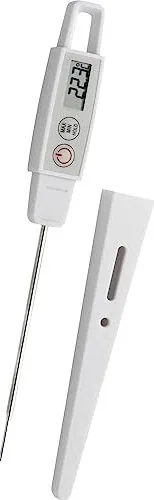
Electronic Puncture Thermometer DET3R
Item-No. 123320
1. Functions
• Present temperature, MAX/MIN/HOLD
• T 90 Measuring time approx. 8 s
• Automatic shutdown with permanent measuring function
• Puncture probe 105 mm • watertight, can be calibrated • For home, profession and hobby,
also for food according to HACCP • With plastic casing and clip • Battery provided
2. Keys
1 ON/OFF button
2 MAX/MIN/HOLD button
3 °C/°F button
3. Housing
4 Battery compartment
5 Plastic casing
6 Clip
4. Operation
• Remove the protection foil from the display.
• Open the battery compartment by turning the lid counter clockwise using a coin (direction of
arrow: OPEN).
• Insert the button cell battery (LR 44) with the „+“ pole up.
• Close the battery compartment. (Direction of arrow: CLOSE).
• All segments are shown briefly.
• The device is now ready for use.
• The display shows the actual measured temperature.
• The sensor is at the tip of the probe.
• Press the button MAX/MIN/HOLD in normal mode.
• HOLD will appear on the display.
• The measured temperature is being stored.
• Press the button MAX/MIN/HOLD three times to return to the normal operating mode.
4.1 MAX/MIN function
• Press the button MAX/MIN/HOLD twice in the normal mode and the maximum temperature
measured since the last reset (MAX) is shown.
• Press the button MAX/MIN/HOLD again and the minimum temperature measured since the
last reset (MIN) is shown.
• Press the button MAX/MIN/HOLD again to return to the normal operating mode.
• If the temperature is rising or falling in Max./Min.-operating mode respectively deviating from
the shown value a dynamic update will occur.
• To delete the stored values of maximum and minimum temperature, you have to hold the but-
ton MAX/MIN/HOLD for 3 seconds in the respective mode, while MAX or MIN is displayed.
• „—-“ will appear on the display.
• Press the button MAX/MIN/HOLD to return to the normal operating mode.
4.2 Shutdown
• Press the ON/OFF key for 2 seconds.
• OFF flashes on the display.
• The device switches off.
• If not in use, the device turns off after approx. 10 minutes.
4.3 Conversion switch °C/°F
• Use a pointy item to press the gray button in the opening on the back of the device in order
to change between °C (Celsius) and °F (Fahrenheit) as measuring unit for the temperature.
4.4 Long term measurements
• Press the button MAX/MIN/HOLD in normal mode for 3 seconds.
• X appears in the display.
• The automatic shutdown function is deactivated.
• If you press the button MAX/MIN/HOLD the automatic shutdown function will be reactivated.
5. Calibration
• Press the ON/OFF key.
• Insert the measuring probe of the device for about 3 minutes into a vessel with ice water until
the temperature no longer changes (±2°C).
• Production of ice water: Fill a thermos flask completely with crushed ice. Afterwards, fill up the
thermos flask with cold water in such a way that no air is trapped. After approx. 30 minutes,
the ice water temperature reaches 0°C (+0.1°C) in the thermos flask. Depending on the qual-
ity of thermos flask, the temperature will remain constant for up to 24 hours.
• Observe the probe to be immersed by at least two third of its length.
• Keep pressing the button °C/°F (approx. 3 s) in order to open the calibration mode.
• CAL will appear on the display.
• Wait until the temperature displayed shows 0°C (±0,5°C).
• Keep pressing the button °C/°F until 0°C appears on the display.
• The device is now calibrated.
• By releasing the °C/°F button, you return to the normal mode.
6. Replacing the battery
• Replace the battery if the battery symbol appears.
• Use alkaline batteries. Ensure that the batteries to be inserted have the correct polarity. Weak
batteries should be replaced as soon as possible in order to avoid leaking of the battery.
Batteries contain harmful acids. When handling leaked batteries, use protective gloves and
goggles!
7. Maintenance
• Store the device in a dry place.
• Do not expose the product to high temperature and strong vibrations.
• The device should only be cleaned with a soft, slightly damp cloth. Do not use an abrasive
agent or solvents!
• If the device does not work faultlessly, replace the battery.
8. Intended Use
• The device is not a toy. Keep it out of the reach of children.
• This device is not intended to be used for medical purpose or for public information.
• The technical data of this device can be altered without prior notice.
• Improper handling or unauthorised opening of the device will void the warranty.
9. Disposal
a) In general
Please dispose of the device when it is no longer of use, according to the current
statutory requirements.
b) Batteries and rechargeable batteries
As a consumer, you are required (Battery Ordinance) to responsibly dispose of all used bat-
teries and rechargeable batteries; it is forbidden to throw them away in household waste!
Contaminated batteries/rechargeable batteries are labelled with these symbols to
indicate that disposal in household waste is forbidden. The designations for the
heavy metals involved are: Cd = Cadmium, Hg = Mercury, Pb = Lead.
You can return used batteries, rechargeable batteries and button cells free of
charge to any authorised disposal station in your area, in our stores or in any oth-
er store where batteries/rechargeable batteries/button cells are sold!
Thus, you fulfil the legal requirements and contribute to protecting the environment!
10. Technical Data
Measuring range: -40°C to +250°C (-40°F to 482° F)
Operating temperature: -20°C to +50°C (-4°F to 122° F)
Accuracy : ±0,5°C at -10°C…100°C (14°F…212°F),otherwise ±1,0°C
Battery: LR 44 button cell
Shutdown function: automatically after 10 minutes
Legal notice
These operating instructions are a publication by Conrad Electronic SE, Klaus-Conrad-Str. 1, D-92240 Hirschau (www.conrad.com).
All rights including translation reserved. Reproduction by any method, e.g. photocopy, microfilming, or the capture in electronic data processing
systems require the prior written approval by the editor. Reprinting, also in part, is prohibited.
These operating instructions represent the technical status at the time of printing. Changes in technology and equipment reserved.
© Copyright 2014 by Conrad Electronic SE.
햲
햳
햶 햵 햷 햴

Chat with your Voltcraft DET3R manual using AI

Get instant AI answers from your Voltcraft DET3R manual

Ask anything about the Voltcraft DET3R. Answers come from this manual, with the pages they are based on.

Ask a Question

0/1000

Do you recommend DET3R?

Yes No
0
User Pic

victoria49

6 months ago

Is the delivery time accurate and is the service reliable?

0
User Pic

Manual.ly

6 months ago

While most customers report fast delivery and good service, one review warns about potentially unreliable shipping estimates. We recommend checking recent feedback for the latest status.

M: QW-35-FL
M: QW-35-FL
0
User Pic

Therese Sauer

4 months ago

How does this thermometer compare to others in terms of speed and calibration?

M: QW-35-FL

Frequently Asked Questions

A

To calibrate, press the ON/OFF button and immerse the probe in ice water for three minutes until stable. Hold the °C/°F button to enter calibration mode, wait for 0°C to appear, then hold the button again until the display reads exactly 0°C before releasing.

Is this answer helpful?

A

The device uses a single LR44 button cell battery. It is recommended to use alkaline batteries and replace them immediately if the low battery symbol appears to prevent leakage damage.

Is this answer helpful?

A

Yes, the measuring range extends up to +250°C (482°F), which covers boiling water temperatures comfortably without risking damage to the sensor or unit.

Is this answer helpful?

A

Use a pointed object to press the small gray button located in the opening on the back of the device. Each press toggles the unit between Celsius and Fahrenheit.

Is this answer helpful?

A

Yes, the Voltcraft DET3R is waterproof, making it safe for cleaning with damp cloths and resistant to splashes during food preparation or other liquid-based tasks.

Is this answer helpful?

A

Yes, pressing the MAX/MIN/HOLD button once freezes the current temperature reading on the display. Pressing it three times returns the device to normal operation mode.

Is this answer helpful?

M: QW-35-FL

Advantages and Disadvantages

Advantages

  • Fast T90 measurement time of approximately 8 seconds for quick results.
  • Wide temperature range from -40°C to +250°C suitable for various uses.
  • Includes MAX/MIN/HOLD functions for tracking temperature trends effectively.
  • Waterproof construction ensures durability during cleaning and usage.
  • Easy calibration process using ice water for maintaining high accuracy.
VS

Disadvantages

  • Automatic shutdown occurs after 10 minutes unless long-term mode is activated.
  • Probe length of 105 mm may be too short for deep containers in some scenarios.
  • Requires a coin to open the battery compartment which might be inconvenient.
  • Not intended for medical purposes so should not be used for health monitoring.
  • Display segments flash briefly at startup which might confuse first-time users.
M: QW-35-FL

Product Specification

Measurement range

-40°F to +482°F

Features

Auto-off after 10 min

Power supply

Battery powered (1x button cell)

Weight

1.2 oz

M: QW-35-FL

Product Description

Voltcraft DET3R Digital Thermometer - Read, Download & Print Free

The Voltcraft DET3R Digital Thermometer is a versatile and precise electronic instrument designed for a wide range of applications, from professional kitchens to home hobbyists. This device features a durable stainless steel probe with a plastic casing, making it ideal for measuring temperatures in liquids, solids, and food items while adhering to HACCP standards. Its compact design includes a convenient clip for attaching to aprons or pockets, ensuring easy access during critical tasks.

Equipped with an advanced sensor, the DET3R delivers rapid readings with a T90 measurement time of approximately eight seconds. Users can easily switch between Celsius and Fahrenheit using a dedicated button on the rear panel. The display offers clear visibility of current temperatures alongside maximum and minimum recorded values, which can be held in place for detailed analysis. An automatic shutdown feature conserves battery life after ten minutes of inactivity, though a permanent measuring mode is available for extended monitoring sessions.

Calibration is straightforward, allowing users to maintain accuracy by dipping the probe into ice water and adjusting settings via the interface. The unit comes pre-loaded with an LR44 alkaline battery, ready for immediate use upon removing the protective film from the screen. Whether you are baking, brewing coffee, or managing industrial processes, this thermometer provides reliable performance with a measurement range spanning from -40°C to +250°C.

Key Features

  • Versatile Use: Suitable for household, professional, and hobbyist applications.
  • Waterproof Design: Built to withstand splashes and cleaning routines.
  • User-Friendly Interface: Simple buttons for power, unit conversion, and data holding.
  • High Accuracy: Precise measurements within ±0.5°C under standard conditions.
  • Long Battery Life: Efficient power management extends operational time.

Important Notes

Always dispose of used batteries according to local regulations to protect the environment. Do not attempt to open the casing yourself, as this voids the warranty. Keep the device out of reach of children as it is not a toy.

M: QW-35-FL

© Copyright 2026 Manual.ly