Federal Communications Commission (FCC) Compliance Notices
Class B Interference Statement
This equipment has been tested and found to comply with the limits for a Class B digital device, pursuant to Part 15, Subpart B of the FCC Rules.
These limits are designed to provide reasonable protection against harmful interference in a residential installation. This equipment generates, uses,
and can radiate radio frequency energy and, if not installed and used in accordance with the instructions,
may cause harmful interference to radio
communications. However, there is no guarantee that interference will not occur in a particular
installation. If this equipment does cause harmful
interference to radio or television reception, which can be determined by turning the equipment o and on, the user is encouraged to try to correct
the interference by one or more of the following measures:
• Reorient or relocate the receiving antenna.
• Increase the separation between the equipment and receiver.
• Connect the equipment into an outlet on a circuit dierent from that to which the receiver is connected.
• Consult the dealer or an experienced radio/TV technician for help.
FCC Caution:
This device complies with Part 15 of the FCC Rules. Operation is subject to the following two conditions: (1) This device may not
cause harmful
interference, and (2) this device must accept any interference received, including interference that may cause undesired
operation. This product is
compliant with the Consumer Product Safety Improvement Act of 2008, Public Law 110314 (CPSIA)
CANADA-statement
This device complies with Innovation, Science and Economic Development Canada’s licence-exempt RSS(s).
Operation is subject to the following two conditions :
(1) This device may not cause interference; and
(2) This device must accept any interference, including interference that may cause undesired operation of the device.
Le présent appareil est conforme aux CNR d’Innovation, Sciences et Développement économique Canada exempt(s)
de licence(s) applicables aux appareils radio exempts de licence. L’exploitation est autorisée aux deux conditions suivantes :
(1) l’appareil ne doit pas produire de brouillage ;
(2) l’utilisateur de l’appareil doit accepter tout brouillage radioélectrique subi, même si le brouillage est susceptible
d’en compromettre le fonctionnement.
Radiation Exposure Statement:
The product complies with Canada portable RF exposure limits set forth for an uncontrolled environment and are safe for intended operation
as described in this manual. The further RF exposure reduction can be achieved if the product can be kept as far as possible from the user body
or set the device to lower output power if such function is available.
Le produit est conforme aux limites d‘exposition pour les appareils portables RF pour les Etats-Unis et le Canada établies pour un environnement
non contrôlé Le produit est sûr pour un fonctionnement tel que décrit dans ce manuel. La réduction aux exposition RF peut être augmentée si
l’appareil peut être conservé aussi loin que possible du corps de l‘utilisateur ou que le dispositif est réglé sur la puissance de sortie la plus faible si
une telle fonction est disponible.
For warranty information and service, please visit www.turtlebeach.com/warranty
WARRANTY SERVICE FOR PURCHASES IN AUSTRALIA
Our goods come with guarantees that cannot be excluded under the Australian Consumer Law. For complete details please visit
www.turtlebeach.com/warranty.
To make a warranty claim in Australia during the Warranty Period, Purchaser should contact the VTB repair centre:
Tecworks International Pty Ltd, 13 Distribution Place, Seven Hills NSW 2147, Tel: 1300 074 512
Turtle Beach Europe Ltd is obligated as a producer with a main activity of selling under The Producer Responsibility Obligations
(Packaging Waste) Regulations 2007. To fulfill our obligation we are registered with Comply Direct and their Recycling Room.
Here you will find advice and information on packaging waste management, recycling symbols and the waste hierarchy principles
of reduce, reuse and recycle. https://www.complydirect.com/the-recycling-room/ For instructions in other languages, please visit
Any product names mentioned in this guide may be trademarks or registered trademarks and are the property of their respective owners.
P/N: 426-249-005-500 RC
This symbol on the product or its packaging indicates that this product must not be disposed of with your other
household waste. Instead, it is your responsibility to dispose of your waste equipment by handing it over to a designated
collection point for the recycling of waste electrical and electronic equipment. The separate collection and recycling
of your waste equipment at the time of disposal will help conserve natural resources and ensure that it is recycled in
a manner that protects human health and the environment. For more information about where you can drop o your
waste for recycling, please contact your local authority, or where you purchased your product.
European Union and European Fair Trade Association (EFTA) Regulatory Compliance
Declaration of Conformity
Marking by this symbol:
Hereby, Voyetra Turtle Beach Inc. declares that Stealth 600 Gen 3 Headset Model: HWBB0001 & Dongle Model: HWAA0001
& HWAA0010 is in compliance with Directive 2014/30/EU(EMC), 2014/53/EU(RED), 2014/35/EU(Safety), 2015/863
amending Annex II to 2011/65/EC(RoHS), 2012/19/EU (WEEE), 2006/1907/EU (REACH), 94/92/EU (PACKAGING), 2006/66/
EU (Battery), Electromagnetic Compatibility Regulations 2016(EMC), Radio Equipment Regulations 2017(Radio), Electrical
Equipment Regulations 2016(Safety), The Restriction of the Use of Certain Hazardous Substances in Electrical and Electronic
Equipment Regulations 2012.
The full text of the EU/UK declaration of conformity is available at the following internet address:
http://www.turtlebeach.com/homologation
Radio frequency: 2400MHz
Operating frequency: 2400~2483.5MHz
Max. Output power: 4 dBm
Warning:
To prevent possible hearing damage, do not
listen at high volume levels for long periods.
QUICK START GUIDE
GUIDE DE DÉMARRAGE RAPIDE
IMPORTANT
READ BEFORE USING
IMPORTANT
LIRE AVANT UTILISATION
STEALTH 600 GEN 3
CERTIFICATION MODEL:
HEADSET: HWAA0001
DONGLE: HWAA0010
SETUP FOR XBOX® | CONFIGURATION POUR XBOX®
FR
1. Mettez l‘émetteur sans-fil en mode «Xbox»
2. Connectez l‘émetteur sans-fil au port USB-A de la Xbox
®
3. Allumez le casque
4. Attendez que le casque et l‘émetteur USB soient appairés
DE
1. Stelle den Funksender auf den Modus „Xbox“ ein
2. Verbinde den kabellosen Sender mit dem USB-A
Anschluss der Xbox
®
3. Schalte das Headset ein
4. Warte, bis Headset und USB Sender gekoppelt sind
KO
1. „Xbox“
2. Xbox
®
USB-A
3.
4. USB
EN
1. Set the USB wireless transmitter to “Xbox” mode
2. Connect the USB wireless transmitter to the
USB-A port on Xbox
®
3. Power on headset
4. Wait for headset and USB wireless transmitter to pair
ES
1. Configura el transmisor inalámbrico en el modo „Xbox“.
2. Conecta el transmisor inalámbrico al puerto USB-A
de la Xbox
®
.
3. Enciende los auriculares
4. Espera a que se emparejen los auriculares y el transmisor USB
JP
1. ワイヤレストランスミッターを「Xbox」モードに設定します。
2. ワイヤレストランスミッターをXbox
®
の USB-A
端子に接続します。
3. ヘッドセットの電源を入れます。
4. ヘッドセットとUSB トランスミッターがペアリングされるのを
待ちます。
1
3
2
4
Xbox Version only
SETUP FOR PLAYSTATION, PC AND NINTENDO SWITCH™
CONFIGURATION POUR PLAYSTATION®, PC ET NINTENDO SWITCH™
FR
1.
M
ettez l‘émetteur sans-fil en mode «USB» (concerne la version
Xbox uniquement; pour toutes les autres versions, passez à l‘étape2)
2. Connectez l‘émetteur sans-fil au port USB-A de la PlayStation
®
,
PC ou Nintendo Switch
™
3. Allumez le casque
4. Attendez que le casque et l‘émetteur USB soient appairés
DE
1. Stelle den Funksender auf den Modus „USB“ ein (nur Xbox-
Version – alle anderen Versionen, fahre mit Schritt 2 fort)
2. Verbinde den kabellosen Sender mit dem USB-A
Anschluss von PlayStation
®
, PC oder Nintendo Switch
™
3. Schalte das Headset ein
4. Warte, bis Headset und USB Sender gekoppelt sind
KO
1. “USB“Xbox
2
2. USB-A
(PlayStation
®
, PCNintendo Switch
™
)
3.
4. USB
(Xbox version)
(PS/PC version)
EN
1. Set the USB wireless transmitter to “USB“ mode
(Xbox version only – all other versions, proceed to step 2)
2. Connect the USB wireless transmitter to the USB-A
port on PlayStation
®
, PC or Nintendo Switch
™
3. Power on headset
4. Wait for headset and USB wireless transmitter to pair
ES
1. Configura el transmisor inalámbrico en el modo „USB“
(solo en la versión para Xbox; en todas las demás
versiones, ve al paso 2).
2. Conecta el transmisor inalámbrico al puerto USB-A
en PlayStation
®
, PC o Nintendo Switch
™
3. Enciende los auriculares
4. Espera a que se emparejen los auriculares y el transmisor USB
JP
1. ワイヤレストランスミッターを「USB」モードに設定します(Xbox
バージョンのみ。他のバージョンの場合はステップ2に進む。)
2. ワイヤレストランスミッターをPlayStation
®
、PC、Nintendo
Switch
™
の USB-A端子に接続します。
3. ヘッドセットの電源を入れます。
4. ヘッドセットと USB トランスミッターがペアリングされるのを待ちます。
1
3
2
4
HEADSET CONTROLS | COMMANDES DU CASQUE
Bouton QuickSwitch
Appuyer (1s) = Basculer
entre les modes RF 2,4 GHz
et Bluetooth
LED Status Indication
Indication de statut LED
EQ Mode Button
Bouton de mode égaliseur
Power Button, Superhuman Hearing
Press (2s) = Power on/o
Press (1s) = Superhuman Hearing on/o
Bouton d‘alimentation
Appuyer (2s) = Allumer
USB Charge & Update Port
Port de mise à jour
et charge USB
Mute | Désactivation du microUnmute | Activation du micro
Bluetooth Multi-Function
Button (MFB)
See Bluetooth Pairing setup
Bouton multifonction
Bluetooth (MFB)
Voir la configuration de
l‘appairage Bluetooth
Master Volume
Volume principal
Game / Chat Mix ,
Variable Mic-Monitoring
Game / Chat Mix on Xbox version only
Variable Mic-Monitoring on PlayStation
and PC versions
Volume de réglage du chat/micro
Volume du chat sur la version Xbox
uniquement. Volume de réglage du retour
micro sur les versions PC et PlayStation
Any questions? Des questions?
www.turtlebeach.com/support
Please register your product to receive important updates.
Enregistrez votre produit pour recevoir les mises à jour importantes.
www.turtlebeach.com/productregistration
For warranty, visit:
Concernant la garantie, visitez :
www.turtlebeach.com/warranty
The Stealth 600 will enter Bluetooth pairing mode when
powered on. If no Bluetooth connection is made within
two minutes, pairing mode will stop. To pair new devices,
follow the Bluetooth pairing steps on this page.
Le Stealth 600 entrera en mode d‘appairage Bluetooth
lorsqu‘il sera allumé. Si aucune connexion Bluetooth
n‘est eectuée dans les deux minutes, le mode appai-
rage se désactive. Pour appairer de nouveaux appareils,
suivez les étapes Bluetooth sur cette page.
BLUETOOTH SETUP | CONFIGURATION BLUETOOTH
The QuickSwitch button allows you to quickly switch between low-latency 2.4GHz Wireless and
Bluetooth modes based on your preference. Use Bluetooth mode to make calls, listen to music or
connect to other compatible Bluetooth devices. We recommend using the 2.4GHz Wireless mode
for best performance when gaming on consoles or PC.
Note:
Select advanced audio features available in 2.4GHz Wireless mode may not be supported
in Bluetooth mode.
Le bouton QuickSwitch vous permet de basculer rapidement entre les modes sans-fil 2,4 GHz à
faible latence et le Bluetooth selon vos préférences. Utilisez le mode Bluetooth pour passer des
appels, écouter de la musique ou vous connecter à d‘autres appareils Bluetooth compatibles.
Nous recommandons d‘utiliser le mode sans-fil 2,4 GHz pour obtenir les meilleures performances
en jeux sur consoles ou PC.
Remarque : Certaines fonctions audio avancées disponibles en mode sans-fil 2,4 GHz peuvent ne
pas être prises en charge en mode Bluetooth.
To enable Bluetooth pairing mode:
1. Press and hold the Bluetooth multi-function button (MFB)
until the “Pairing Bluetooth” voice prompt plays.
2. After placing your headset in pairing mode, select the
headset from within your device’s Bluetooth settings
menu to connect.
3. The Bluetooth MFB is used to answer and end calls as well
as media playback control when connected to a compatible
mobile phone.
QUICKSWITCH BUTTON | BOUTON QUICKSWITCH
When the headset is connected using the USB wireless trans-
mitter in the default 2.4GHz Wireless mode, incoming calls can
be answered by single pressing the Bluetooth MFB. The headset
will automatically switch back to 2.4GHz Wireless mode when
the call is ended by single pressing the Bluetooth MFB again.
Activation du mode d’appairage Bluetooth :
1. Appuyez sur le bouton multifonction Bluetooth (MFB) et
maintenez-le enfoncé jusqu‘à ce que vous entendiez le
message vocal „Pairing Bluetooth“.
2. Après avoir placé votre casque en mode d‘appairage, sélec-
tionnez-le dans le menu des paramètres Bluetooth de votre
appareil pour vous connecter.
3. Le bouton MFB Bluetooth est utilisé pour répondre et mettre
fin aux appels ainsi que pour contrôler la lecture des médias
lorsqu‘il est connecté à un téléphone portable compatible.
Lorsque le casque est connecté à l‘aide de l‘émetteur sans-fil USB
en mode sans fil 2,4 GHz par défaut, il est possible de répondre aux
appels entrants en appuyant simplement sur le bouton MFB Blue-
tooth. Le casque repasse automatiquement en mode sans-fil 2,4 GHz
lorsque l‘appel est terminé en appuyant à nouveau sur le bouton MFB.
IMPORTANT | IMPORTANT
PLEASE MAKE SURE YOUR HEADSET IS UPDATED WITH THE LATEST FIRMWARE.
VEUILLEZ VOUS ASSURER QUE VOTRE CASQUE DISPOSE DE LA DERNIÈRE
VERSION DU MICROLOGICIEL.
AndroidiOS
Download the Swarm
™
II mobile app for Android or iOS to update your headset
to the latest firmware and customize settings.
Alternatively, you can use the Swarm
™
II desktop software for Windows
available at turtlebeach.com/swarm2
Téléchargez l‘application mobile Swarm
™
II pour Android ou iOS afin de mettre votre
casque à jour avec la dernière version du micrologiciel et de personnaliser les paramètres.
Vous pouvez également utiliser le logiciel Swarm
™
II pour Windows,
disponible sur turtlebeach.com/swarm2
Stealth™ 600 Gaming Headset
Casque de jeu Stealth™ 600
USB Wireless Transmitter
OR
Xbox
version
PS/PC
version
Récepteur USB sans-fil
Charging Cable (USB-A to USB-C)
Câble de chargement (USB-A vers USB-C)
PACKAGE CONTENTS | CONTENU
QuickSwitch Button
Press (1s) = Switch between
2.4GHz Wireless and
Bluetooth modes
Bouton d‘alimentation, Superhuman Hearing
Appuyez (2s) = Allumer/éteindre
Appuyez (1s) = Superhuman Hearing on/o
/1
%
Quick check
I'm not a robot
Incorrect answer, please try again.
Chat with your Turtle Beach Stealth 600 Gen 3 manual using AI
Get instant AI answers from your Turtle Beach Stealth 600 Gen 3 manual
Ask anything about the Turtle Beach Stealth 600 Gen 3. Answers come from this manual, with the pages they are based on.
Ask a Question
0/1000
Do you recommend Stealth 600 Gen 3?
YesNo
Frequently Asked
Questions
A
Press the QuickSwitch button once to toggle between 2.4GHz Wireless and Bluetooth modes depending on your current preference.
Is this answer helpful?
A
Yes, the headset works with Xbox using the included USB wireless transmitter set to Xbox mode via the USB-A port.
Is this answer helpful?
A
Updating firmware is recommended using the Swarm mobile app or desktop software to ensure the latest performance features work correctly.
Is this answer helpful?
A
Yes, variable mic-monitoring is available on Xbox versions, while PC and PlayStation versions offer adjustable mic monitor volumes.
Is this answer helpful?
A
If no connection is made within two minutes of turning on, pairing mode stops, and you must reactivate it to pair again.
Is this answer helpful?
A
Charge the headset using the provided USB cable plugged into the USB Charge and Update Port on the side of the device.
Is this answer helpful?
A
Warning advises against listening at high volume levels for long periods to prevent possible hearing damage while gaming.
Is this answer helpful?
M: QW-35-FL
Advantagesand
Disadvantages
Advantages
QuickSwitch button enables seamless transitions between 2.4GHz and Bluetooth modes for versatile device usage.
Supports multiple platforms including Xbox, PlayStation, PC, and Nintendo Switch for broad compatibility.
Includes Superhuman Hearing feature to provide enhanced audio cues critical for competitive gaming scenarios.
Variable mic monitoring allows players to hear their own voice clearly for better team communication.
Firmware updates via Swarm app ensure longevity and performance improvements over time.
VS
Disadvantages
Advanced audio features available in wireless mode may not be supported when connected via Bluetooth protocol.
Requires specific firmware updates through external software or apps to maintain optimal functionality status.
USB wireless transmitter settings differ between Xbox and other platform configurations requiring mode changes.
No explicit battery life specification provided in basic text limiting expectations for continuous play duration.
Pairing mode on Bluetooth stops after two minutes of inactivity requiring reactivation for new device connection.
M: QW-35-FL
Product
Specification
Type
Headphones (Over-Ear)
Design
Headband
Principle
Closed-back
Microphone
Boom Mic
Wireless
Bluetooth 5.2, Digital Wireless
Controls
Volume Control, Mute Button (Mic Flip)
Battery Life
80h
Charging Port
USB-C Charging Port
Frequency Response
20Hz-20kHz
Drivers
1.97 inches
Software Features
Equalizer Presets, Custom Equalizer, App Control
Special Features
USB Wireless Adapter Included
M: QW-35-FL
Product
Description
Immersive Audio for Every Modern Gamer
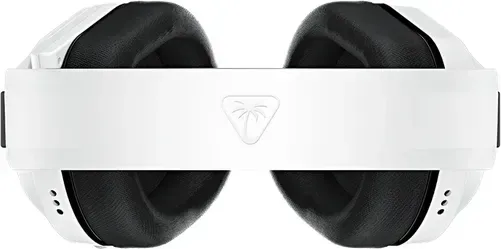
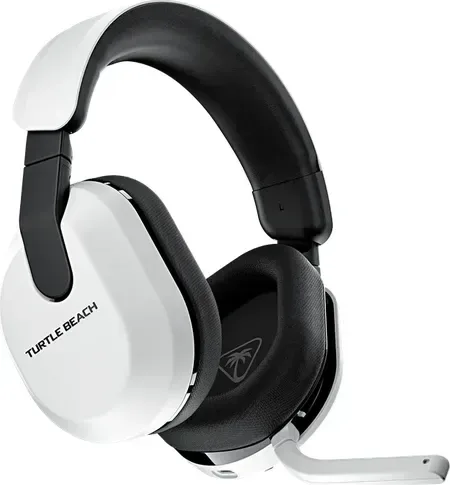
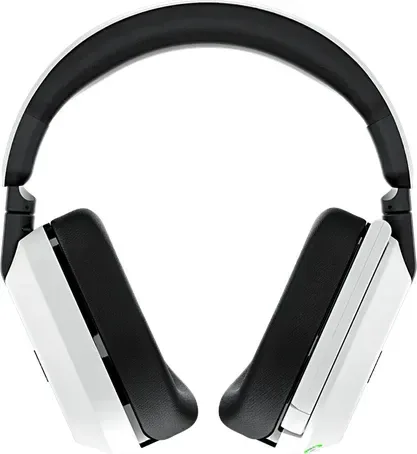
The Turtle Beach Stealth 600 Gen 3 stands out as a premier choice for gamers seeking versatility across multiple platforms simultaneously. Whether you are on Xbox, PlayStation, PC, or Nintendo Switch, this headset delivers exceptional audio performance suitable for intense competition. One of the standout features is the ability to manage connections effortlessly between devices. Users often refer to documentation like the Turtle Beach Stealth 600 Gen 3 Manual to understand the full range of capabilities available with this specific hardware configuration before starting.
Seamless Connectivity and Configuration Steps
Setting up the headset is straightforward with clear instructions provided by the manufacturer regarding region-specific models. For Xbox users, simply set the transmitter to Xbox mode and plug it into the USB port on the console. Once powered on, the pairing process happens automatically to establish a stable wireless link immediately. PlayStation, PC, and Switch users connect the transmitter to the USB-A port directly without switching modes initially unless using the Xbox dongle. The QuickSwitch button allows seamless toggling between low-latency 2.4GHz Wireless and Bluetooth modes quickly. This flexibility ensures you can answer calls or listen to music on your phone without disconnecting from your console game session entirely.
Advanced Audio Features and Control Interfaces
Audio customization is handled through the intuitive onboard controls located directly on the left ear cup shell. The volume wheel adjusts master levels instantly for all audio types, while separate mix knobs balance game and chat audio precisely for communication. On Xbox versions, you have access to variable mic-monitoring, allowing you to hear your own voice clearly without any unnatural distortion. The Superhuman Hearing setting provides enhanced audio cues that are critical for spotting enemies during competitive play. To keep the device performing optimally over time, updating firmware via the Swarm mobile app or desktop software is highly recommended before extensive use begins daily.
Comfort and Design Considerations for Long Sessions
Designed specifically for extended gaming sessions, the plush memory foam ear cushions provide soft support to reduce physical fatigue during marathon matches. The adjustable headband distributes weight evenly across the top of the head, ensuring stability throughout gameplay without slipping off unexpectedly. Charging is convenient via the dedicated USB-C port located on the right side panel for easy access. This power management system ensures you spend less time tethered to a wall outlet and more time immersed in your virtual world environments safely indoors. Regulatory compliance ensures safe radiation exposure limits are met during normal operation near the human body consistently. Warning labels suggest avoiding high volume levels for long periods to prevent possible hearing damage during usage.
Maximizing Your Overall Experience Today
By understanding the setup procedures and utilizing features like QuickSwitch effectively, players truly maximize their immersion levels significantly. Whether you prioritize crystal clear comms or immersive soundscapes, this headset adapts to your diverse needs effectively across various gaming ecosystems currently available. Always ensure your unit is updated to prevent potential interference issues described in official specifications regularly. Registering the product helps receive important updates regarding firmware patches for continued reliability.