
Turtle Beach Ear Force XP400 Manual
PDF manual · 25 Pages
English



Quick check
Incorrect answer, please try again.
Chat with your Turtle Beach Ear Force XP400 manual using AI
Get instant AI answers from your Turtle Beach Ear Force XP400 manual
Ask anything about the Turtle Beach Ear Force XP400. Answers come from this manual, with the pages they are based on.
Ask a Question
Do you recommend Ear Force XP400?
Yes NoVideo Manual
Turtle Beach® Ear Force® XP300 & Ear Force XP400 XBOX® Gaming Headsets
Frequently Asked Questions
Power off both devices and place them at least 60 cm apart. Hold the PAIR button on the transmitter until its LED flashes rapidly, then hold the headset POWER button for 6 seconds until its LED flashes. Wait up to 30 seconds for pairing; repeat up to five times if needed.
Is this answer helpful?
Connect the transmitter USB to your console for power and the optical TOSLINK cable to the console or HDTV optical output. Set the console audio output to Dolby Digital 5.1 in system sound settings. Older Xbox 360 models without optical out require an Xbox 360 audio adapter (sold separately).
Is this answer helpful?
The built-in 1000 mAh Li-Po battery provides over 10 hours of continuous play; a battery booster can extend use up to about 15 hours. When battery is low a tone sounds every 10 seconds; you can recharge using the supplied charging cable while continuing to game.
Is this answer helpful?
Blast Limiter reduces loud transients (explosions) to reveal quieter sounds like footsteps; presets include Off, Mild, Medium, Max. Tone cycles EQ presets: Flat, Bass Boost, Treble Boost, and Bass+Treble Boost to match music or game genres and personal preference.
Is this answer helpful?
Dropouts usually stem from poor RF reception: distance beyond recommended range, large obstructions between headset and transmitter, bad transmitter placement, or interference from nearby wireless routers or base stations. Move closer or reposition the transmitter to improve reception.
Is this answer helpful?
For phones: power Bluetooth on the headset (hold BT MFB until LED flashes), scan and select 'TURTLE BEACH BLUETOOTH CHAT' on your phone and enter passkey 0000. For PS3: enable Manage Bluetooth Devices, put XP400 Bluetooth in pairing mode, select 'TURTLE BEACH BLUETOOTH CHAT' and enter 0000.
Is this answer helpful?
If the main power button won't turn the headset off, press and hold the MUTE button for 10 seconds to initiate a forced shutdown. If problems persist, consult TurtleBeach.com/support for warranty or service options.
Is this answer helpful?
Advantages and Disadvantages
Advantages

- Dolby Digital wireless surround with selectable surround angle presets for tailored spatial imaging.
- Large 50mm neodymium drivers and four EQ presets for flexible tonal shaping (Flat, Bass, Treble, Bass+Treble).
- Dual-band 2.4/5GHz RF link and Bluetooth for simultaneous game audio and mobile/PS3 chat connectivity.
- Blast Limiter reduces loud transients so quieter in-game sounds like footsteps are easier to hear.
- Rechargeable battery provides 10+ hours (up to ~15h with booster) and can be charged while gaming.
Disadvantages

- Wireless range and performance can degrade with walls, interference, or poor transmitter placement.
- Some mobile phone models may exhibit Bluetooth quirks requiring re-pairing or manual SCO initiation.
- Older Xbox 360 consoles lacking optical out need a separate adapter (sold separately).
- Audio dropouts possible if transmitter and headset exceed recommended distance (~20 ft for best results).
- Headset firmware and features may be limited by console compatibility and future OS changes.
Product Specification
Design
Headphones (Over-Ear)
Form Factor
Headband
Microphone
Boom Microphone
Wireless
Bluetooth, Digital Wireless
Controls
Volume Control, Mute Button
Battery
USB Micro-B Charging Port
Certified for
PS3, Xbox 360
Color
black, green
Product Description
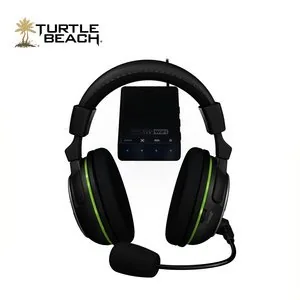
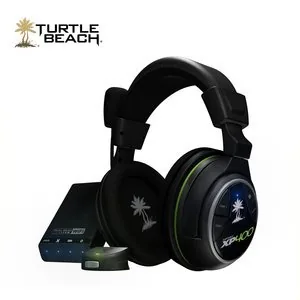
Turtle Beach Ear Force XP400 — Wireless Dolby Surround Gaming Headset
The Turtle Beach Ear Force XP400 delivers immersive Dolby surround sound and versatile connectivity for console and mobile gamers. Designed primarily for Xbox 360 but compatible with PS3 and Bluetooth-enabled devices, the XP400 pairs a dual-band wireless headset with a compact transmitter for low-latency game audio and chat. Its large 50mm neodymium drivers and selectable equalizer presets (Flat, Bass Boost, Treble Boost, Bass & Treble Boost) let players tune audio to cinematic explosions or subtle in-game cues. Built-in Blast Limiter presets tame loud transients so you can better hear footsteps and ambient sounds during competitive play.
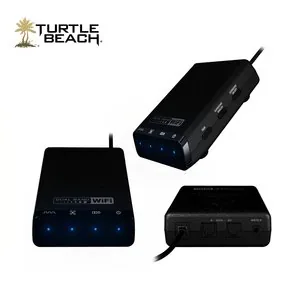
Comfort and control are emphasized with on-headset controls: power/pairing, game volume, Bluetooth volume, mic mute, tone and limiter buttons, and a removable boom mic. The headset supports wireless game audio via a dual-band 2.4/5GHz digital RF link with up to ~30-foot range through the included transmitter that offers optical in/out pass-through, USB power, and selectable surround sound angle presets to shape virtual spatial imaging.
For voice chat the XP400 includes an XBA Bluetooth chat adapter for Xbox 360 controllers and direct Bluetooth pairing for mobile phones and PS3 chat. Bluetooth multi-function controls handle call answer/end, reject, redial and in-call mute. The headset houses a rechargeable Li-Po battery (1000 mAh) offering more than 10 hours of continuous play with a battery booster circuit extending life up to ~15 hours; low-battery tones warn every 10 seconds and the unit can be recharged while gaming using the supplied charging cable.
Setup is straightforward: connect the transmitter via USB and optical TOSLINK to your console/TV, set console audio output to Dolby Digital 5.1, then pair the headset and transmitter following the PAIR and POWER button procedure. Troubleshooting guidance covers common issues — no sound, audio dropouts (range, obstacles, RF interference), voice chat drops (network lag), and specific Bluetooth quirks for certain phone models. Safety guidance warns about hearing damage from prolonged high-volume use and recommends gradual volume increases.
Technically the XP400 features stereo 27mW/channel amplification, frequency response from 20Hz–20kHz, condenser mic response 50Hz–15kHz, automatic shutdown after carrier loss, and regulatory compliance (FCC, CE, IC). A one-year limited warranty and manufacturer support via TurtleBeach.com are included.
Notes:
- Works best with optical output; older Xbox 360 units may require a separate adapter.
- Keep transmitter and headset within recommended range (ideally <20 ft) and avoid large obstructions.
- Use Blast Limiter and EQ presets to balance clarity and impact for competitive play.
Search for 67,706 Manuals online


Type-in Brand or Model