
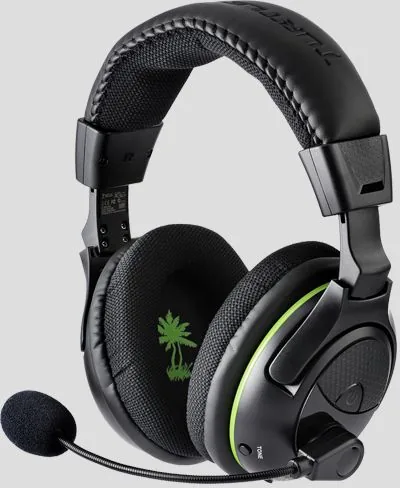
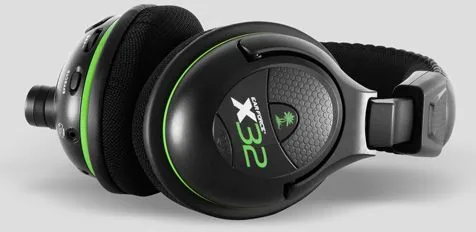
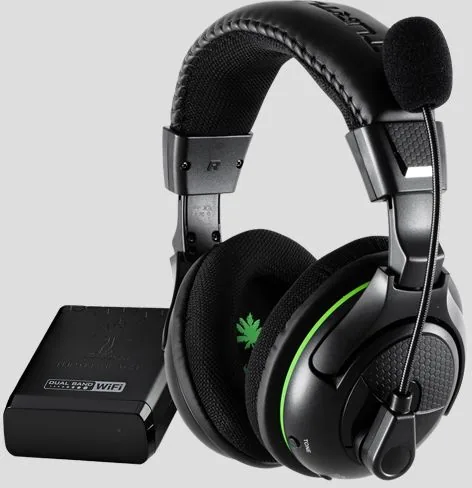
Turtle Beach Ear Force X32 Manual
PDF manual · 32 Pages
English



Quick check
Incorrect answer, please try again.
Chat with your Turtle Beach Ear Force X32 manual using AI
Get instant AI answers from your Turtle Beach Ear Force X32 manual
Ask anything about the Turtle Beach Ear Force X32. Answers come from this manual, with the pages they are based on.
Ask a Question
Do you recommend Ear Force X32?
Yes NoFrequently Asked Questions
Press and hold the power button for three seconds until it turns off. The battery cover is also accessible for replacing AAA batteries.
Is this answer helpful?
The headset maintains a connection up to thirty feet from the transmitter using dual-band WiFi digital transmission.
Is this answer helpful?
Ensure both are off, power the transmitter, hold the PAIR button until the LED flashes rapidly, then hold the headset power button until linked.
Is this answer helpful?
Yes, by adding the Turtle Beach DSS or DSS2 surround sound processors which are sold separately.
Is this answer helpful?
The product comes with a one-year limited warranty covering defects in materials and workmanship for the original purchaser.
Is this answer helpful?
Check that the headset and transmitter are within twenty feet, ensure no walls block the signal, and verify USB connections are secure.
Is this answer helpful?
Advantages and Disadvantages
Advantages

- Wireless freedom with up to thirty feet of range within the gaming room
- Sound customization via equalizer presets like Bass Boost and Treble Boost
- Extended battery life up to fifteen hours with battery booster circuit
- Integrated chat boost for clear voice communication during gameplay
Disadvantages

- Requires separate purchase for surround sound upgrades using DSS processors
- Uses standard AAA batteries rather than built-in rechargeable cells
- Compatible primarily with Xbox 360 consoles requiring specific adapters
- Automatic shutdown activates after signal loss or audio silence
Product Specification
Type
Headphones (Over-Ear)
Form
Headband
Microphone
Boom Microphone
Wireless
Digital Wireless
Control
Volume Control
Certified for
Xbox 360
Color
Black
Product Description
Experience Premium Gaming Audio with the Turtle Beach Ear Force X32
Gaming enthusiasts understand the importance of clear audio when immersing themselves in virtual worlds. The Turtle Beach Ear Force X32 stands out as a premier choice for Xbox 360 gamers seeking a wireless solution that delivers rich sound without cluttering the play area. This review explores the features that make this headset a favorite among competitive players and casual fans alike.
Wireless freedom is the primary selling point of the Ear Force X32. With a robust dual-band WiFi digital transmission system, users enjoy up to thirty feet of range within their gaming room. This ensures that movements around the house do not disrupt your connection or cause audio dropouts during critical gameplay moments. The transmitter connects easily via USB ports on the console, providing a stable link for both game audio and microphone communication.
Sound customization is another highlight. The headset includes an equalizer with presets such as Bass Boost and Treble Boost, allowing players to tailor the audio profile to their specific needs. Additionally, the Sound Field Expander offers settings like Narrow and Wide to adjust the stereo image width. These tools work together to provide spatial awareness crucial for survival games or team-based shooters.
Comfort and battery life are essential factors. Equipped with 50 mm diameter speakers and neodymium magnets, the drivers deliver powerful sound at a comfortable listening level. The unit operates on two AAA batteries, which are easily replaceable. The included battery booster circuit extends play time up to fifteen hours, ensuring long gaming sessions remain uninterrupted. Automatic shutdown features conserve power when the signal is lost or audio is silent.
Setup instructions are straightforward, though referring to the Turtle Beach Ear Force X32 Manual is recommended for initial pairing and configuration. Pairing the headset with the transmitter involves holding specific buttons until the LEDs flash in synchronization. Once connected, the Xbox Talkback cable enables voice chat directly through the console settings. Whether engaging in online multiplayer or enjoying single-player campaigns, the Ear Force X32 delivers an immersive auditory experience that enhances every gaming session.
The package contains the transmitter, RCA splitter cables for older setups, and an Xbox 360 Talkback cable for voice chat. This versatility allows connection to various audio setups, including HDMI consoles requiring separate audio adapters. Safety warnings emphasize keeping volume at safe levels to prevent hearing damage. Upgrading to surround sound is possible with the addition of Turtle Beach DSS processors for future expansion.
Ultimately, the Ear Force X32 combines reliable wireless performance with customizable audio settings. Its compatibility with specific Xbox controllers makes it a dedicated peripheral. Gamers looking for a wireless headset that balances performance and value will find this model meets their expectations effectively.
Search for 67,706 Manuals online


Type-in Brand or Model