
TRENDnet TPE-TG81g Manual
PDF manual · 7 Pages
English



Quick check
Incorrect answer, please try again.
Chat with your TRENDnet TPE-TG81g manual using AI
Get instant AI answers from your TRENDnet TPE-TG81g manual
Ask anything about the TRENDnet TPE-TG81g. Answers come from this manual, with the pages they are based on.
Ask a Question
Do you recommend TPE-TG81g?
Yes NoFrequently Asked Questions
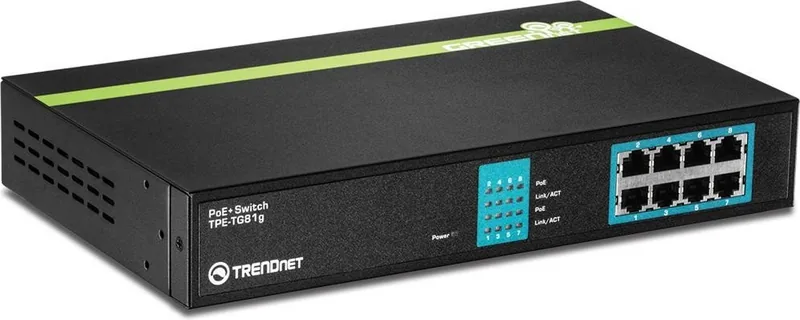
It provides 8 RJ-45 Gigabit Ethernet ports, giving you enough connections for a small office or home network with several wired devices.
Is this answer helpful?
Yes. It supports both 802.3af PoE and 802.3at PoE+, so you can power compatible devices directly through the Ethernet cable.
Is this answer helpful?
The 105W budget lets the switch supply power to multiple PoE devices at once, making it useful for cameras, phones, and access points.
Is this answer helpful?
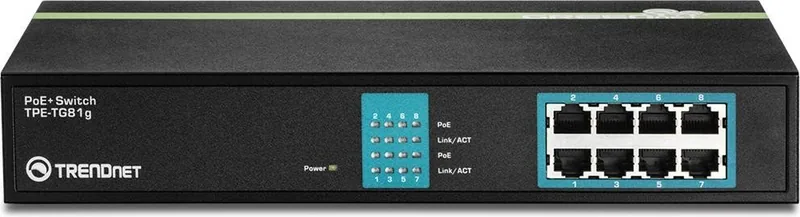
The LEDs show power status, link/activity, and PoE presence. They help you quickly confirm whether a port is active and whether a powered device is connected.
Is this answer helpful?
No. The guidance indicates it should be used only on PoE networks without routing to the outside plant, so it is meant for controlled network environments.
Is this answer helpful?
It works well in small business setups, home offices, retail networks, and basic surveillance systems where simple PoE distribution is needed.
Is this answer helpful?
Advantages and Disadvantages
Advantages

- Eight Gigabit RJ-45 ports support fast wired connections for multiple devices.
- 105W PoE+ budget helps power cameras, phones, and access points through Ethernet.
- LED indicators make it easier to confirm power, link, and PoE activity at a glance.
- Supports 802.3af and 802.3at standards for broad PoE device compatibility.
Disadvantages

- Designed for PoE networks, so it is not intended for routing to outside plant.
- Limited emphasis on advanced management features; it is mainly a simple switch.
- Total PoE power is shared, so high-demand devices may reduce available budget for others.
Product Specification
Function
Switch
Type
Standalone, Rackmount (via mounting brackets)
Network ports
8x RJ-45 (rear)
Speeds
8x RJ-45 (10/100/1000Base-T)
PoE
8x RJ-45 PoE or 3x RJ-45 PoE+ (8x 15.4W or 3x 30W), total: 105W
Backplane
16Gb/s, 11.9Mp/s, 9KB Jumboframes, 2K MAC addresses
Officially supported standards
802.3, 802.3ab, 802.3af, 802.3at, 802.3az, 802.3u, 802.3x
Configuration
unmanaged
Cooling
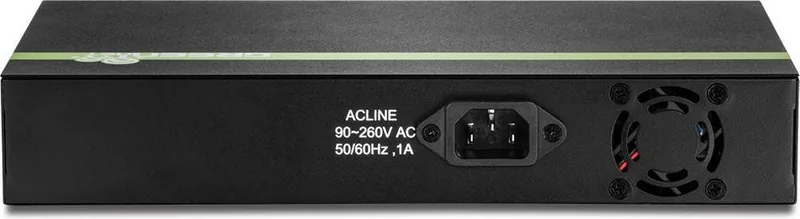
active, 1x fan
Dimensions (WxHxD)
10.47x1.73x6.30in, 1U
Weight
3.00 lb
Color
black
Special features
Metal housing, removable mounting brackets
Manufacturer warranty
three years
Product Description
TRENDnet TPE-TG Desktop Gigabit Switch, 8x RJ-45, 105W PoE+
If you are building a clean, reliable small-network setup, the TRENDnet TPE-TG Desktop Gigabit Switch, 8x RJ-45, 105W PoE+ Manual points to a device that is designed for practical everyday connectivity. This compact desktop switch combines eight Gigabit RJ-45 ports with Power over Ethernet Plus support, making it useful for cameras, access points, VoIP phones, and other network gear that benefits from both data and power in one cable.
One of the most appealing parts of this switch is its straightforward approach. There is no complicated setup flow in the experience it suggests—just connect the devices, verify the LEDs, and let the network do the work. The port indicators are especially helpful, since they show power status, link activity, and whether a PoE device is present. For busy environments, that kind of quick visual feedback can save time during installation and troubleshooting.
With support for PoE and PoE+, this model is built to handle modern powered devices while keeping cabling simple. The 105W power budget gives it flexibility for multiple endpoints, especially in home offices, small businesses, retail spaces, and light surveillance setups. Gigabit speeds also help ensure that powered devices are not forced into slow, bottlenecked connections when traffic increases.
The switch is also presented with a strong focus on compatibility and safe use. It works with 802.3af and 802.3at standards, and the guidance emphasizes proper connection practices, correct LED behavior, and the importance of using it in the intended PoE environment. That makes it a solid fit for users who want a dependable network expansion device without extra complexity.
From a practical perspective, this is the kind of product that earns its place by being easy to understand and easy to deploy. It is compact, functional, and built for scenarios where powered networking matters more than advanced management features. For many users, that balance is exactly what makes a desktop PoE+ switch valuable.
Notes
- Ideal for powering compatible network devices over Ethernet.
- LED indicators help confirm power, link, and PoE status.
- Best suited for small deployments that need simple, reliable switching.
- Recycling and warranty guidance should be followed according to local and manufacturer instructions.
Search for 67,732 Manuals online


Type-in Brand or Model