
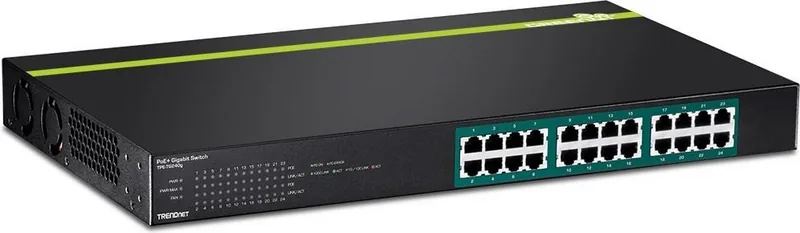
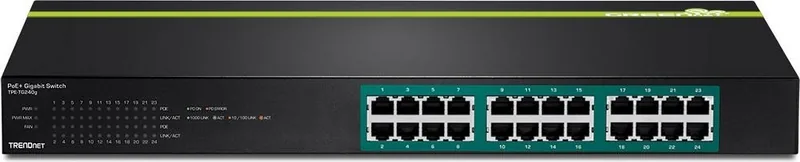

TRENDnet TPE-TG240g Manual
PDF manual · 9 Pages
English



Quick check
Incorrect answer, please try again.
Chat with your TRENDnet TPE-TG240g manual using AI
Get instant AI answers from your TRENDnet TPE-TG240g manual
Ask anything about the TRENDnet TPE-TG240g. Answers come from this manual, with the pages they are based on.
Ask a Question
Do you recommend TPE-TG240g?
Yes NoFrequently Asked Questions
It is used to connect multiple network devices with Gigabit speed while also powering PoE-compatible equipment such as IP cameras, access points, and VoIP phones. It is well suited to office and rack-based installations.
Is this answer helpful?
The switch provides 24 RJ-45 Gigabit ports. These ports are intended for wired network connections, and PoE+ capability is available for supported devices on the appropriate ports.
Is this answer helpful?
Yes. The text indicates support for both IEEE 802.3af (PoE) and IEEE 802.3at (PoE+). That means it can power a range of compatible low- and higher-demand network devices.
Is this answer helpful?
The LEDs help show whether the device is powered, whether PoE is active, whether a port is connected at 1,000 Mbps or 10/100 Mbps, and whether the cooling fans are working. This makes troubleshooting faster.
Is this answer helpful?
Yes. Its rackmount design makes it suitable for standard network racks, which helps keep cabling organized and equipment easier to manage in professional installations.
Is this answer helpful?
Check the total PoE power budget and the power needs of each connected device. The switch can support multiple PoE connections, but the combined load must stay within its available budget for stable operation.
Is this answer helpful?
Advantages and Disadvantages
Advantages

- 24 Gigabit RJ-45 ports support fast wired connectivity across many devices.
- PoE+ support reduces cable runs by delivering data and power together.
- LED indicators make it easier to check power, PoE load, and link status.
- Rackmount design suits structured server rooms and network cabinets.
Disadvantages

- PoE power budget must be managed carefully when many devices are connected.
- Cooling depends on functioning fans, so fan status should be monitored.
- The focus is on core switching and power delivery, not advanced smart features.
- Best used in fixed installations, so it is less flexible for mobile setups.
Product Specification
Function
Switch
Type
Standalone, Rackmount (via mounting brackets)
Network ports
24x RJ-45
Speeds
24x RJ-45 (10/100/1000Base-T)
PoE
24x RJ-45 PoE+ (24x 30W), total: 370W
Backplane
48Gb/s, 35.7Mp/s, 10KB Jumboframes, 8k MAC addresses
Officially supported standards
802.3, 802.3ab, 802.3af, 802.3at, 802.3az, 802.3u, 802.3x
Cooling
active
Dimensions (WxHxD)
17.32x1.73x9.84in, 1U
Weight
7.94 lb
Color
black
Special features
Metal housing, removable mounting brackets
Manufacturer's warranty
three years
Product Description
TRENDnet TPE-TG240g Rackmount Gigabit Switch Review
The TRENDnet TPE-TG Rackmount Gigabit Switch, 24x RJ-45, PoE+ Manual points to a practical networking device built for environments that need both speed and power in one unit. With 24 Gigabit RJ-45 ports, this switch is a strong fit for offices, security systems, wireless deployments, and other setups where multiple endpoints must stay connected without sacrificing bandwidth.
Built for Power and Performance
What makes this model especially useful is its PoE+ support. It follows IEEE 802.3af and 802.3at standards, allowing compatible devices such as IP cameras, access points, and VoIP phones to receive both data and power through a single cable. That reduces cable clutter, simplifies installation, and makes it easier to place devices where outlets are limited. The switch also supports a substantial total power budget, which is important when several powered devices are connected at the same time.
Clear Status Monitoring
The front-panel LED indicators are a major advantage for day-to-day use. They help show power status, PoE activity, fan health, and link speed at a glance. This is especially helpful in busy network cabinets where quick troubleshooting matters. The guide also explains how to interpret maximum PoE budget conditions, so administrators can see when the switch is approaching its power limit and adjust connected devices accordingly.
Simple Installation and Reliable Design
As a rackmount switch, this unit is designed to fit neatly into standard network racks, which makes it a good choice for organized IT spaces. The installation guidance is straightforward and practical, focusing on port behavior, LED meaning, and basic operational checks rather than unnecessary complexity. For teams that want dependable switching with power delivery in a familiar form factor, it offers a balanced solution.
Notes
- Best suited for networks that need both Gigabit data and PoE+ power.
- Plan connected PoE devices carefully to stay within the available power budget.
- LED indicators can speed up troubleshooting and maintenance.
- Rackmount format supports cleaner deployment in managed network environments.
Search for 67,732 Manuals online


Type-in Brand or Model