
TRENDnet TPE-S50 Manual
PDF manual · 6 Pages
English



Quick check
Incorrect answer, please try again.
Chat with your TRENDnet TPE-S50 manual using AI
Get instant AI answers from your TRENDnet TPE-S50 manual
Ask anything about the TRENDnet TPE-S50. Answers come from this manual, with the pages they are based on.
Ask a Question
Do you recommend TPE-S50?
Yes NoFrequently Asked Questions
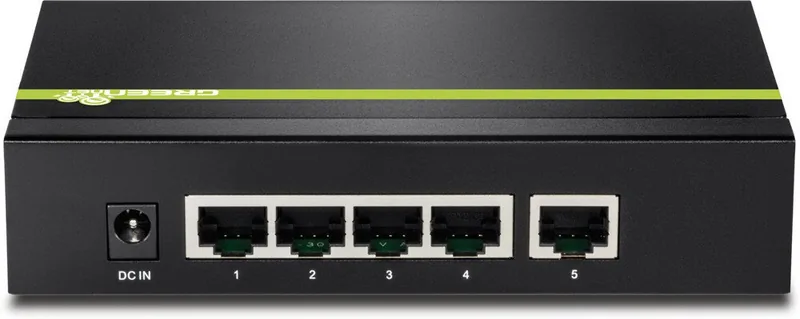
It provides five RJ-45 ports. The layout includes PoE-capable ports for powering 802.3af devices and a separate non-PoE RJ-45 port for standard Ethernet devices.
Is this answer helpful?
The switch supports IEEE 802.3af PoE. This means it is intended for PoE devices that comply with 802.3af power requirements.
Is this answer helpful?
Power availability is limited to 15.4 W per PoE port, with a maximum total PoE power budget of 31 W across all PoE ports. If demand exceeds the budget, power is allocated first-come, first-served until the 31 W limit is reached.
Is this answer helpful?
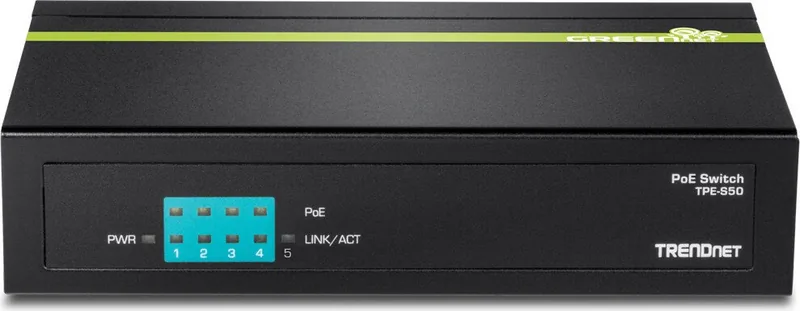
LEDs indicate whether the switch is powered, whether a PoE device is connected, and whether links are up. Status patterns also show transmitting and receiving activity. Checking these LEDs helps confirm successful installation and network activity.
Is this answer helpful?
Yes. You can connect non-PoE Ethernet devices using the non-PoE port. PoE devices should be connected to the PoE-capable ports so they can be powered according to 802.3af requirements.
Is this answer helpful?
Use the included power adapter rated 48 V DC at 0.75 A. Using a different adapter may risk incorrect operation or damage.
Is this answer helpful?
Yes. It is intended to be connected only to PoE networks without routing to the outside plant. This aligns with safety and deployment guidance included with the product.
Is this answer helpful?
Advantages and Disadvantages
Advantages

- Supports PoE with IEEE 802.3af for compatible devices.
- Max PoE power is 15.4 W per port and 31 W total.
- LED indicators show power status, PoE detection, and link/activity.
- Includes a suitable 48 V DC power adapter for desktop installation.
Disadvantages

- Only five RJ-45 ports, limiting expansion for larger networks.
- PoE is capped at 802.3af-class power and may not suit higher-power devices.
- When PoE reaches 31 W total, allocation follows first-come, first-served behavior.
- Intended for PoE network connections and should not be routed to outside plant.
Product Specification
Function
Switch
Type
Standalone
Network ports
5x RJ-45 (rear)
Speeds
5x RJ-45 (10/100Base-T)
PoE
4x RJ-45 PoE+ (4x 15.4W), total: 31W
Backplane
1Gb/s, 744kp/s, 56KB packet buffer, 1k Mac addresses
Officially supported standards
802.3, 802.3af, 802.3az, 802.3u, 802.3x
Configuration
unmanaged
Cooling
passive
Dimensions (WxHxD)
5.55x1.18x3.74in
Weight
0.74 lb
Color
black
Special features
Metal housing
Manufacturer warranty
three years
Product Description
TRENDnet TPE-S Desktop Switch, 5x RJ-45, PoE, V1 Manual.
Compact and practical, the TRENDnet TPE-S Desktop Switch (TPE-S50, V1) is designed to connect small networks with built-in power delivery for compatible devices. With five RJ-45 ports and 10/100 Mbps connectivity, it is a convenient choice for powering and linking equipment such as IP cameras, VoIP phones, and other IEEE 802.3af PoE devices without needing separate power adapters at each endpoint.
PoE power delivery you can plan
This switch supports PoE using the 802.3af standard. Power availability is capped at 15.4 W per PoE port, with a maximum PoE power budget of 31 W total. If multiple powered devices are connected and the demand reaches the system limit, power is allocated on a first-come, first-served basis until the 31 W cap is reached. This makes power budgeting important when adding more devices.
Clear LED status for faster checks
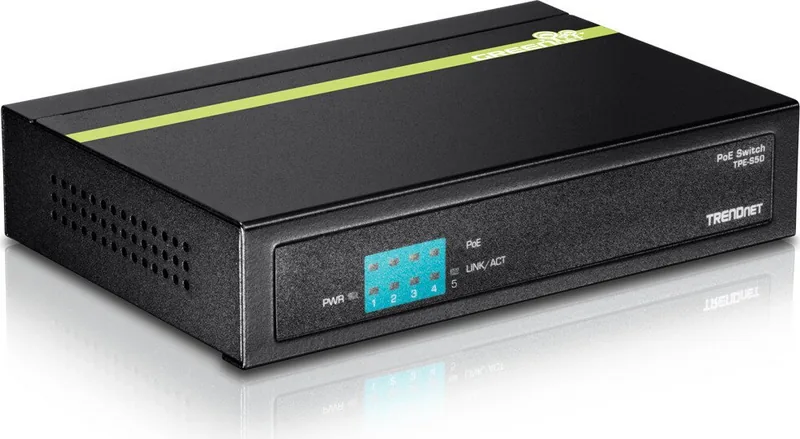
The front LED indicators help you verify the switch and connection states quickly. You get visual confirmation for whether the device is powered, whether a PoE device is detected on a PoE-capable port, and whether links are up. The link/activity LEDs use amber and green states to show connectivity and data transmission activity, making troubleshooting simpler during setup.
Simple setup and safe deployment
Use the included power adapter rated 48 V DC, 0.75 A. Connect PoE devices to the PoE ports, and use the non-PoE port for standard Ethernet devices that do not require PoE power. For correct operation, connect the unit only to PoE networks and avoid routing to the outside plant.
Compliance, warranty, and support
The TPE-S50 (V1) is supported by regulatory compliance declarations and is covered by a limited warranty against defects in materials and workmanship under normal use. Product registration and technical support resources are available through TRENDnet, and the installation instructions reference safe operation and certification expectations for typical usage.
Notes
- Verify PoE and link/activity LEDs during installation.
- Match PoE requirements to 802.3af devices to avoid power mismatches.
- Manage device power needs to stay within the 31 W total budget.
Key takeaways
- 5 RJ-45 ports for 10/100 Mbps networking in a compact desktop format.
- PoE (802.3af) with 15.4 W max per port and 31 W max total power budget.
- LED indicators for power, PoE detection, and link/activity monitoring.
- Power allocation follows first-come, first-served when the total PoE budget is reached.
Pros and cons
Pros
- Built-in 802.3af PoE support to simplify powering compatible devices.
- Practical power budget limits (15.4 W per port, 31 W total).
- LED indicators for quick operational and troubleshooting checks.
Cons
- PoE is limited to 802.3af power levels, not higher-power PoE types.
- Only five ports total, so it is best for small setups.
- Power allocation can shift when total PoE demand hits the 31 W limit.
Search for 67,732 Manuals online


Type-in Brand or Model