
TRENDnet TPE-S44 Manual
PDF manual · 5 Pages
English



Quick check
Incorrect answer, please try again.
Chat with your TRENDnet TPE-S44 manual using AI
Get instant AI answers from your TRENDnet TPE-S44 manual
Ask anything about the TRENDnet TPE-S44. Answers come from this manual, with the pages they are based on.
Ask a Question
Do you recommend TPE-S44?
Yes No
Robert Klein
7 months ago
Does this unit support PoE webcams?

Manual.ly
7 months ago
Yes, it functions perfectly with PoE webcams. The device supports Power over Ethernet, which simplifies installation by delivering both power and data through a single cable. You can connect directly without needing separate power supplies for the cameras. We recommend standard Ethernet cables for best performance.

Sarah Klein
7 months ago
Does this device support PoE webcams?
Manual.ly
7 months ago
Yes, multiple users confirmed that the device works super with PoE webcams. You can expect reliable performance.
Frequently Asked Questions
You must use the included forty-eight volt DC adapter rated at zero point eight amps. Using a different adapter may cause physical damage to the equipment or the connected devices. Ensure the adapter matches the voltage and frequency requirements for your region.
Is this answer helpful?
The total PoE output across all four PoE ports is capped at thirty watts. If the total demand exceeds this limit, the switch will prioritize port one over port four. Lower priority ports will be disabled until sufficient power is available.
Is this answer helpful?
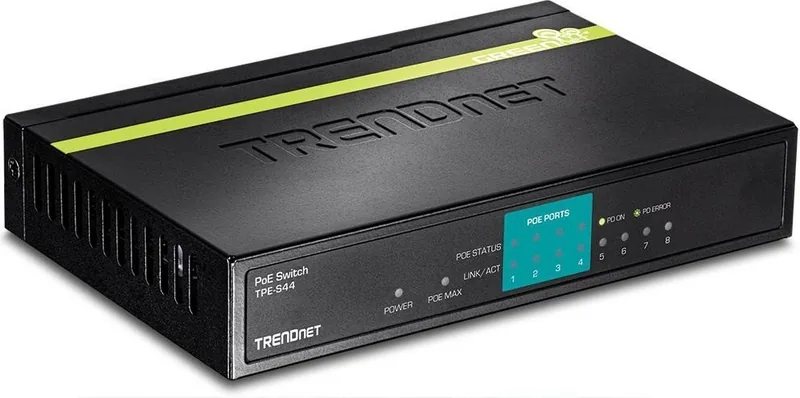
Green power indicates the unit is on while red means it is off. Green PoE status shows the port is supplying power correctly. Blinking Link/Act lights mean an active connection is established. Red PoE status indicates maximum capacity is reached.
Is this answer helpful?
No, you must ensure sufficient heat dissipation and ventilation around the switch. Do not stack heavy objects on top of the unit. Proper airflow is essential to prevent overheating during extended operation periods.
Is this answer helpful?
Registration should be done online via the TRENDnet website registry page. Specific warranty periods are listed on the product pages. Keep your proof of purchase ready when registering for service claims.
Is this answer helpful?
No, this specific model supports 10/100 Mbit/s speeds only. It is designed for Fast Ethernet connections. Gigabit performance requires a different model from the TRENDnet product line.
Is this answer helpful?
The wall socket should not be more than one point eight two meters from the switch. This distance helps maintain stable power delivery and reduces issues with voltage drops or connector stress during use.
Is this answer helpful?
Advantages and Disadvantages
Advantages

- Supports IEEE 802.3af powered devices for easy connectivity
- Provides up to fifteen point four watts per PoE port
- LED indicators show clear status for quick troubleshooting
- Port priority ensures power during total output overload
- Complies with FCC Part 15 for unlicensed operation
Disadvantages

- Total PoE output is limited to thirty watts for four ports
- Power socket distance must not exceed eighteen feet from unit
- Mounting surface must support minimum weight of four hundred thirty grams
- Cannot route to outside plant networks for safety compliance
- Requires specific forty-eight volt DC adapter for operation
Product Specification
Function
Switch
Type
Standalone
Network ports
8x RJ-45 (Rear)
Speeds
8x RJ-45 (10/100Base-T)
PoE
4x RJ-45 PoE (4x 15.4W), total: 30W
Backplane
1.6Gb/s, 1.19Mbps, 2k MAC addresses
Officially supported standards
802.1p, 802.3, 802.3af, 802.3az, 802.3u, 802.3x
Configuration
unmanaged
Dimensions (WxDxH)
5.91x1.10x3.78 inches
Weight
13.05 oz
Color
Black
Special features
Metal housing, external power supply
Manufacturer warranty
3 years
Note
Different revisions available.
Product Description
TRENDnet TPE-S Desktop Switch Overview
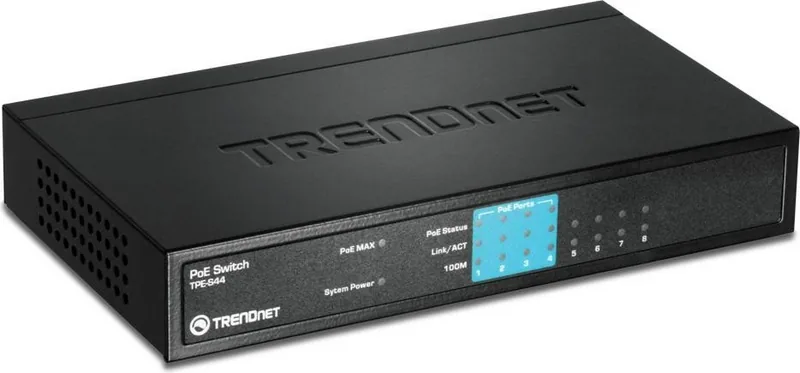
The TRENDnet TPE-S Desktop Switch offers reliable high-speed connectivity tailored for small office or home networks. With eight RJ-45 ports, users can connect a variety of networked devices without significant complexity. Four of these ports support Power over Ethernet capabilities, allowing simultaneous power and data transmission over a single cable. This simplifies cabling significantly for devices such as IP cameras, VoIP phones, and wireless access points. The switch supports 10/100 Mbit/s speeds, ensuring efficient data transfer for standard networking applications requiring fast connection reliability.
Advanced Power Management and LED Indicators
Power distribution is a critical feature of this equipment. Each PoE port can provide up to fifteen point four watts of electrical power. The maximum total PoE output reaches thirty watts for the entire unit. Status LEDs provide visual feedback on operation. A green light indicates that power is active. A red light signals that the power is off or capacity is reached. Link activity blinks during active data transfer sessions. Ensuring proper ventilation around the unit prevents potential overheating issues. The support surface must hold at least four hundred thirty grams to ensure physical stability during operation.
Hardware Installation Procedures
Setup requires minimal technical expertise to complete successfully. Connect the forty-eight volt DC power adapter securely to the unit. Plug it into a nearby wall socket not exceeding eighteen feet away to prevent voltage drops. Use an Ethernet patch cable to link the computer directly to a free port. Attach PoE devices to the first four ports on the chassis. Check the LEDs to verify successful network and power connections immediately. Port priority ensures power availability during overload by disabling lower priority ports first.
Technical Compliance and Support Resources
The device complies with FCC rules under Part 15 for unlicensed use. It must not cause harmful interference and must accept any interference received. Users should register the product online for valid warranty registration. TRENDnet provides comprehensive technical support for all regional inquiries regarding installation. Toll free numbers are available for US and Canada customers. Regional phone numbers are listed on the support website page. Recycling is recommended for all electronic waste disposal processes. Ensure you contact your local retailer for specific recycling advice. Follow local authority guidelines for safe environmental disposal methods. Check with your Local Authority or Retailer for recycling advice.
Important Usage Notes
Please ensure no heavy items ever rest on top of the switch. Use only the specified adapter to avoid electrical damage. Maintain clear airflow paths around the chassis for cooling. Do not modify the equipment or void the warranty. Keep the device in a cool dry place away from moisture. Ensure the area is well ventilated for heat dissipation. This ensures longevity of the product hardware.
Search for 67,732 Manuals online


Type-in Brand or Model
Lisa Hoffmann
6 months ago
Does this device work with Power over Ethernet webcams?
Manual.ly
6 months ago
Yes, this product is fully compatible with PoE webcams. It delivers consistent performance when connected to PoE-enabled network infrastructure. Users report successful operation with standard PoE switches and cameras. Ensure your switch meets the required power budget for stable connectivity.