
TRENDnet TPE Rackmount Gigabit Smart Switch 8-Port Manual
PDF manual · 169 Pages
English



Quick check
Incorrect answer, please try again.
Chat with your TRENDnet TPE Rackmount Gigabit Smart Switch 8-Port manual using AI
Get instant AI answers from your TRENDnet TPE Rackmount Gigabit Smart Switch 8-Port manual
Ask anything about the TRENDnet TPE Rackmount Gigabit Smart Switch 8-Port. Answers come from this manual, with the pages they are based on.
Ask a Question
Do you recommend TPE Rackmount Gigabit Smart Switch 8-Port?
Yes NoFrequently Asked Questions
The default IP address for the switch is 192.168.10.200. You can access the management page by typing this address into your web browser. Ensure your computer is on the same subnet for initial access.
Is this answer helpful?
Yes, this switch supports connection to the TRENDnet Hive Cloud Management platform. You can select this option during the setup wizard to manage devices remotely. You must have internet access and an account to register the unit.
Is this answer helpful?
The total PoE budget for this specific model is one hundred thirty watts. This power is distributed across the PoE+ ports to energize compatible devices. The LED indicators show when the budget is near capacity.
Is this answer helpful?
Log into the web interface and navigate to the Administration menu. You can modify the admin password or create new user accounts. Ensure you save the configuration to flash memory to retain changes after reboot.
Is this answer helpful?
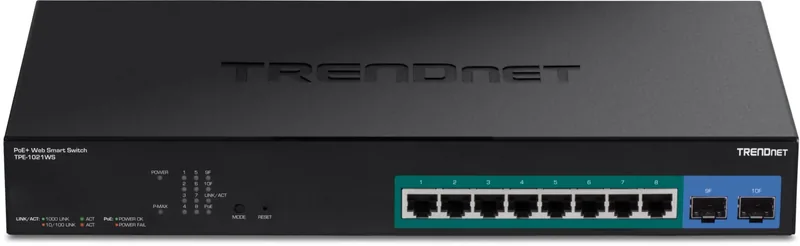
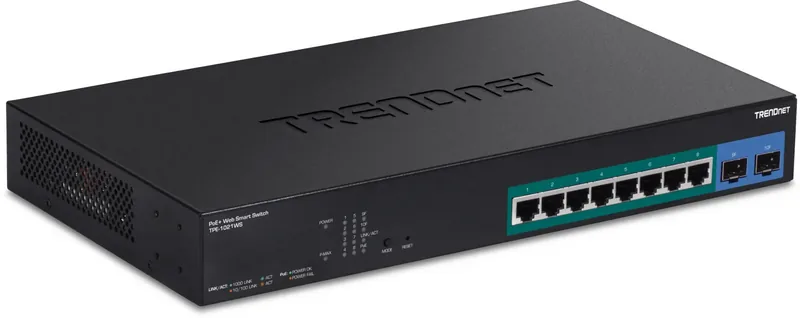
It features eight Gigabit PoE+ RJ-45 ports and two SFP slots. The SFP slots support optional mini-GBIC modules for fiber connections. Ports 17 through 20 exist on larger models in this series.
Is this answer helpful?
Yes, a standard rack mount kit is included in the package. You can attach brackets to the front panel and secure the unit in a 19-inch rack. Leave ventilation space at the front and rear for cooling.
Is this answer helpful?
Yes, the switch supports IPv6 configuration for network interface settings. You can enable static or DHCPv6 addressing for each VLAN. This ensures compatibility with next-generation internet protocols.
Is this answer helpful?
Advantages and Disadvantages
Advantages

- Eight Gigabit PoE+ ports provide up to thirty watts per port
- Two SFP slots support optional fiber optic modules for uplinks
- Supports TRENDnet Hive cloud management for remote oversight
- Robust security with SSL, SSH, and access control lists
- VLAN support allows network segmentation for improved security
Disadvantages

- Firmware upgrade to V2.10.010 required for Layer 2+ features
- Default IP address 192.168.10.200 requires subnet adjustment for access
- Web interface requires browser access without CLI command line
- PoE budget is shared across all ports dynamically
- Rack mounting kit must be attached carefully for stability
Product Specification
Function
Switch
Type
Standalone, Rackmount (via rack ears)
Network ports
8x RJ-45, 2x SFP
Speeds
8x RJ-45 (10/100/1000Base-T), 2x SFP (1Gb/s)
PoE
8x RJ-45 PoE+ (8x 30W), total: 130W
Backplane
20Gb/s, 14.9Mb/s, 10KB Jumboframes, 4.1MB Packet buffer, 8K Mac addresses
Officially supported standards
802.1D, 802.1Q, 802.1X, 802.1ab, 802.1p, 802.1q, 802.1s, 802.1w, 802.1x, 802.3, 802.3ab, 802.3ad, 802.3af, 802.3at, 802.3az, 802.3u, 802.3x, 802.3z, IGMPv3, MLDv2
Configuration
Web interface, Configuration software (Windows), via Cloud
Cooling
Passive
Dimensions (WxHxD)
12.99x1.73x7.09 inches, 1HE
Weight
3.88 lbs
Color
Black
Features
Metal enclosure, removable rack ears, firmware updates possible
Manufacturer warranty
3 years
Note
For this device, "link aggregation" was officially specified with the obsolete standard IEEE 802.3ad. The function has not been managed by IEEE Working Group 3 (IEEE 802.3, CSMA/CD - Ethernet) since 2008, but by Working Group 1 (IEEE 802.1, High Level Interface - Internetworking) and is technically defined unchanged via IEEE 802.1AX.
Product Description
TRENDnet TPE Rackmount Gigabit Smart Switch
The TRENDnet TPE Rackmount Gigabit Smart Switch stands as a robust networking solution for modern small to medium businesses. This specific model delivers exceptional flexibility with eight RJ-45 Gigabit Ethernet ports that support Power over Ethernet Plus. Each port provides up to thirty watts, ensuring seamless operation for IP phones and wireless access points. Additionally, two SFP slots offer fiber optic uplink capabilities, enhancing connectivity options for backbone networks.
Power management is central to the design. With a total PoE budget of one hundred thirty watts, this switch efficiently powers connected devices without requiring external AC adapters for every unit. The hardware includes clear LED diagnostics to monitor link speed, activity, and PoE status instantly. Administrators can quickly identify issues using the reset and mode buttons located on the front panel.
Management is streamlined through a comprehensive web interface accessible via standard browsers. Users can configure the device locally or utilize the TRENDnet Hive cloud management platform for remote oversight. This dual capability ensures network administrators maintain control regardless of their physical location. Security features are robust, incorporating SSL, SSH, and advanced access control lists to protect sensitive data. Quality of Service policies allow traffic prioritization, ensuring critical applications receive necessary bandwidth. The switch supports IPv4 and IPv6 addressing, providing future-proof networking capabilities.
Installation is straightforward with a standard rackmount kit included. The unit fits securely into EIA standard racks, conserving valuable equipment closet space. VLAN support allows network segmentation for improved performance and security. The setup wizard guides users through initial configuration steps, including IP addressing and password changes. While firmware updates are recommended for full Layer 2+ management functionality, the process is straightforward. Time settings can be manually adjusted or synchronized via SNTP for accurate logging. RADIUS and TACACS+ support are available for enhanced authentication security.
Traffic management includes storm control and bandwidth regulation to prevent network congestion. Loopback detection ensures cable integrity, minimizing downtime caused by physical layer errors. Static unicast and multicast entries help optimize packet flow within complex network topologies. The device supports IGMP snooping for efficient multicast filtering. Monitoring tools provide real-time statistics on throughput and packet errors. The dashboard offers a quick view of system uptime and hardware metrics. Ensure firmware is V2.10.010 or newer for all management features.
Notes: Always save configuration changes to flash memory to retain settings after reboot.
Search for 67,732 Manuals online


Type-in Brand or Model